The Art of Hiring in Building Awesome Engineering Teams

As engineering managers, one of our most crucial responsibilities is building and maintaining high-performing teams. In this post, we’ll explore some key insights and strategies for effective hiring as a part of team building in the tech industry.

The Myth of the All-Star Team

Many of us dream of assembling a team full of tech leads, but the reality is that such a strategy is rarely feasible or even desirable, except perhaps in very small startups. The market simply doesn’t have enough of these high-level professionals to go around, and even if it did, there are compelling reasons to build a more diverse team.

Embracing Diversity in Experience and Skills

A truly effective team balances youth and experience, varied skill sets, and diverse backgrounds. While it’s tempting to hire only seasoned professionals, too much experience in one team can lead to conflicts and stagnation. On the flip hand, experienced team members often find fulfillment in mentoring younger colleagues.

It’s also crucial to avoid the pitfall of building a homogeneous team in terms of technical skills. A team of “all Java engineers,” for instance, might excel in their specific domain but struggle when faced with challenges that require a broader skill set, this makes them less able to respond to change, less Agile. Instead, aim for a mix of professionals who can work across different stacks, encouraging cross-pollination of ideas and skills within the team.

The T-Shaped Professional

“Overspecialization breeds weakness.” – Major Motoko Kusanagi

This philosophy applies perfectly to building tech teams. We should aim to cultivate and hire T-shaped professionals – individuals with deep expertise in one area (the vertical bar of the T) and a broad understanding of other related fields (the horizontal bar).

This approach not only creates a more adaptable team but also fosters an environment of continuous learning.

The biggest jump in my engineering knowledge was when I had to work with engineers that came from a different language background. It forced me to learn abstract language concepts to communicate effectively, which is a major step to becoming a polyglot.

Growing Your Own Talent

Sometimes, the best hire is the one you don’t make. As Ben Horowitz famously said, “When you can’t hire them, you need to grow them.” If you’re struggling to find the right external candidates, consider investing in developing your existing team members. Ask yourself: What would it take to turn your IC3 engineers into IC5s? This approach not only builds loyalty but can also be more cost-effective in the long run as hiring takes time and resources.

The Art of Headhunting

Never underestimate the power of your personal and professional networks when it comes to hiring. If you don’t have an extensive network, make one. Engage more actively on professional platforms like LinkedIn, get out into the community to conferences and meet people, leverage social media for hires.

Personal connections can significantly improve your hiring success rate. For instance, I maintain an almost 100% offer acceptance rate because I know most of my candidates through either my or my directs’ social networks. This allows for open conversations about expectations well before we reach the offer stage.

Common Hiring Pitfalls to Avoid

  1. Overemphasis on Technical Skills: While technical prowess is important, it shouldn’t be the sole criterion. Remember, it’s often easier to teach technical skills than to change someone’s personality or cultural fit. We hare engineering manager’s not psychologists.
  2. Rigid Skill Checklists: Instead of ticking boxes on a predefined list of skills, focus on understanding how a candidate can add unique value to your team. Some of my best hires have come from unexpected backgrounds, like Linux kernel experts or embedded systems specialists, simply because they were excellent engineers with the ability to adapt and learn. Embedded systems was an interesting one, you need to build in a lot of redundancy for things in remote location to have backups in the event of failure, its not unlike the web scale production systems we deal with.

The Crucial Probation Period

The probation period is your opportunity to evaluate a new hire in action. Use this time wisely:

  • Set clear expectations from the start
  • Create a structured onboarding plan with built-in evaluation points
  • Don’t hesitate to make tough decisions if necessary

Remember, passing someone you’re unsure about can have long-lasting consequences.

What if you pass someone you aren’t sure on? What are the consequences?

If you have to let them go later its impactful, not only on them but the team. They start to form social bonds to members of the team, letting someone go is never a good experience, and what ever experience they have they’ll be sharing with all their friends on the team after they leave, letting someone go they don’t just disappear. It’s much easier on the staff and the team if this happens earlier.

Conclusion

Hire is a core part of building an effective engineering team, and is both an art and a science. By focusing on diversity, adaptability, and cultural fit, while avoiding common pitfalls, you can create a team that’s not just technically proficient, but also innovative, collaborative, and poised for long-term success.

Building Awesome Teams: An Engineering Manager’s Guide

Welcome to our comprehensive series on the art and science of building exceptional engineering teams. As we embark on this journey together, let’s start with a fundamental question that lies at the heart of engineering leadership:

“What is the job of an Engineering Manager?”

If you were to ask me this question, my answer would be simple yet profound: “Building Awesome Teams.”

This straightforward statement encapsulates the essence of engineering management, a role that extends beyond technical oversight or project management. Building awesome teams is a continuous process that begins the moment you start hiring and continues through every stage of an engineer’s journey with your team, right up to and including the point when they move on to new challenges.

Tech: A People Problem in Disguise

One of the most crucial insights that any engineering leader can gain is this: Tech is, first and foremost, a people problem. The sooner you realize this truth, the sooner you’ll start winning at tech.

Yes, we work with complex systems, intricate code, and cutting-edge technologies. But at the end of the day, it’s people who write the code, design the systems, and push the boundaries of what’s possible. It’s people who collaborate, innovate, and turn ideas into reality. And it’s people who can make or break a project, a product, or even an entire company.

Exploring the Art of Team Building

In this series, we’ll dive deep into all aspects of building awesome teams. We’ll cover topics such as:

  1. Hiring: How to attract, identify, and onboard the right talent for your team.
  2. Performance Management: Strategies for nurturing growth, providing feedback, and helping your team members excel.
  3. Execution: Techniques for forming effective teams, collaborating across departments, and delivering results.
  4. Managing Exits: How to handle both voluntary and involuntary departures in a way that respects individuals and maintains team morale.

Each of these topics is crucial in its own right, but they also interlink and influence each other. By mastering these areas, you’ll be well on your way to building and maintaining truly awesome teams.

Why This Matters

In the fast-paced world of technology, having a high-performing team isn’t just a nice-to-have—it’s a necessity. They’re better equipped to solve complex problems, adapt to changing circumstances, and deliver value to your organization and its customers.

Moreover, awesome teams create a positive feedback loop. They attract more great talent, inspire each other to greater heights, and create an environment where everyone can do their best work. As an engineering manager, there’s no greater satisfaction than seeing your team thrive and achieve things they never thought possible.

Join Us on This Journey

Whether you’re a seasoned engineering leader or just starting your management journey, this series has something for you. We’ll blend theoretical insights with practical advice, drawing on real-world experiences and best practices from the field.

So, are you ready to dive in and start building awesome teams? Let’s begin this exciting journey together!

Stay tuned for our first installment in the series

7 Golden Rules for Library Development: Ensuring Stability and Reliability

As software engineers, we often rely on libraries to streamline our development process and enhance our applications. However, creating and maintaining a library comes with great responsibility. In this post, we’ll explore five essential practices that every library developer should follow to ensure their code remains stable, reliable, and user-friendly.

Before we dive in, let’s consider this famous quote from Linus Torvalds, the creator of Linux:

“WE DO NOT BREAK USERSPACE!”

This statement encapsulates a core principle of software development, especially relevant to library creators. It underscores the importance of maintaining compatibility and stability for the end-users of our code.

1. Preserve Contract Integrity: No Breaking Changes

The cardinal rule of library development is to never introduce breaking changes to your public contracts. This means:

  • Use method overloads instead of modifying existing signatures
  • Add new properties rather than altering existing ones
  • Think critically about your public interfaces before implementation

Remember, the urge to “make the code cleaner” is rarely a sufficient reason to break existing contracts. Put more effort into designing robust public interfaces from the start.

Code Examples

Let’s look at some examples in Kotlin to illustrate how to preserve contract integrity:

C# Examples

using System;

// Original version
public class UserService
{
    public void CreateUser(string name, string email)
    {
        // Implementation
    }
}

// Good: Adding an overload instead of modifying the existing method
public class UserService
{
    public void CreateUser(string name, string email)
    {
        // Original implementation
    }
    
    public void CreateUser(string name, string email, int age)
    {
        // New implementation that includes age
    }
}

// Bad: Changing the signature of an existing method
public class UserService
{
    // This would break existing code
    public void CreateUser(string name, string email, int age)
    {
        // Modified implementation
    }
}

// Good: Adding a new property instead of modifying an existing one
public class User
{
    public int Id { get; set; }
    public string Name { get; set; }
    public string Email { get; set; }
    public DateTime CreatedAt { get; set; } = DateTime.UtcNow; // New property with a default value
}

// Better: Avoid using primitives in parameters
public class UserService
{
    public void CreateUser(User user)
    {
        // Modified implementation
    }
}

2. Maintain Functional Consistency

Contract changes are the basic one that people are usually aware of, functional changes are changes that change what you expect from a library under a given condition, this is a little harder, but again its a simple practice to follow to achieve it.

Functional consistency is crucial for maintaining trust with your users. To achieve this:

  • Have good test coverage
  • Only add new tests; never modify existing tests

This approach ensures that you don’t inadvertently introduce functional changes that could disrupt your users’ applications.

3. Embrace the “Bug” as a Feature

Counter-intuitive as it may seem, fixing certain bugs can sometimes do more harm than good. Here’s why:

  • Users often build their code around existing behavior, including bugs
  • Changing this behavior, even if it’s “incorrect,” can break dependent systems, and cause more problems than you fix

Unless you can fix a bug without modifying existing tests, it’s often safer to leave it be and document the behavior thoroughly.

4. Default to Non-Public Access: Minimize Your Public API Surface

When developing libraries, it’s crucial to be intentional about what you expose to users. A good rule of thumb is to default to non-public access for all elements of your library. This approach offers several significant benefits for both library maintainers and users.

Firstly, minimizing your public API surface provides you with greater flexibility for future changes. The less you expose publicly, the more room you have to make internal modifications without breaking compatibility for your users. This flexibility is invaluable as your library evolves over time.

Secondly, a smaller public API reduces your long-term maintenance burden. Every public API element represents a commitment to long-term support. By keeping this surface area minimal, you effectively decrease your future workload and the potential for introducing breaking changes.

Lastly, a more focused public API often results in a clearer, more understandable interface for your users. When users aren’t overwhelmed with unnecessary public methods or properties, they can more easily grasp the core functionality of your library and use it effectively.

To implement this principle effectively, consider separating your public interfaces and contracts into a distinct area of your codebase, or even into a separate project or library. This separation makes it easier to manage and maintain your public API over time.

Once an element becomes part of your public API, treat it as a long-term commitment. Any changes to public elements should be thoroughly considered and, ideally, avoided if they would break existing user code. This careful approach helps maintain trust with your users and ensures the stability of projects that depend on your library.

In languages that support various access modifiers, use them judiciously. Employ ‘internal’, ‘protected’, or ‘private’ modifiers liberally, reserving ‘public’ only for those elements that are explicitly part of your library’s interface. This practice helps enforce the principle of information hiding and gives you more control over your library’s evolution.

For the elements you do make public, provide comprehensive documentation. Thorough documentation helps users understand the intended use of your API and can prevent misuse that might lead to dependency on unintended behavior.

Consider the following C# example:

// Public API - in a separate file or project
public interface IUserService
{
    User CreateUser(string name, string email);
    User GetUser(int id);
}

// Implementation - in the main library project
internal class UserService : IUserService
{
    public User CreateUser(string name, string email)
    {
        // Implementation
    }

    public User GetUser(int id)
    {
        // Implementation
    }

    // Internal helper method - can be changed without affecting public API
    internal void ValidateUserData(string name, string email)
    {
        // Implementation
    }
}

In this example, only the IUserService interface is public. The actual implementation (UserService) and its helper methods are internal, providing you with the freedom to modify them as needed without breaking user code.

Remember, anything you make public becomes part of your contract with users. By keeping your public API surface as small as possible, you maintain the maximum flexibility to evolve your library over time while ensuring stability for your users. This approach embodies the spirit of Linus Torvalds’ mandate: “WE DO NOT BREAK USERSPACE!” It allows you to respect your users’ time and effort by providing a stable, reliable foundation for their projects.

6. Avoid Transient Dependencies: Empower Users with Flexibility

An often overlooked aspect of library design is the management of dependencies. While it’s tempting to include powerful third-party libraries to enhance your functionality, doing so can lead to unforeseen complications for your users. Instead, strive to minimize transient dependencies and provide mechanisms for users to wire in their own implementations. This approach not only reduces potential conflicts but also increases the flexibility and longevity of your library.

Consider a scenario where your library includes functions for pretty-printing output. Rather than hardcoding a dependency on a specific logging or formatting library, design your interface to accept generic logging or formatting functions. This allows users to integrate your library seamlessly with their existing tools and preferences.

Here’s an example of how you might implement this in C#:

// Instead of this:
public class PrettyPrinter
{
    private readonly ILogger _logger;

    public PrettyPrinter()
    {
        _logger = new SpecificLogger(); // Forcing a specific implementation
    }

    public void Print(string message)
    {
        var formattedMessage = FormatMessage(message);
        _logger.Log(formattedMessage);
    }
}

// Do this:
public class PrettyPrinter
{
    private readonly Action<string> _logAction;

    public PrettyPrinter(Action<string> logAction)
    {
        _logAction = logAction ?? throw new ArgumentNullException(nameof(logAction));
    }

    public void Print(string message)
    {
        var formattedMessage = FormatMessage(message);
        _logAction(formattedMessage);
    }
}
// Or this: (When the framework has support for generic implementations like logging and DI)
public class PrettyPrinter
{
    private readonly ILogger _logger;

    public PrettyPrinter(ILogger<PrettyPrinter> logger)
    {
        _logger = logger ?? throw new ArgumentNullException(nameof(logger));
    }

    public void Print(string message)
    {
        var formattedMessage = FormatMessage(message);
        _logger.LogInformation(formattedMessage);
    }
}

In the improved version, users can provide their own logging function, which could be from any logging framework they prefer or even a custom implementation. This approach offers several benefits:

  1. Flexibility: Users aren’t forced to adopt a logging framework they may not want or need.
  2. Reduced Conflicts: By not including a specific logging library, you avoid potential version conflicts with other libraries or the user’s own code.
  3. Testability: It becomes easier to unit test your library without needing to mock specific third-party dependencies.
  4. Future-proofing: Your library remains compatible even if the user decides to change their logging implementation in the future.

This principle extends beyond just logging. Apply it to any functionality where users might reasonably want to use their own implementations. Database access, HTTP clients, serialization libraries – all of these are candidates for this pattern.

By allowing users to wire in their own dependencies, you’re not just creating a library; you’re providing a flexible tool that can adapt to a wide variety of use cases and environments. This approach aligns perfectly with our overall goal of creating stable, user-friendly libraries that stand the test of time.

You can also consider writing extension libraries that add default implementations.

For example, your base Library MyLibrary doesn’t include a serializer, just the interface, and you create MyLibrary.Newtonsoft that contains the Newtonsoft Json serializer implementation for the interface in your library and wires it up for the user. This gives teh consumer the convenance of an optional default, but flexibility the change.

7. Target Minimal Required Versions: Maximize Compatibility

When developing a library, it’s tempting to use the latest features of a programming language or framework. However, this approach can significantly limit your library’s usability. A crucial principle in library development is to target the minimal required version of your language or framework that supports the features you need.

By targeting older, stable versions, you ensure that your library can be used by a wider range of projects. Many development teams, especially in enterprise environments, cannot always upgrade to the latest versions due to various constraints. By supporting older versions, you make your library accessible to these teams as well.

Here are some key considerations:

  1. Assess Your Requirements: Carefully evaluate which language or framework features are truly necessary for your library. Often, you can achieve your goals without the newest features.
  2. Research Adoption Rates: Look into the adoption rates of different versions of your target language or framework. This can help you make an informed decision about which version to target.
  3. Use Conditional Compilation: If you do need to use newer features, consider using conditional compilation to provide alternative implementations for older versions.
  4. Document Minimum Requirements: Clearly state the minimum required versions in your documentation. This helps users quickly determine if your library is compatible with their project.
  5. Consider Long-Term Support (LTS) Versions: If applicable, consider targeting LTS versions of frameworks, as these are often used in enterprise environments for extended periods.

Here’s an example in C# demonstrating how you might use conditional compilation to support multiple framework versions:

public class MyLibraryClass
{
    public string ProcessData(string input)
    {
#if NETSTANDARD2_0
        // Implementation for .NET Standard 2.0
        return input.Trim().ToUpper();
#elif NETSTANDARD2_1
        // Implementation using a feature available in .NET Standard 2.1
        return input.Trim().ToUpperInvariant();
#else
        // Implementation for newer versions
        return input.Trim().ToUpperInvariant();
#endif
    }
}

In this example, we provide different implementations based on the target framework version. This allows the library to work with older versions while still taking advantage of newer features when available.

Remember, the goal is to make your library as widely usable as possible. By targeting minimal required versions, you’re ensuring that your library can be integrated into a diverse range of projects, increasing its potential user base and overall value to the developer community.

8. Internal Libraries: Freedom with Responsibility

Yes there’s a 8th, but it only applies to internal.

While internal libraries offer more flexibility, it’s crucial not to abuse this freedom:

  • Use tools like SourceGraph to track usage of internal methods
  • Don’t let this capability become an excuse to ignore best practices
  • Strive to maintain the same level of stability as you would for public libraries

Remember, avoiding breaking changes altogether eliminates the need for extensive usage tracking, saving you time and effort in the long run.

Tips

  1. Set GenerateDocumentationFile to true in your csproj files, it will enable a static code analysis rule that errors if you don’t have xml comments for documentation of public methods. It will make you write documentation for all public methods that will help you think about “should this be public” and if the answer is yes think about the contract.
  2. Use Analyzers: Implement custom Roslyn analyzers, eslint, etc. to enforce your library’s usage patterns and catch potential misuse at compile-time. (Example)
  3. Performance Matters: Include benchmarks in your test suite to catch performance regressions early. Document performance characteristics of key operations.
  4. Version Thoughtfully: Use semantic versioning (SemVer) to communicate the nature of changes in your library. Major version changes should be avoided and reserved for breaking changes, minor versions for new features, and patches for bug fixes.

Conclusion

Developing a library is more than just writing code; it’s about creating a tool that empowers other developers and stands the test of time. By adhering to the golden rules we’ve discussed – from preserving contract integrity to targeting minimal required versions – you’re not just building a library, you’re crafting a reliable foundation for countless projects.

Remember, every public API you expose is a promise to your users. By defaulting to non-public access, avoiding transient dependencies, and embracing stability even in the face of “bugs,” you’re honoring that promise. You’re telling your users, “You can build on this with confidence.”

The words of Linus Torvalds, “WE DO NOT BREAK USERSPACE!”, serve as a powerful reminder of our responsibility as library developers. We’re not just writing code for ourselves; we’re creating ecosystems that others will inhabit and build upon.

As you develop your libraries, keep these principles in mind. Strive for clarity in your public interfaces, be thoughtful about dependencies, and always consider the long-term implications of your design decisions. By doing so, you’ll create libraries that are not just useful, but respected and relied upon.

In the end, the mark of a truly great library isn’t just in its functionality, but in its reliability, its adaptability, and the trust it builds with its users. By following these best practices, you’re well on your way to creating such a library. Happy coding, and may your libraries stand the test of time!

The F5 Experience (Local Setup)

In our journey to achieve the perfect F5 Experience, one of the most critical aspects is local setup. The ability to clone a repository and immediately start working, without any additional configuration, is the cornerstone of a smooth development process. In this post, we’ll explore various techniques and best practices that contribute to a zero-setup local environment.

1. .gitattributes: Ensuring Cross-Platform Compatibility

One often overlooked but crucial file is .gitattributes. This file can prevent frustrating issues when working across different operating systems, particularly between Unix-based systems and Windows.

# Set default behavior to automatically normalize line endings
* text=auto

# Explicitly declare text files you want to always be normalized and converted
# to native line endings on checkout
*.sh text eol=lf

By specifying eol=lf for shell scripts, we ensure that they maintain Unix-style line endings even when cloned on Windows. This prevents the dreaded “bad interpreter” errors that can occur when Windows-style CRLF line endings sneak into shell scripts.

2. .editorconfig: Consistent Coding Styles Across IDEs

An .editorconfig file helps maintain consistent coding styles across different editors and IDEs. This is particularly useful in teams where developers have personal preferences for their development environment.

# Top-most EditorConfig file
root = true

# Unix-style newlines with a newline ending every file
[*]
end_of_line = lf
insert_final_newline = true
charset = utf-8
indent_style = space
indent_size = 2

# 4 space indentation for Python files
[*.py]
indent_size = 4

3. IDE Run Configurations: Streamlining Scala and Kotlin Setups

For Scala and Kotlin applications, storing IntelliJ IDEA run configurations in XML format and pushing them to the repository can save significant setup time. Create a .idea/runConfigurations directory and add XML files for each run configuration:

<component name="ProjectRunConfigurationManager">
  <configuration default="false" name="MyApp" type="Application" factoryName="Application">
    <option name="MAIN_CLASS_NAME" value="com.example.MyApp" />
    <module name="myapp" />
    <method v="2">
      <option name="Make" enabled="true" />
    </method>
  </configuration>
</component>

This avoids manual configuration after cloning the repo.

4. Package Manager Configurations: Handling Private Repositories

For .NET projects, a nuget.config file can specify private NuGet servers:

<?xml version="1.0" encoding="utf-8"?>
<configuration>
  <packageSources>
    <add key="nuget.org" value="https://api.nuget.org/v3/index.json" protocolVersion="3" />
    <add key="MyPrivateRepo" value="https://nuget.example.com/v3/index.json" />
  </packageSources>
</configuration>

nuget will search all parent folders looking for a nuget config, so put it high up once.

Similarly, for Node.js projects, you can use .npmrc or .yarnrc files to configure private npm registries:

registry=https://registry.npmjs.org/
@myorg:registry=https://npm.example.com/

5. launchSettings.json: Configuring .NET Core Apps

While launchSettings.json is often in .gitignore, including it can provide a consistent run configuration for .NET Core applications:

{
  "profiles": {
    "MyApp": {
      "commandName": "Project",
      "launchBrowser": true,
      "applicationUrl": "https://localhost:5001;http://localhost:5000",
      "environmentVariables": {
        "ASPNETCORE_ENVIRONMENT": "Development"
      }
    }
  }
}

6. Stick to Native Commands

While it’s tempting to create custom scripts to automate setup, this can lead to a proliferation of project-specific commands that new team members must learn, also it can lead to dependencies on not only things being installed but platform specific scripts (bash on windows vs linux vs mac, or version of python, etc). Instead, stick to well-known, native commands when possible:

  • For .NET: dotnet builddotnet rundotnet test
  • For Node.js: npm run devnpm test
  • For Scala: sbt runsbt test

This approach reduces the learning curve for new contributors and maintains consistency across projects.

7. Gitpod for Casual Contributors

While experienced developers often prefer local setups, Gitpod can be an excellent option for casual contributors. It provides a cloud-based development environment that can be spun up with a single click. Consider adding a Gitpod configuration to your repository for quick contributions and code reviews.

8. README.md: The Canary in the Coal Mine

Your README.md should be concise and focused on getting started. If your README contains more than a few simple steps to get the project running, it’s a sign that your setup process needs optimization.

A ideal README might look like this:

# MyAwesomeProject

## Getting Started

1. Clone the repository
2. Open in your preferred IDE

That's it! If you need to do anything more than this, please open an issue so we can improve our setup process.

Conclusion

Achieving a seamless F5 Experience for local setup is an ongoing process. By implementing these practices, you can significantly reduce the friction for new contributors and ensure a consistent development experience across your team.

Remember, the goal is to make the setup process as close to zero as possible. Every step you can eliminate or automate is a win for developer productivity and satisfaction.

In our next post, we’ll dive into optimizing the build and compile process to further enhance the F5 Experience. Stay tuned!

The F5 Experience (Testing)

Part of the F5 Experience is also running tests. Can I open my IDE and “just run the tests” after cloning a project?

Unit tests generally yes, but pretty much every other kind of test that engineers create these days (UI, Integration, end-to-end, etc.) needs complex environments managed either manually, or spawned in Kubernetes or a Docker Compose that brings your laptop to a crawl when running.

End-to-end tests I’ll leave for another day, and focus mainly on the ones with fewer hops such as UI and integration tests.

So what’s the problem here? The problem is if tests are hard to run, people won’t run them locally. They’ll wait for CI, and CI then becomes a part of the inner loop of development. You rely on it for dev feedback for code changes locally.

Even the best CI pipelines are looking at at least 5-10 minutes, the average ones even longer. So if you have to wait 10-15 minutes to validate your code changes are OK, then it’s going to make you less effective. You want the ability to run the test locally to get feedback in seconds.

Let’s first measure the problem. Below are open-source repos for Jest, Vitest, NUnit, and xUnit collectors:

These allow us to fire the data at an ingestion endpoint to get it to our Hadoop. They can be reused as well by anyone that sets up an endpoint and ingests the data.

They will also send from CI, using the username of the person that triggered the build when running in CI and the logged-in user from the engineer’s local. This allows us to compare who is triggering builds that run tests vs. if they are running on their locals.

Looking into this data on one of our larger repos, we found that there was a very low number of users running the integration tests locally, so it was a good candidate for experimentation.

When looking at the local experience, we found a readme with several command-line steps that needed to be run in order to spin up a Docker environment that worked. Also, the steps for local and CI were different, which was concerning, as this means that you may end up with tests that fail on CI but you can’t replicate locally.

Looking at this with one of my engineers, he suggested we try Testcontainers to solve the problem.

So we set up the project with Testcontainers to replace the Docker Compose.

The integration tests would now appear and be runnable in the IDE, the same as the unit tests. So we come back to our zero setup goal of the F5 Experience, and we are winning.

Also, instead of multiple command lines, you can now run dotnet test and everything is orchestrated for you (which is what the IDE does internally). Some unreliable “waits” in the Docker Compose were able to be removed because the Testcontainers orchestration takes care of this, knowing when containers are ready and able to be used (such as databases, etc.).

It did take a bit of time for our engineers to get used to it, but we can see over time the percentage of engineers running CI vs. Local is increasing, meaning our inner loop is getting faster.

Conclusion

The F5 Experience in testing is crucial for maintaining a fast and efficient development cycle. By focusing on making tests easy to run locally, we’ve seen significant improvements in our team’s productivity and the quality of our code.

Key takeaways from our experience include:

  1. Measure First: By collecting data on test runs, both in CI and locally, we were able to identify areas for improvement and track our progress over time.
  2. Simplify the Setup: Using tools like Testcontainers allowed us to streamline the process of running integration tests, making it as simple as running unit tests.
  3. Consistency is Key: Ensuring that the local and CI environments are as similar as possible helps prevent discrepancies and increases confidence in local test results.
  4. Automation Matters: Removing manual steps and unreliable waits not only saves time but also reduces frustration and potential for errors.

The journey to improve the F5 Experience in testing is ongoing. As we continue to refine our processes and tools, we should keep in mind that the ultimate goal is to empower our engineers to work more efficiently and confidently. This means constantly evaluating our testing practices and being open to new technologies and methodologies that can further streamline our workflow.

Remember, the ability to quickly and reliably run tests locally is not just about speed—it’s about maintaining the flow of development, catching issues early, and fostering a culture of quality. As we’ve seen, investments in this area can lead to tangible improvements in how our team works and the software we produce.

Let’s continue to prioritize the F5 Experience in our development practices, always striving to make it easier and faster for our engineers to write, test, and deploy high-quality code.

The F5 Experience (Speed)

Is a term I’ve been using for years; I originally learned it from a consultant I worked with at Readify years ago.

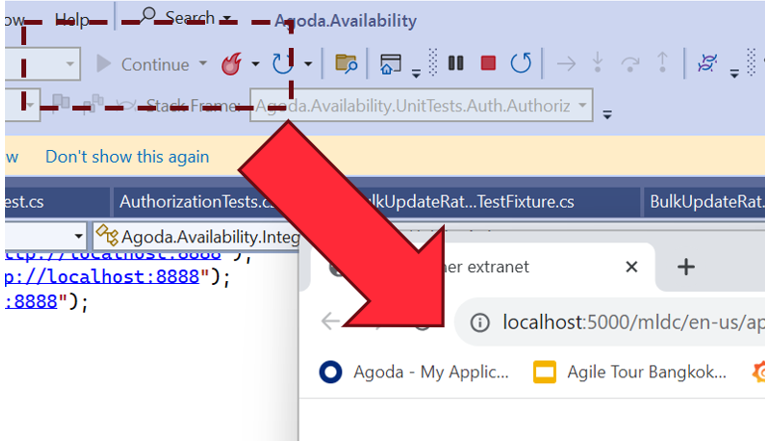
Back then we were working a lot on .NET, and Visual Studio was the go-to IDE. In Visual Studio, the button you press to debug was “F5”. So we used to ask the question:

“Can we git clone, and then just press F5 (Debug), and the application works locally?”

And also:

“What happens after this? Is it fast?”

So there are 2 parts to the F5 Experience really:

  1. Setup (is it Zero)
  2. Debug (is it fast)

Let’s start with the second part of the problem statement and what work we’ve done there.

Is it fast to build?

This is the first question we asked, so let’s measure compile time locally.

We’ve had devs report that things are slow, but it’s hard to know anecdotally because you don’t know in practice how often people need to clean build vs. incremental build vs. hot reload, and this can make a big difference.

For example, if you measure the three, and just for example’s sake they measure:

  • Clean: 25 minutes
  • Incremental: 30 seconds
  • Hot reload: 1 second

You might think, this is fine because it’s highly unlikely people need to clean build, right?

Wrong. The first step in troubleshooting any compilation error is “clean build it”, then try something else. Also, updates in dependencies can cause invalidation of cache and recalculations and re-downloading of some dependencies. With some package managers, this can take a long time. On top of this, you have your IDE reindexing, which can take a long time in some languages too. I still have bad memories about seeing IntelliJ having a 2 hr+ in-progress counter for some of our larger Scala projects years ago.

So you need to measure these to understand what the experience is actually like; otherwise, it’s just subjective opinions and guesswork. And if it is serious, solving this can have big impacts on velocity, especially if you have a large number of engineers working on a project.

How do we do this?

Most compilers have an ability to add plugins or something of the sort to enable this. We created a series of libraries for this. Here are the open-source ones for .NET and webpack/vite:

I’ll use the .NET one as an example because it’s our most mature one for backend, then go into what differences we have on client-side systems like webpack and vite later in another post.

So after adding this, we now have data in Hadoop for local compilation time for our projects.

And it was “amazing”; even for our legacy projects, it was showing 20-30 seconds, which I couldn’t believe. So I went to talk to one of our engineers and sat down and asked him:

“From when you push debug in your IDE to when the browser pops up and you can check your changes, does it take 20-30 seconds?”

He laughed.

He said it’s at least 4-5 minutes.

So we dug in a bit more. .NET has really good compilation time if you have a well-laid-out and small project structure, and this is what we were reporting. After it’s finished compiling the code though, it has to start the web server, and sometimes this takes time, especially if you have a large monolithic application that is optimized for production. In production, we do things like prewarm cache with large amounts of data. In his case, there wasn’t any mocking or optimizations done for local; it just connects to a QA server that, while having less data than production, still has enough that it impacts it in a huge way. On top of this, add remote/hybrid work, when you are downloading this over a VPN, and boom! Your startup time goes through the roof.

So what can we do? Measure this too, of course.

Let’s look a little bit at the web server lifecycle in .NET though (it’s pretty similar in other platforms):

The thread will hang on app.Run() until the web server stops; however, the web server itself has lifecycle hooks we can use. In .NET’s case, HostApplicationLifetime has an OnStarted event. So we can handle this.

However, the web browser may have “popped up,” but the page is still loading. This is because if you don’t initialize the DI dependencies of an HTTP controller before app.Run(), it will the first time the page is accessed.

So we need another measurement to complete the loop, which is:

“The time of first HTTP Request completion after startup”

This will give us the full loop of “Press F5 (Debug)” to “ready to check” on my local.

To do this, we need some middleware, which is in the .NET library mentioned above as well.

So now we have the full loop; let’s look at some data we collected:

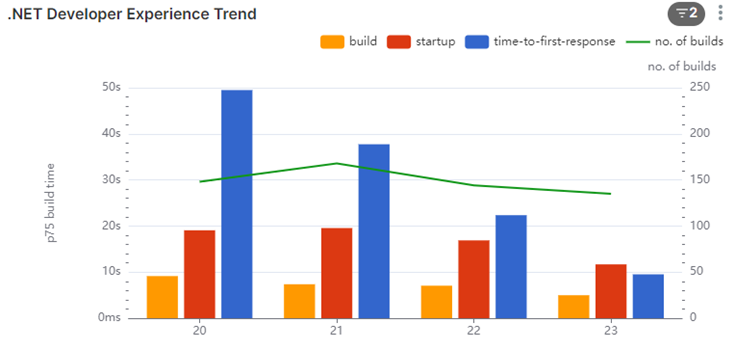
Here’s one of our systems that takes 2-3 min to startup on an average day. We saw that there was an even higher number of 3min+ for the first request, so total waiting time of about 5 minutes. So we started to dig into why.

Before I mentioned the Web Browser “popping up,” this is the behavior on Visual Studio. Most of our engineers use Rider (or other JetBrains IDEs depending on their platform). When we looked into it, we found it wasn’t a huge load time of the first request; it was only taking about 20 seconds. What we found is that because JetBrains IDEs depended on the user opening the browser, the developer opens the browser minutes after it was ready. But why weren’t they opening it straight away? What was this other delay?

We were actually capturing another data point which proved valuable: it was the time the engineer context switches because they know it will take a few minutes, they go off and do something else.

The longer the compile and startup time, the longer they context switch (the bigger tasks they take on while waiting). It starts with checking email and Slack, to going and getting a coffee.

On some repos, we saw extreme examples of 15 to 20 min average for developers opening browsers on some days when the compile and startup time gets high. Probably a busy coffee machine on this day! 🙂

We had a look at some of our other repos that were faster:

In this one, we see that the startup is about 20-30 seconds (including compile time). The first request does take some time (we measured 5-10 seconds), but we are seeing about 30 seconds for the devs, so it’s unlikely they are context switching a lot.

We dug into this number some more though. We found most of the system owners weren’t context switching; they were waiting.

The people that were context switching were the contributors from other areas. We contacted a few of them to understand why. And they told us:

“I honestly didn’t expect it to be that fast, so after pressing debug, I would go make a coffee or do something else.”

To curb this behavior, we found that you can change Rider to pop up the browser, and by doing this, it would interrupt the devs’ context switch, and they would know it’s fast and hopefully change their behavior.

Conclusion

The F5 Experience highlights a critical aspect of developer productivity that often goes unmeasured and unoptimized. Through our investigation and data collection, we’ve uncovered several key insights:

  1. Compilation time alone doesn’t tell the whole story. The full cycle from pressing F5 to having a workable application can be significantly longer than expected.
  2. Developer behavior adapts to system performance. Slower systems lead to more context switching, which can further reduce productivity.
  3. Different IDEs and workflows can have unexpected impacts on the overall development experience.
  4. Even small changes, like automatically opening the browser in Rider, can have a positive impact on developer workflow.

By focusing on the F5 Experience, we can identify bottlenecks in the development process that might otherwise go unnoticed. This holistic approach to measuring and improving the development environment can lead to substantial gains in productivity and developer satisfaction.

Moving forward, teams should consider:

  • Regularly measuring and monitoring their F5 Experience metrics
  • Optimizing local development environments, including mocking or lightweight alternatives to production services
  • Continuously seeking feedback from developers about their workflow and pain points

Remember, the goal is not just to have fast compile times, but to create a seamless, efficient development experience that allows developers to stay in their flow and deliver high-quality code more quickly.

By prioritizing the F5 Experience, we can create development environments that not only compile quickly but also support developers in doing their best work with minimal frustration and waiting. This investment in developer experience will pay dividends in increased productivity, better code quality, and happier development teams.

Anecdote

Another thing we were capturing with this data was information like machine architecture. We noticed 3 out of about 150 Engineers working on one of our larger repos had a compile time that was 3x the others, 3-4 minutes compare to a minute or so. We also noticed they had 7th gen vs the 9th gen intel’s that most fo the engineers had at the time, so we immediately connected out IT support to get them new laptops 🙂

An Introduction to the F5 Experience

In the fast-paced world of software development, efficiency and productivity are paramount. As our systems grow more complex and our teams more distributed, we constantly seek ways to streamline our processes and improve our workflow. Enter the concept of the “F5 Experience” – a philosophy and set of practices aimed at optimizing the developer experience from setup to testing and beyond.

What is the F5 Experience?

The term “F5 Experience” originates from the F5 key in Visual Studio, which is used to start debugging. At its core, the F5 Experience is about achieving zero setup in the development environment. It asks a simple yet powerful question:

Can we clone a repository, press F5 (or its equivalent), and have the application work locally without any additional setup?

Originally this concept came from Andrew Harcourt when I was working with him many years ago now.

This concept extends beyond just running the application. It encompasses both debugging and testing, aiming for a seamless, zero-setup experience across these development tasks.

The focus on zero setup has significant implications for the entire development process:

  1. Instant Start: The ability to begin working on a project immediately after cloning, without complex configuration steps.
  2. Seamless Debugging: Making the process of identifying and fixing issues as smooth as possible, right from the start.
  3. Effortless Testing: Ensuring that tests can be run easily and produce consistent results, without additional setup.

While the F5 Experience primarily focuses on zero setup, this principle has positive knock-on effects on other aspects of development:

  1. Fast Feedback: Minimizing the time between making a change and seeing its effects.
  2. Improved Productivity: Reducing time wasted on environment setup and configuration.
  3. Consistent Environments: Ensuring that all developers work in nearly identical conditions, reducing “works on my machine” issues cause from Engineers having to “patch” together a working environment for testing.

By striving for the ideal Local Developer Experience, we create a foundation for a more efficient, enjoyable, and productive development process.

Why Does the Local Developer Experience Matter?

In our journey to improve developer productivity, we’ve identified several key areas where the Local Developer Experience can make a significant impact:

1. Reducing Time Wasted on Setup

How often have you joined a new project, only to spend days setting up your local environment? A good F5 Experience means that new team members can be productive within minutes, not days or weeks.

2. Improving the Speed of the Inner Loop

The “inner loop” of development – the cycle of writing code, running it, and seeing the results – should be as fast as possible. Long compile times, slow startup processes, or cumbersome testing procedures all detract from this ideal.

3. Enhancing Testing Practices

Tests are crucial for maintaining code quality, but they’re only effective if they’re run regularly. If running tests is a pain, developers will avoid doing it. We aim to make running tests as simple as running the application itself.

4. Minimizing Context Switching

When developers have to wait for long periods – whether for builds, tests, or environment setup – they tend to switch contexts. This context switching can significantly reduce productivity. By optimizing these processes, we keep developers in their flow state.

The Road Ahead

Achieving the ideal F5 Experience is an ongoing journey. It requires a commitment to continuous improvement, a willingness to challenge established practices, and an openness to new tools and methodologies.

In the posts that follow, we’ll dive deeper into each aspect of the F5 Experience. We’ll share our successes, our challenges, and the lessons we’ve learned along the way. We’ll explore how these principles can be applied in different contexts, from small startups to large enterprises, and across various technology stacks.

Our goal is not just to improve our own processes, but to spark a conversation in the wider development community about how we can all work more efficiently and enjoyably.

This is the first in a series of Blog post on the topic, stay tuned for more.

Too Many Meetings?

I ran a survey recently with my engineers about their pain points. The number one pain point was too many meetings. This is a common complaint with teams that do Scrum, but our Scrum is pretty lightweight, so I started to dig a bit further – “go see.”

I sat down with a few of my engineers and, after confirming they agreed that they have too many meetings, I bluntly said to them, “Show me your calendar.” As I suspected, in all cases, it was pretty sparse, except for one of my tech leads, which I understood. What I did notice, though, is that they had meetings mid-morning and mid-afternoon consistently.

So my hypothesis was: it’s not that they have too many meetings; it’s that they get interrupted and don’t have long periods of focus to work. Working as an engineer before, I understand this. You need a good few uninterrupted hours every day to get into your zone and get stuff done.

I’ve had to deal with this before (as I said, it’s a common complaint in Scrum) and also have colleagues that have as well. Based on past experience, I was able to put together something that we tried. It starts off a bit draconian, but I think you have to because people always bend the rules. So here’s the guidance we came up with:

Practices around Meetings

Please observe the following practices around meetings to enhance productivity and maintain focus.

No Meetings after Lunch

Engineers need at least 2-3 uninterrupted hours straight each day, more if possible. This uninterrupted time is crucial for deep work and maintaining a flow state, which becomes essential for problem-solving and creativity in engineering tasks. According to Cal Newport, author of “Deep Work,” uninterrupted work periods significantly enhance productivity and job satisfaction.

While this may be challenging on sprint planning days, consider making one day per sprint an exception to this rule for sprint ceremonies. Getting other teams into this habit might also be difficult, but targeting one director area at a time can make it more manageable. Here are some tips to deal with it.

Alternative: If morning meetings are challenging, consider scheduling additional meetings at 5 pm to ensure uninterrupted work periods during the day until at least 5 pm.

Default Meeting Time is 30 Minutes

Avoid scheduling 1+ hour meetings at all costs, unless absolutely necessary. Shorter meetings encourage people to arrive on time and be efficient. It also pushes attendees to get to the point quickly and wrap up discussions promptly. Parkinson’s Law states that work expands to fill the time available for its completion. Therefore, shorter meetings can help in focusing discussions and give more time back to attendees.

Tip: If a meeting finishes early, LEAVE, rather than extending discussions unnecessarily.

Review the Purpose of Each Meeting

Assess the necessity of every meeting. If the meeting’s purpose can be achieved via an email or a Slack chat, do this instead. This helps reduce the number of unnecessary meetings and allows more time for focused work.

Tip: Establish clear agendas and goals for meetings to determine if they are truly necessary.

Combine Meetings with the Same Attendees

If you have two meetings that require the same people, schedule them back-to-back in the same room. This approach not only ensures everyone is on time for the second meeting, but if the first meeting ends early, you can start the second one earlier, and potentially give people back more free time.

Supporting Information and Citations
Newport, C. (2016). Deep Work: Rules for Focused Success in a Distracted World. Grand Central Publishing.
Parkinson, C. N. (1955). Parkinson’s Law. The Economist.
Harvard Business Review. (2017). Stop the Meeting Madness. Retrieved from Harvard Business Review.

[Previous content remains unchanged]

Conclusion

Implementing these meeting practices can significantly improve team productivity and engineer satisfaction. By prioritizing uninterrupted work time, keeping meetings focused and efficient, and critically evaluating the necessity of each meeting, we can create an environment that fosters deep work and creativity.

Remember, the goal is not to eliminate meetings entirely, but to make them more purposeful and less disruptive to the flow of work. As we adopt these practices, we should:

  1. Regularly check in with the team to assess the impact of these changes
  2. Be flexible and willing to adjust the practices as needed
  3. Lead by example, adhering to these guidelines ourselves

It’s important to recognize that changing ingrained habits takes time and persistence. There may be initial resistance or challenges, especially when coordinating with other teams or departments. However, the potential benefits – increased productivity, improved job satisfaction, and higher quality work – make this effort worthwhile.

By fostering a culture that values focused work time and efficient communication, we can help our engineers thrive and deliver their best work. Let’s view this as an ongoing process of optimization, always seeking ways to improve our work environment and practices.

Push Groups: Encouraging Adoption of New Tools and Technologies

Another process I’ve been trialling I wanted to share:

Sometimes when you want people to try something new you need to be a bit pushy to get them out of their comfort zone. This is where Push groups get their names.

Push Groups are structured sessions designed to encourage and facilitate the adoption of new tools and technologies within software engineering company. These groups typically consist of 3-4 people from different teams who come together to learn, install, and practice using a new tool or technology.

In the session is “very” hands on. We generally start with the installing the tool on everyone’s laptops, then run through some exercises that participants are required to complete in front of the organiser and share their immediate feedback of why the tool does or does not work.

This serves two purposes

  1. It pushes people to try something they otherwise would not have
  2. It gives the orgnaiser immediate feedback of issues they might not have know

In one example where we used this, we noticed many of our engineers in one area where not using customs shells they were just using vanilla Bash terminal on Mac or Powershell on windows. So we ran a session on Terminal tooling with ohmyposh, windows terminal etc. (we did a separate session with other tech for mac users, I’m using the windows one as an example because its the one geriatric old me that’s familiar with windows tooling ran).

In the first session we got them to install it, pick their themes/fonts (a bit of fun), try some common tasks, like git clone and run one of their repos using npm cli etc. demoing common quality of life features like git/k8s/etc information in the cli, statement completion, etc.

During the session one of the of the devs raised to me, he said: “Look, this is cool, but I never use the terminal outside my IDE, I only use it inside. I then realised its a totally different setup to customise the terminal inside the IDE, but in the session we worked it out and updated the content so that we supported both.

After the session there’s two goals

  1. Use it! – try honestly to use this new thing over the next two weeks, push yourself a bit to try it. And provide feedback about what does and doesnt work.
  2. Run another session for your team the same – even if it doesnt work for you, and get them to do the same thing and provide feedback

Most of the time we find that tools that are useful take off and reach critical mass and become ubiquitous, sometimes though things dont work, and that’s ok, as long as you get the feedback and learn.

Tethics Moments

A long time ago we had to do this exercise called “Ethics Moments”, I think many companies run these, they are pretty common. I liked the format, the scenarios though were not relevant to my engineers. They never face issues with Bribes from local government officials for example. They do however, everyday face what I would call “Technical Ethical” issues around technical debt, collaboration with other teams, execution decisions, etc.

So I decided to use the format but create scenarios more relevant to day-to-day for engineers. And as a play on words used the Term “Tethics”. And got engineers talking about what to do in certain scenarios relevant to day to day.

So let’s dig into some details.

Why are we here?

As engineers, we do things the right way, but we often seem to only limit this to a moral and ethical scope. With Tethics moments, we want to open this discussion of integrity also to the technical work we do. What is the right way to deal with technical dilemmas without hurting the product in the short term or long term? This can be very subjective, and on top of that, we also want to move fast, so how do we solve these problems so we can move fast tomorrow as well?

Create the Scenarios

A scenario should be a dilemma, and something that happens day-today.

I regularly have beers with my engineers, and sometimes when I do, I hear some crazy stories about code reviews, design reviews, etc generally when people are working with teams less mature or under pressure. Pressure is one of the main reason for technical debt in my opinion.

You dont have to be a beer drinker to create scenarios, but you do need to create a comfortable environment (RE: psychological safety, topic for another post) where your engineers feel comfortable speaking out, and this will help you find these things, the ones that come up more often are the ones you want to use for senarios.

I break these up into 3 sections title, description, and notes for the session leader, the notes help guide the conversation in the right direction, which should happen in a leader session anyway, which I’ll go into next. But the reason you need guidance is sometimes your engineers dont understand that they can push back, sometimes they think “this is the way things are” and when this is the case, you need some guidance so the session leader is confident to break them out of this.

I’ll give you an example of one of ours that I think will be relatable to a lot of orgs.

Scenario:
Owner vs Contributor

Description:
You are a system owner for “Generic Frontend System 2”.​
A backend team has sent you a large pull request for review, without a prior design review or any notice the work is coming. ​

It looks clear from their PR that they don’t have the best ReactJS skills, and it needs a lot of reworking, they’ve even managed to introduce a new state management library in their work. On top of this, the fact that it’s so large means it will probably take the team many days, or even weeks, to make all the needed changes.​

When you raise this with them, they say that they are on a hard deadline with Product changes, need to get this into production fast to meet their KPI for the quarter, and argue that it’s still functionally working, even though the code is not up to standards, so they ask if you can let it pass anyway.​

What should you do?

Notes for leader:
In the end it up to the system owner (you in this scenario) how they handle this, if you have push back against what you want (e.g. them fixing their code) and you don’t like it, escalate straight away to manager and higher if you need.​​ You’ll get support for this.

A common practice though, is that if its not “too” bad, getting a commitment from the team that they will immediately work on a fix after it’s merge, and bringing their manager AND PO into the room to make sure everyone is clear on the commitment. The PO is the one that a) has the most control over the sprint backlog and b) is most concerned with getting it into production that fastest, and may also be the one that tells every “its ok to wait”, you’ll be surprised.

<end senario>

So you can see we are leaving it pretty open here, in our company, system owners are the one that ultimately are responsible for the technical debt of their system, it’s part of our ownership culture, so it’s up to them how they handle it, there is guidance there because sometimes our system owners dont feel empowered, sometimes teams are under a lot of pressure and get into ruts, so this type of encouragement helps them get out of it.

The second part of the notes is talking about compromise, because sometimes you need it, but its ultimately up to you how you do this, its just one suggestion.

How to distribute sessions top down

“Top down” is usually a trigger word for me, living in South East Asia, where many companies have a bad top-down cultures. But in this case its not, its important for leaders to help shape a good culture, and this is one tool for helping.

The first session you should run is one with your leaders or managers, run them through the scenarios. Then they get your direct feedback on what is your expectations of how engineer should be dealing with these through the conversations. This is needed because ultimately if an engineer sees a problem and escalates and everyone is aligned they’ll get support from the top, if we arent aligned they might not and this will cause a problem for them.

After this tell them to run with their directs, and so on, for larger numbers of direct report you can run session with leads and send them out, or run multiple session, varies with your org structure.

Finally the session itself

How to run a session?

  • Use the deck of scenarios (have at least 6-7). As a Tethics leader, you should read through them and pick 3-4 you feel are most relevant for your direct reports or team members (depending on how you are running it).
  • Schedule a 1-hour session with direct reports
  • Limit session size to 4-5 people maximum – if you have more people, then schedule multiple sessions.
  • Fewer people means more people will speak out.
  • Read a scenario together, then 15-20 minutes go around the group to ask what each person thinks the right thing to do in that scenario would be. – There is no right or wrong answer to most; it’s about an open discussion.
  • Repeat the process for your selected other Tethics leaders to run with other people.

Are you the moderator?

  • Ask each person to talk and have their say one at a time.
    • Choose a different person to start talking for each scenario.
  • Don’t interrupt people as they are talking.
  • Save your personal opinions on the subject for the end of everyone else talking.
  • Focus more on commenting on others’ opinions than voicing your own.
  • Try Lead people to a better conclusion by questioning (RE: Socratic method of coaching, another topic post) rather than disagreeing.

And that’s it, please let me know if you try this and what your stories are in the comments.