Planning for Change: The Fallacy of Long-Term Roadmaps in Software Development

Introduction

In the world of software development, long-term roadmaps have long been a staple of project management. These carefully crafted plans, often spanning months or even years, aim to provide a clear path forward for product development. They outline features, set deadlines, and allocate resources with precision that would make any project manager proud.

But here’s the deal: by the time you start working on that meticulously planned roadmap, the market is already changing. The technology landscape shifts like quicksand beneath your feet, and customer needs evolve at breakneck speed. This creates a fundamental tension between our desire for orderly planning and the chaotic reality of the tech world.

The Siren Song of Long-Term Roadmaps

Despite this tension, companies are often drawn to long-term planning like moths to a flame. It’s not hard to see why:

  1. Illusion of Control: Long-term roadmaps provide a comforting sense of control in an unpredictable industry. They offer a vision of the future that feels tangible and achievable.
  2. Alignment with Business Goals: These roadmaps allow companies to align their development efforts with broader business objectives, creating a narrative of progress that’s easy to communicate to stakeholders.
  3. Resource Allocation: With a long-term plan in hand, it becomes easier (in theory) to allocate resources, budget for future needs, and make hiring decisions.
  4. Compatibility with Traditional Business Cycles: Many businesses operate on annual or multi-year planning cycles. Long-term roadmaps fit neatly into these established rhythms, making them attractive to executives and boards.

The Problems: When Plans Meet Reality

However, as Mike Tyson famously said, “Everybody has a plan until they get punched in the mouth.” In software development, that punch often comes swiftly and from multiple directions:

  1. Rapid Technological Changes: The tech you planned to use might be outdated by the time you implement it. New frameworks, languages, or methodologies can emerge that render your careful plans obsolete.
  2. Shifting Market Demands: Customer needs and expectations can change dramatically in a short time. The feature that seemed critical six months ago might be irrelevant today.
  3. Disruptive Competitors: In the time it takes to execute your roadmap, a new competitor might enter the market with an innovative solution that changes the game entirely.
  4. Estimation Difficulties: Accurately estimating time and resources for software development is notoriously difficult, especially for work that’s months or years in the future.
  5. Stifled Innovation: Rigid adherence to a long-term plan can blind you to new opportunities and stifle the kind of rapid innovation that’s often necessary in the tech world.

Case Studies: The Perils and Promises of Planning

Let’s look at a couple of real-world examples that illustrate the challenges and opportunities in software development planning:

  1. Waterfall Woes at FirstBank: FirstBank, a large financial institution with over 10 million customers, spent 18 months meticulously planning a comprehensive overhaul of their online banking system. The project, codenamed “Digital Horizon,” was designed to modernize their web-based services and improve customer experience.However, by the time they were halfway through development in 2010, the mobile revolution was in full swing. The iPhone and Android smartphones had exploded in popularity, and customers were increasingly demanding mobile banking solutions. Much of FirstBank’s planned desktop-focused features suddenly seemed outdated.The bank found itself in a difficult position. They had already invested millions in the project, but continuing as planned would result in a product that was behind the curve at launch. They made the painful decision to scrap significant portions of their work and pivot towards mobile development. This led to delays of over a year and cost overruns exceeding $30 million.The “Digital Horizon” project, originally slated to give FirstBank a competitive edge, instead left them playing catch-up in the mobile banking space for years to come.
  2. Agile Triumph at QuickPay: In contrast, QuickPay, a small fintech startup founded in 2012, took an iterative approach to developing their peer-to-peer payment app. Instead of planning out years in advance, they released a minimal viable product (MVP) with basic transfer functionality and rapidly iterated based on user feedback.This agile approach allowed QuickPay to pivot quickly when they discovered an unexpected demand. Users were frequently splitting bills at restaurants and bars, and wanted an easy way to divide payments among friends. This wasn’t a feature QuickPay had originally considered as central to their app.Within two months, QuickPay had developed and released a “Split Bill” feature. They continued to refine it based on user feedback, adding capabilities like itemized bill splitting and integration with popular restaurant POS systems.Within a year, the “Split Bill” feature became QuickPay’s main selling point, setting them apart in a crowded fintech market. It propelled them from 100,000 users to over 5 million, capturing a significant market share from larger, more established payment apps.By 2015, QuickPay’s success attracted the attention of major financial institutions. They were acquired by a leading bank for $400 million, a testament to the value created by their, customer-focused development approach.

These examples highlight a crucial truth in the fast-paced world of software development: the ability to adapt quickly and respond to user needs often trumps even the most carefully laid long-term plans.

The Inevitability of Change in Software Development

In the world of software development, change isn’t just common—it’s inevitable. Unlike traditional industries where conditions might remain stable for years, the software landscape can transform dramatically in a matter of months or even weeks. This rapid evolution is driven by several factors:

  1. Technological Advancements: New programming languages, frameworks, and tools emerge constantly, often rendering existing solutions obsolete.
  2. Shifting User Expectations: As users interact with various digital products, their expectations for functionality, design, and user experience evolve rapidly.
  3. Market Disruptions: Startups with innovative ideas can quickly disrupt established markets, forcing everyone to adapt.
  4. Regulatory Changes: Especially in fields like fintech or healthcare, new regulations can necessitate significant changes to software systems.

This constant state of flux means that software development requires a fundamentally different approach to planning compared to other industries. While a construction project can often stick closely to initial blueprints, a software project needs to be able to pivot at a moment’s notice.

The key is to embrace change not as a disruption, but as an opportunity for innovation and improvement. This mindset shift is crucial for success in the dynamic world of software development.

Alternative Approaches to Planning

As Elon Musk once said, “You don’t need a plan. Sometimes you just need balls”, operating without a long term plan is scary for some people, you feel less in control, but once you realize you are in even less control with one, it get’s easier. Here are some alternative approaches that embrace the dynamic nature of software development:

  1. Inspect and Adapt Principle: This principle acknowledges that we can’t predict everything, so we need to regularly examine our progress and adjust our approach based on what we learn. Agile methodologies, in particular, heavily rely on this principle, incorporating regular retrospectives and iterative development to ensure teams can pivot quickly when needed.
  2. Extreme Programming (XP) Cycles: XP introduces an interesting approach with its weekly and quarterly cycles. The weekly cycle focuses on short-term planning and execution, where teams plan at the start of each week and deliver working software by the end. The quarterly cycle is used for reflection and longer-term planning, allowing teams to adjust their course based on what they’ve learned over the past quarter. This dual-cycle approach balances the need for immediate action with longer-term strategic thinking.
  3. Rolling Wave Planning: This technique involves detailed planning for the near-term future, with broader, less detailed plans for the longer term. As time progresses, the plan is continuously updated and the detailed planning “wave” rolls forward. This approach acknowledges that we have more accurate information about the near future and allows for flexibility as we move forward.
  4. OKRs (Objectives and Key Results): This goal-setting framework, popularized by Google, focuses on setting ambitious objectives and measurable key results. OKRs are typically set quarterly, allowing for more frequent reassessment and pivoting compared to traditional annual planning. They provide direction without prescribing specific solutions, giving teams the flexibility to determine the best way to achieve the objectives.
  5. “Just Enough” Planning: This concept emphasizes doing only the minimum amount of planning necessary to start making progress. It’s about finding the sweet spot between flying blind and over-planning. The idea is to do just enough planning to provide direction and alignment, but not so much that it becomes a burden or limits adaptability.

The common thread among these approaches is flexibility. They all acknowledge that plans will change and build in mechanisms for adapting to new information or circumstances. By embracing these more dynamic planning methods, software development teams can stay agile in the face of inevitable change and uncertainty.

Balancing Long-Term Vision with Short-Term Flexibility

While embracing change is crucial, it doesn’t mean operating without direction. The key is to balance a clear long-term vision with flexible short-term planning.

The Importance of Long-Term Vision

A compelling long-term vision serves several crucial purposes:

  • It provides a North Star for decision-making
  • It helps align teams and stakeholders around common goals
  • It inspires and motivates team members

Your long-term vision might be something like “Become the go-to platform for peer-to-peer payments” or “Revolutionize online education.” This vision should be ambitious and inspirational, but also clear and focused.

Combining Vision with Flexible Planning

Here’s how you can maintain your long-term vision while embracing flexible short-term planning:

  1. Set Directional OKRs: Use your long-term vision to inform high-level, directional OKRs. These provide guidance without prescribing specific solutions.
  2. Use Adaptive Roadmaps: Instead of detailed feature lists, create roadmaps that focus on problems to be solved or outcomes to be achieved. This allows teams the flexibility to find the best solutions.
  3. Regular Check-ins: Schedule regular sessions to review progress and reassess priorities (quarterly at most). This allows you to course-correct while still moving towards your long-term vision. Some advice I got on this once, if the project is on fire, bi-weekly check-ins, if the project is running smoothly monthly or even quarterly, if the project is doing “amazing” biweekly, work out what makes them so good and maybe you can apply in other areas.
  4. Empower Teams: Give your teams the autonomy to make decisions about how to best achieve the objectives. They’re closest to the work and often best positioned to respond to changes.
  5. Communicate Constantly: Regularly reinforce the long-term vision while acknowledging and explaining changes in short-term plans. This helps maintain alignment and buy-in.

By maintaining a clear long-term vision while embracing flexible short-term planning, you can navigate the ever-changing landscape of software development effectively. You’ll be positioned to seize new opportunities as they arise, while still moving consistently towards your ultimate goals.

Remember, in software development, the ability to adapt is often more valuable than the ability to predict. Embrace change, stay flexible, and keep your eyes on the horizon.

Implementing More Flexible Planning in Your Organization

Transitioning from long-term roadmaps to more adaptive planning isn’t just about adopting new methodologies—it’s a cultural shift. Here are some tips to help you make this transition:

  1. Start Small: Begin with a pilot project or team. This allows you to test and refine your approach before rolling it out organization-wide.
  2. Educate Your Team: Provide training on adaptive planning techniques. Help your team understand the ‘why’ behind the change.
  3. Emphasize Outcomes Over Outputs: Shift focus from feature delivery to achieving business outcomes. This mindset change is crucial for flexible planning.
  4. Shorten Planning Horizons: Instead of annual plans, consider quarterly or even monthly planning cycles.
  5. Embrace Uncertainty: Teach your team that it’s okay not to have all the answers upfront. Uncertainty is a normal part of software development.

Communicating this change to stakeholders is crucial. Here’s how to manage expectations:

  1. Be Transparent: Explain the reasons for the change. Share both the potential benefits and the challenges you anticipate.
  2. Focus on Value Delivery: Show stakeholders how this approach will lead to faster value delivery and better alignment with business needs.
  3. Use Visual Tools: Employ visual roadmaps or boards to show progress and plans. These can be easier for stakeholders to understand than traditional Gantt charts.
  4. Regular Updates: Provide frequent updates on progress and changes. This helps stakeholders feel involved and informed.

Conclusion

Long-term roadmaps, while comforting, often fall short in the fast-paced world of software development. They can lead to wasted resources, missed opportunities, and products that don’t meet user needs.

Instead, embracing more flexible planning approaches allows teams to:

  • Respond quickly to changes in technology and market demands
  • Deliver value to users more frequently
  • Learn and improve continuously

Remember, change in software development is not just inevitable—it’s an opportunity. By adopting more adaptive planning methods, you position your team to seize new opportunities as they arise and create better products for your users.

Call to Action

As you finish reading this post, take a moment to reflect on your current planning processes. Are they truly serving your team and your users? Or are they holding you back?

Here’s what you can do right now:

  1. Review Your Current Process: Identify areas where your planning might be too rigidly planning or disconnected from user needs.
  2. Start a Conversation: Discuss these ideas with your team. Get their input on how you could make your planning more flexible.
  3. Experiment: Choose one small aspect of your planning to make more adaptive. It could be as simple as adding a monthly check-in to reassess priorities.
  4. Measure and Learn: Keep track of how these changes impact your team’s productivity and the value you deliver to users.

Remember, the goal isn’t to eliminate planning altogether, but to make it more responsive to the realities of software development. Start small, learn as you go, and gradually build a more adaptive, resilient planning process.

The future of your software development efforts—and possibly your entire business—may depend on your ability to plan flexibly and embrace change. Are you ready to take the first step?
Are You Focusing on Output Over Outcomes? Rethinking Software Development

As an engineering manager, you’re tasked with building awesome teams. You work tirelessly to help keep projects on track, meet deadlines, and deliver results. But lately, something feels off. Your team is undoubtedly busy, even productive by conventional measures. Yet, you can’t shake the nagging feeling that all this activity isn’t translating into meaningful impact for your business or your users.

If this resonates with you, your team might be caught in a cycle of prioritizing output over outcomes. Let’s explore what this looks like from a leadership perspective and why it’s a critical issue to address.

Signs of the Problem

  1. Measuring Work Alone: Your team’s success is measured primarily by output – story points completed, tickets closed, features shipped. But what about the outcomes? Are you tracking the actual value these activities bring to the business?
  2. Lack of Feedback: Features are developed, shipped to production, and marked as “done.” But then… silence. There’s no mechanism in place to gather feedback on whether these features are successful or even used.
  3. Team Disconnection: Your developers are “shielded” from talking to business people. You might have heard the phrase, “Don’t interrupt our precious engineers’ time.” But this protection comes at a cost – disconnection from the very problems they’re trying to solve.
  4. Deadline-Driven Development: Your team is constantly working towards deadlines handed down from above. The problem? No one on the team understands where these deadlines come from or why they’re important.
  5. Product Overwork: Your Product Managers are spending so much time writing detailed specifications that you’re considering hiring people whose sole job is to create detailed specs for the engineers. This level of detail might seem helpful, but it can stifle creativity and problem-solving.

The Round Corners Saga: A Case Study

Let me share a story that might hit close to home. Your team has been working on a new user interface. In a recent sprint review, you’re surprised to learn that one of your engineers spent five days ensuring text boxes had perfectly rounded corners across all browsers and devices.

Proud of their attention to detail, your developer showcases the feature. But when you speak with the product owner, you discover that the round corners weren’t even a requirement – they were just a default style in the design tool’s mockups.

Five days of a skilled developer’s time, spent on an unintended, unnecessary detail. As a manager, how do you react? More importantly, how do you prevent this from happening again?

Here’s the thing: I don’t blame the engineer. I think it’s a fundamental problem that stems from the way we’re brought up, and more broadly, from Western-based education systems.

Think about it like this:

  • As a child, you have your parents telling you what to do.
  • In school, your teachers tell you what to do.
  • At university, your lecturers tell you what to do.

You spend the first part of your life with people telling you what to do. So it’s only natural that people find it easy to get trapped into finding the next person to tell them what to do. And usually, in dev teams that do Scrum, this becomes their Product Owner or manager.

It’s the managers responsibility to coach this out of people.

The Real Costs

This way of working comes with significant costs:

  1. Strategic Misalignment: Your team’s efforts aren’t driving towards key business objectives. You’re busy, but are you moving in the right direction?
  2. Opportunity Cost: Time spent on unnecessary features or misguided efforts is time not spent on innovations that could provide a real competitive advantage.
  3. Talent Retention Risk: Skilled developers often leave when they feel their work lacks purpose or impact. Are you at risk of losing your best people?

Solutions: Leadership for Purpose-Driven Development

As a leader, you have the power to shift your team’s focus from output to outcomes. Here’s how:

  1. Reinforce the ‘Why’: Push your engineers to ask why. Why are we building this feature? Why is it important? Why now?
  2. Redefine Success Metrics: Your Product Manager should already be doing this, but they might be hiding it from the engineers, I’ve seen this many times, some Product people think by doing this it’s less distracting for the engineers, but it has a negative effect. If they’re not doing it at all, you have bigger problems, and you probably need to go higher than your team to address them.
  3. Encourage Customer Connection: Break down the barriers between your developers and the users they’re building for. Teach them who they serve, the customer, and if you can introduce them to some and get them talking to them.
  4. Promote Learning Loops: Make time to analyze the impact of your work after it’s shipped. What worked? What didn’t? Why? Get your engineers engaged with the Analytics data that comes out of their system, get them excited about how many users are using their new feature, and if people aren’t, ask why?
  5. Cross-Team Collaboration: And I don’t just mean in formal settings. Have a beer together sometimes. Build real relationships across teams, Engineers, Design, Product and other business units.

Understanding the “Feature Factory” Phrase

The term “feature factory” vividly illustrates a development process that prioritizes output over outcomes, quantity over quality. Like workers on an assembly line, developers in this environment might be busy but disconnected from the larger purpose of their work.

As a leader, your role is to transform this factory into an innovation studio – a place where each line of code contributes to a larger vision, where your team’s skills are applied to solving real problems, not just checking off feature lists.

Moving Forward

Recognizing that your team may be stuck in this output-focused mindset is a crucial first step. The next is to start changing the conversation at all levels – with your team, with product managers, with stakeholders.

Start asking different questions in your meetings:

  • “How will we measure the success of this feature?”
  • “What problem are we solving for our users?”
  • “If this feature succeeds, what impact will it have on our key business metrics?”

Encourage your team to think beyond the immediate task to the larger purpose. Help them see their work not as isolated features, but as integral parts of a solution that brings real value to users and the business.

Remember, you became a leader to make a difference – to guide your team to create impactful, meaningful work. Don’t let the trap of focusing on output rob you and your team of that opportunity.

Are you ready to lead the change? Your team’s potential for true innovation and impact is waiting to be unleashed.

Measuring Product Health: Beyond Code Quality

In the world of software development, we often focus on code quality as the primary measure of a product’s health. While clean, efficient code with passing tests is crucial, it’s not the only factor that determines the success of a product. As a product engineer, it’s essential to look beyond the code and understand how to measure the overall health of your product. In this post, we’ll explore some key metrics and philosophies that can help you gain a more comprehensive view of your product’s performance and impact.

The “You Build It, You Run It” Philosophy

Before diving into specific metrics, it’s important to understand the philosophy that underpins effective product health measurement. We follow the principle of “You Build It, You Run It.” This approach empowers developers to take ownership of their products not just during development, but also in production. It creates a sense of responsibility and encourages a deeper understanding of how the product performs in real-world conditions.

What Can We Monitor?

When it comes to monitoring product health, there are several areas we usually focus on:

  1. Logs: Application, web server, and system logs
  2. Metrics: Performance indicators and user actions
  3. Application Events: State changes within the application

While all these are important, it’s crucial to understand the difference between logs and metrics, and when to use each.

The Top-Down View: What Does Your Application Do?

One of the most important questions to ask when measuring product health is: “What does my application do?” This top-down approach helps you focus on the core purpose of your product and how it delivers value to users. So ultimatelly when this value is impacted you know when to act.

Example: E-commerce Website

Let’s consider an e-commerce website. At its core, the primary function of such a site is to facilitate orders. That’s the ultimate goal – to guide users through the funnel to complete a purchase.

So, how do we use this for monitoring? We ask two key questions:

  1. Is the application successfully processing orders?
  2. How often should it be processing orders, and is it meeting that frequency right now?

How to Apply This?

To monitor this effectively, we generally look at 10-minute windows throughout the day (for example, 8:00 to 8:10 AM). For each window, we calculate the average number of orders for that same time slot on the same day of the week over the past four weeks. If the current number falls below this average, it triggers an alert.

This approach is more nuanced and effective than setting static thresholds. It naturally adapts to the ebb and flow of traffic throughout the day and week, reducing false alarms while still catching significant drops in performance. By using dynamic thresholds based on historical data, you’re less likely to get false positives during normally slow periods, yet you remain sensitive enough to catch meaningful declines in performance.

One of the key advantages of this method is that it avoids the pitfalls of static thresholds. With static thresholds, you often face a dangerous compromise. To avoid constant alerts during off-hours or naturally slow periods, you might set the threshold very low. However, this means you risk missing important issues during busier times. Our dynamic approach solves this problem by adjusting expectations based on historical patterns.

While we typically use 10-minute windows, you can adjust this based on your needs. For systems with lower volume, you might use hourly or even daily windows. This will make you respond to problems more slowly in these cases, but you’ll still catch significant issues. The flexibility allows you to tailor the system to your specific product and business needs.

Another Example: Help Desk Chat System

Let’s apply our core question – “What does this system DO?” – to a different type of application: a help desk chat system. This question is crucial because it forces us to step back from the technical details and focus on the fundamental purpose of the system adn teh value it delviers to the business and ultimately the customer.

So, what does a help desk chat system do? At its most basic level, it allows communication between support staff and customers. But let’s break that down further:

  1. It enables sending messages
  2. It displays these messages to the participants
  3. It presents a list of ongoing conversations

Now, you might be tempted to say that sending messages is the primary function, and you’d be partly right. But remember, we’re thinking about what the system DOES, not just how it does it.

With this in mind, how might we monitor the health of such a system? While tracking successful message sends is important, it might not tell the whole story, especially if message volume is low. We should also consider monitoring:

  • Successful page loads for the conversation list (Are users able to see their ongoing chats?)
  • Successful loads of the message window (Can users access the core chat interface?)
  • Successful resolution rate (Are chats leading to solved problems?)

By expanding our monitoring beyond just message sending, we get a more comprehensive view of whether the system is truly doing what it’s meant to do: helping customers solve their problems efficiently.

This example illustrates why it’s so important to always start with the question, “What does this system DO?” It guides us towards monitoring metrics that truly reflect the health and effectiveness of our product, rather than just its technical performance.

A 200 Ok response, is not always OK

As you consider your own systems, always begin with this fundamental question. It will lead you to insights about what you should be measuring and how you can ensure your product is truly serving its purpose.

The Bottom-Up View: How Does Your Application Work?

While the top-down view focuses on the end result, the bottom-up approach looks at the internal workings of your application. This includes metrics such as:

  • HTTP requests (response time, response code)
  • Database calls (response time, success rate)

Modern systems often collect these metrics through contactless telemetry, reducing the need for custom instrumentation.

Prioritizing Alerts: When to Wake Someone Up at 3 AM

A critical aspect of product health monitoring is knowing when to escalate issues. Ask yourself: Should the Network Operations Center (NOC) call you at 3 AM if a server has 100% CPU usage?

The answer is no – not if there’s no business impact. If your core business functions (like processing orders) are unaffected, it’s better to wait until the next day to address the issue.

Using Loss as a Currency for Prioritization

Once you’ve established a health metric for your system and can compare current performance against your 4-week average, you gain a powerful tool: the ability to quantify “loss” during a production incident. This concept of loss can become a valuable currency in your decision-making process, especially when it comes to prioritizing issues and allocating resources.

Imagine your e-commerce platform typically processes 1000 orders per hour during a specific time window, based on your 4-week average. During an incident, this drops to 600 orders. You can now quantify your loss: 400 orders per hour. If you know your average order value, you can even translate this into a monetary figure. This quantification of loss becomes your currency for making critical decisions.

With this loss quantified, you can now make more informed decisions about which issues to address first. This is where the concept of “loss as a currency” really comes into play. You can compare the impact of multiple ongoing issues, justify allocating more resources to high-impact problems, and make data-driven decisions about when it’s worth waking up engineers in the middle of the night.

Reid Hoffman, co-founder of LinkedIn, once said, “You won’t always know which fire to stamp out first. And if you try to put out every fire at once, you’ll only burn yourself out. That’s why entrepreneurs have to learn to let fires burn—and sometimes even very large fires.” This wisdom applies perfectly to our concept of using loss as a currency. Sometimes, you have to ask not which fire you should put out, but which fires you can afford to let burn. Your loss metric gives you a clear way to make these tough decisions.

This approach extends beyond just immediate incident response. You can use it to prioritize your backlog, make architectural decisions, or even guide your product roadmap. When you propose investments in system improvements or additional resources, you can now back these proposals with clear figures showing the potential loss you’re trying to mitigate, all be it with a pitch of crytal ball about how likely these incident are to occura gain sometimes.

By always thinking in terms of potential loss (or gain), you ensure that your team’s efforts are always aligned with what truly matters for your business and your users. You create a direct link between your technical decisions and your business outcomes, ensuring that every action you take is driving towards real, measurable impact.

Remember, the goal isn’t just to have systems that run smoothly from a technical perspective. It’s to have products that consistently deliver value to your users and meet your business objectives. Using loss as a currency helps you maintain this focus, even in the heat of incident response or the complexity of long-term planning.

In the end, this approach transforms the abstract concept of system health into a tangible, quantifiable metric that directly ties to your business’s bottom line.

Conclusion: A New Perspective on Product Health

As we’ve explored throughout this post, measuring product health goes far beyond monitoring code quality or individual system metrics. It requires a holistic approach that starts with a fundamental question: “What does our system DO?” This simple yet powerful query guides us toward understanding the true purpose of our products and how they deliver value to users.

By focusing on core business metrics that reflect this purpose, we can create dynamic monitoring systems that adapt to the natural ebbs and flows of our product usage. This approach, looking at performance in time windows compared to 4-week averages, allows us to catch significant issues without being overwhelmed by false alarms during slow periods.

Perhaps most importantly, we’ve introduced the concept of using “loss” as a currency for prioritization. This approach transforms abstract technical issues into tangible business impacts, allowing us to make informed decisions about where to focus our efforts. As Reid Hoffman wisely noted, we can’t put out every fire at once – we must learn which ones we can let burn. By quantifying the loss associated with each issue, we gain a powerful tool for making these crucial decisions.

This loss-as-currency mindset extends beyond incident response. It can guide our product roadmaps, inform our architectural decisions, and help us justify investments in system improvements. It creates a direct link between our technical work and our business outcomes, ensuring that every action we take drives towards real, measurable impact.

Remember, the ultimate goal isn’t just to have systems that run smoothly from a technical perspective. It’s to have products that consistently deliver value to our users and meet our business objectives.

As you apply these principles to your own systems, always start with that core question: “What does this system DO?” Let the answer guide your metrics, your monitoring, and your decision-making. In doing so, you’ll not only improve your product’s health but also ensure that your engineering efforts are always aligned with what truly matters for your business and your users.

No QA Environment!? Are You F’ING Crazy?

In the world of software development, we’ve long held onto the belief that a separate Quality Assurance (QA) or staging environment is essential for delivering reliable software. But what if I told you that this might not be the case anymore? Let’s explore why some modern development practices are challenging this conventional wisdom and how we can ensure quality without a dedicated QA environment.

Rethinking the Purpose of QA

Traditionally, QA environments have been used for various types of testing:

  • Integration Testing
  • Manual Testing (by developers)
  • Cross-browser Testing
  • Device Testing
  • Acceptance Testing
  • End-to-End Testing

But do we really need a separate environment for all of these? Let’s break it down.

The Pros and Cons of Mocks vs. End-to-End Testing

When we talk about testing, we often debate between using mocks and real systems. Both approaches have their merits and drawbacks.

Cons of Mocks

  • Need frequent updates to match new versions
  • May miss breaking changes that affect your system
  • Can’t guarantee full system compatibility

Cons of Real Systems (QA/Staging)

  • Not truly representative of production
  • Require maintenance
  • May lack proper alerting and monitoring
  • Often have less hardware, resulting in slower performance

As Cindy Sridharan, a testing engineer and blogger, puts it:

“I’m more and more convinced that staging environments are like mocks – at best a pale imitation of the genuine article and the worst form of confirmation bias. It’s still better than having nothing – but ‘works in staging’ is only one step better than ‘works on my machine’.”

Consumer-Driven Contract Testing: A Replacement for End-to-End Testing

Consumer-Driven Contract Testing (CDCT) is more than just a bridge between mocks and real systems – it’s a powerful approach that can effectively replace traditional end-to-end testing. This method allows for “distributed end-to-end tests” without the need for a full QA environment. Let’s explore how this process works in detail.

The CDCT Process

  1. Defining and Recording Pact Contracts
    • Consumers write tests that define their expectations of the provider’s API.
    • These tests generate “pacts” – JSON files that document the interactions between consumers and providers.
    • Pacts include details like HTTP method, path, headers, request body, and expected response.
  2. Using Mocks for Consumer-Side Testing
    • The generated pacts are used to create mock providers.
    • Consumers can now run their tests against these mocks, simulating the provider’s behavior.
    • This allows consumers to develop and test their code without needing the actual provider service.
  3. Publishing Contracts by API Consumers
    • Once generated and tested locally, these pact files are published to a shared location, often called a “Pact Broker”.
    • The Pact Broker serves as a central repository for all contracts in your system.
  4. Verifying Contracts in Provider Pipelines
    • Providers retrieve the relevant pacts from the Pact Broker.
    • They run these contracts against their actual implementation as part of their CI/CD pipeline.
    • This step ensures that the provider can meet all the expectations set by its consumers.
    • If a provider’s changes would break a consumer’s expectations, the pipeline fails, preventing the release of breaking changes.
  5. Continuous Verification
    • As both consumers and providers evolve, the process is repeated.
    • New or updated pacts are published and verified, ensuring ongoing compatibility.

How CDCT Replaces End-to-End Testing

Consumer-Driven Contract Testing (CDCT) changes the testing process by enabling teams to conduct testing independently of other systems. This approach allows developers to use mocks for testing, eliminating the need for a fully integrated environment and providing fast feedback early in the development process.

The key advantage of CDCT lies in its solution to the stale mock problem. The same pact contract that generates the mock also publishes a test that verifies the assumptions made in the mock. This test is then run on the backend system, ensuring that the mock remains an accurate representation of the actual service behavior.

As systems grow in complexity, CDCT proves to be more scalable and maintainable than traditional end-to-end testing. It covers the same ground as end-to-end tests but in a more modular way, basing scenarios on real consumer requirements. This approach not only eliminates environment dependencies but also ensures that testing reflects actual use cases, making it a powerful replacement for traditional end-to-end testing in modern development practices.

In my opinion, you need end to end test to verify a feature works. But we know end-to-end test are flakey, so pact is the only viable solution I have found that gives you the best of both worlds.

Dark Launching: Enabling UAT in Production

Dark launching is a powerful technique that allows development teams to conduct User Acceptance Testing (UAT) directly in the production environment, effectively eliminating the need for a separate QA environment for this purpose. Let’s explore how this works and why it’s beneficial.

Dark launching, also known as feature toggling or feature flags, involves deploying new features to production in a disabled state. These features can then be selectively enabled for specific users or groups, allowing for controlled testing in the real production environment.

By leveraging dark launching for UAT, development teams can confidently test new features in the most realistic environment possible – production itself. This approach not only removes the need for a separate QA environment but also provides more accurate testing results and faster time-to-market for new features. It’s a key practice in modern development that supports rapid iteration and high-quality software delivery.

But it takes me a long time to deploy to production, it’s much faster to deploy to QA, right?

Your production deployment should be as fast as QA; there’s no reason for it not to be. Normally if it is, you have a CI pipeline that isn’t optimized. Your CI should take less than 10 minutes…

The Ten-Minute Build: A Development Practice from Extreme Programming

Kent Beck, in “Extreme Programming Explained,” introduces the concept of the Ten-Minute Build. This practice emphasizes the importance of being able to automatically build the whole system and run all tests in ten minutes or less. If the build takes longer than ten minutes, everyone stops working and optimizes it until it takes less.

He also says: “Practices should lower stress. An automated build becomes a stress reliever at crunch-times. ‘Did we make a mistake? Let’s just build and see’.”

But I didn’t write my tests yet, so I don’t want to go to production yet…

Test-First Development: Building Confidence for Production Releases

In the realm of modern software development, Test-First Development practices such as Behavior-Driven Development (BDD) and Acceptance Test-Driven Development (ATDD) have emerged as powerful tools for building confidence in code quality.

At its core, Test-First Development involves writing tests before writing the actual code. This might seem counterintuitive at first, but it offers several advantages. By defining the expected behavior upfront, developers gain a clear understanding of what the code needs to accomplish. This clarity helps in writing more focused, efficient code that directly addresses the requirements.

The power of these Test-First Development practices lies in their ability to instill confidence in the code from the very beginning. As developers write code to pass these predefined tests, they’re essentially building in quality from the ground up. This approach shifts the focus from finding bugs after development to preventing them during development.

By embracing Test-First Development, it will not only enhance your development process but makes practices like dark launching safe for UAT.

When to Use (and Not Use) Dark Launching

Dark launching is great for:

  • Showing feature progress to designers or Product Owners
  • Allowing stakeholders to use incremental UI changes

However, it’s not suitable for manual testing. Your automated tests should give you confidence in your changes.

Addressing Cross-Browser Testing

Cross-browser testing can be handled through automation tools like Playwright or by using local environments for fine-tuning and inspection.

The Case for Eliminating QA Environments

What I find most commonly is engineers who can’t run their systems locally. If this is the case for you, in order to see your changes, you need to wait for a CI pipeline and deployment to QA. This means your inner loop of development includes CI, and this will slow you down A LOT.

Our goal is to make the inner loop of development fast. QA environments, in my experience, are a crutch that engineers use to support a broken local developer experience. By taking them away, it forces people to fix the local experience and keep their production pipeline lean and fast, both things we want.

While it might be tempting to keep a QA environment “just in case,” this can lead to falling back into old habits.

Conclusion

Embracing modern development practices without a QA environment might seem daunting at first, but it can lead to faster, more reliable software delivery. By focusing on practices like consumer-driven contract testing, dark launching, and test-first development, teams can ensure quality without the overhead of maintaining a separate QA environment. Remember, as with any significant change, it requires commitment and a willingness to break old habits. But the rewards – in terms of efficiency, quality, and speed – can be substantial.

Finishing Strong: Completing Your Monolith Split

In our previous posts, we discussed identifying business domains in your monolith, planning the split, and strategies for execution. Now, let’s focus on the crucial final phase: finishing the split and ensuring long-term success.

Maintaining Momentum

As you progress through your monolith splitting journey, it’s essential to keep the momentum going.

Bi-weekly Check-ins or just having a regular cadence where you track progress to completion helps co-ordinate, especially if you have many teams working on it. Use these bi-weekly meetings to:

  1. Track progress towards completion
  2. Share wins and learnings across teams
  3. Identify and address blockers quickly
  4. Maintain visibility of the project at a management level

These regular touchpoints help ensure that the split remains a priority and doesn’t get sidelined by other initiatives.

Have a Plan to Finish

One of the most critical aspects of a successful monolith split is having a clear plan to finish. Without this, you’ll start another migration before you’ve finished this one and end up with a multi-generation codebase.

Have a timeline in your bi-weekly’s, update it as you go so everyone has their eyes on teh finish line.

This timeline should:

  1. Be realistic based on your progress so far
  2. Include major milestones and dependencies
  3. Be visible to all stakeholders

Remember, if you don’t finish, you’ll start another migration before you’ve finished this one and end up with a multi-generation codebase, which will explode cognitive load and lead to escaping bugs, war rooms, and prod incidents.

Handling the Long Tail

As you approach the end of your split, you’ll likely encounter a long tail of less-frequently used features or challenging components. Keep on top of them, it’ll be hard, but worth it in the end.

Celebrate the success at the end too, mark those big milestones, it means a lot to the people that worked tirelessly on the legacy code.

Conclusion

Completing a monolith split is a significant achievement that requires persistence, strategic thinking, and a clear plan. By maintaining momentum through regular check-ins, having a solid plan to finish, and consistently measuring your progress and impact, you can successfully navigate the challenges of this complex process.

Remember, the goal isn’t just to split your monolith—it’s to improve your system’s overall health, development velocity, and maintainability. Keep this end goal in mind as you make decisions throughout the process.

As you finish your split, take time to celebrate your achievement and reflect on the learnings. These insights will be invaluable for future architectural decisions and potential migrations.

Thank you for following this series on monolith splitting. We hope these insights help you navigate your own journey from monolith to microservices. Good luck with your splitting efforts!

Strategies for Successful Monolith Splitting

In our previous post, we explored how to identify business domains in your monolith and create a plan for splitting. Now, let’s dive into the strategies for executing this plan effectively. We’ll cover modularization techniques, handling ongoing development during the transition, and measuring your progress.

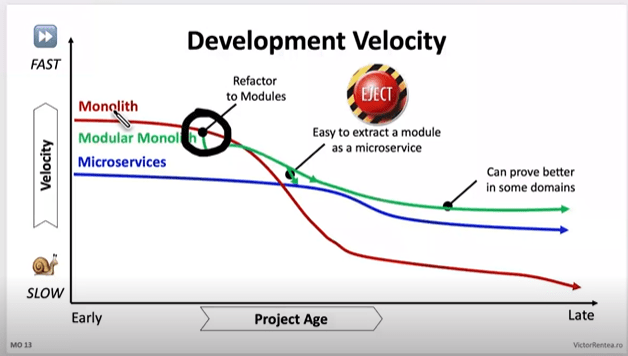
If you are in the early stages of the chart, you can probably look into Modularization, if you are however towards the right hand side (like we were), you will need to take some more drastic action.

If you are on the right hand side, they your monolith is at the point you need to stop writing code there NOW.

There’s 2 things to consider:

  • for new domains, or significant new features in existing domains start them outside straight away
  • for existing domains, build a new system for each of them, and move the code out

Once your code is in a new system, you get all the benefits straight away on that code. You aren’t waiting for an entire system to migrate before you see results to your velocity. This is why we say start with the high volume change areas and domains first.

How to stop writing code there “now”? Apply the open closed principle at the system level

  1. Open for extension: Extend functionality by consuming events and calling APIs from new systems
  2. Closed for modification: Limit changes to the monolith, aim to get to the point where it’s only crucial bug fixes

This pattern encourages you to move to the new high development velocity systems.

Modularization: The First Step for those on the Left of the chart

Before fully separating your monolith into distinct services, it’s often beneficial to start with modularization within the existing system. This approach, sometimes called the “strangler fig pattern,” can be particularly effective for younger monoliths.

Modularization is a good strategy when:

  • Your monolith is relatively young and manageable
  • You want to gradually improve the system’s architecture without a complete overhaul
  • You need to maintain the existing system while preparing for future splits

However, be wary of common pitfalls in this process:

  • Avoid over-refactoring; focus on creating clear boundaries between modules
  • Ensure your modularization efforts align with your identified business domains

For ancient monoliths with extremely slow velocity, a more drastic “lift and shift” approach into a new system is recommended.

Integrating New Systems with the Monolith, for those to the Right

When new requirements come in, especially for new domains, start implementing them in new systems immediately. This approach helps prevent your monolith from growing further while you’re trying to split it.

Integrating new systems with your monolith requires these considerations:

  1. Add events for everything that happens in your monolith, especially around data or state changes
  2. Listen to these events from new systems
  3. When new systems need to call back to the monolith, use the monolith’s APIs

This event-driven approach allows for loose coupling between your old and new systems, facilitating a smoother transition.

Existing Domains: The Copy-Paste Approach for those to the Right

If your monolith is in particularly bad shape, sometimes the best approach is the simplest, build a new system then copy, paste, and call it step one from the L7 router. Don’t get bogged down trying to improve everything right away. Focus on basic linting and formatting, but avoid major refactoring or upgrades at this stage. The goal is to get the code into the new system first, then improve it incrementally.

However, this approach comes with its own set of challenges. Here are some pitfalls to watch out for:

Resist the urge to upgrade everything: A common mistake is trying to upgrade frameworks or libraries during the split. For example, one team, 20% into their split, decided to upgrade React from version 16 to 18 and move all tests from Enzyme to React Testing Library in the new system. This meant that for the remaining 80% of the code, they not only had to move it but also refactor tests and deal with breaking React changes. They ended up reverting to React 16 and keeping Enzyme until further into the migration.

Remember the sooner your code gets into the new system the sooner you get faster.

Don’t ignore critical issues: While the “just copy-paste” approach can be efficient, it’s not an excuse to ignore important issues. In one case, a team following this advice submitted a merge request that contained a privilege escalation security bug, which was fortunately caught in code review. When you encounter critical issues like security vulnerabilities, fix them immediately – don’t wait.

Balance speed with improvements: It’s okay to make some improvements as you go. Simple linting fixes that can be auto-applied by your IDE or refactoring blocking calls into proper async/await patterns are worth the effort. It’s fine to spend a few extra hours on a multi-day job to make things a bit nicer, as long as it doesn’t significantly delay your migration.

The key is to find the right balance. Move quickly, but don’t sacrifice the integrity of your system. Make improvements where they’re easy and impactful, but avoid getting sidetracked by major upgrades or refactors until the bulk of the migration is complete.

Measuring Progress and Impact: Part 1 Velocity

Your goal is to have business impact, impact comes from the velocity game to start with, so taht’s where our measurements start.

Number of MRs on new vs old systems: Initially, focus on getting as many engineers onto the new (high velocity) systems as possible, compare your number of MRs on old vs new over time and monitor the change to make sure you are having the impact here first

Overall MR growth: If the total number of MRs across all systems is growing significantly, it might indicate incorrect splitting or dragging incremental work.

Work tracking across repositories: Ask engineers to use the same JIRA ID (or equivalent) for related work across repositories in the branch name or MR Title or something, to track units of work spanning both old and new systems.

Velocity Metrics on old vs new: Don’t “assume” your new systems will always be better, compare old vs new on velocity metric and make sure you are seeing the difference.

Ok, now when you ht critical mass on the above, for us we called it at about 80%, you will need to shift, the long tail there will be less ROI on velocity, it’ll become a support game, and you need to face it differently.

Measuring Progress and Impact: Part 2 Traffic

So at this time its best to look at traffic, moving high volume traffic pages/endpoints in theory should reduce the impact if there’s an issue with the legacy system thereby reducing the support, this might not be true for your systems, you may have valuable endpoints with low traffic, so you need to work it out the best way for you.

Traffic distribution: Looking per page or per endpoint where the biggest piece of the pie is.

Low Traffic: Looking per page or per endpoint where there is low traffic, this may lead you to find features you can deprecate.

As you move functionality to new services, you may discover features in the monolith that are rarely used. Raise with product and stakeholders, ask “Whats the value this brings vs the effort to migrate and maintain it?”

  1. deprecating the page or endpoint
  2. combining functionality into other similar pages/endpoints to reduce codebase size

Remember, every line of code you don’t move is a win for your migration efforts.

Conclusion

Splitting a monolith is a complex process that requires a strategic approach tailored to your system’s current state. Whether you’re dealing with a younger, more manageable monolith or an ancient system with slow velocity, there’s a path forward.

The key is to stop adding to the monolith immediately, start new development in separate systems, and approach existing code pragmatically – sometimes a simple copy-paste is the best first step. As you progress, shift your focus from velocity metrics to traffic distribution and support impact.

Remember, the goal is to improve your system’s overall health and development speed. By thoughtfully planning your split, building new features in separate systems, and closely tracking your progress, you can successfully transition from a monolithic to a microservices architecture.

In our next and final post of this series, we’ll discuss how to finish strong, including strategies for cleaning up your codebase, maintaining momentum, and ensuring you complete the splitting process. Stay tuned!

Identifying and Planning Your Monolith Split

In the world of software development, monolithic architectures often become unwieldy as applications grow in complexity and scale. Splitting a monolith into smaller, more manageable services can improve development velocity, scalability, and maintainability. However, this process requires careful planning and execution. In this post, we’ll explore the crucial first steps in splitting your monolith: identifying business domains and creating a solid plan.

Finding Business Domains in Your Monolith

The first step in splitting a monolith is identifying the business domains within your application. Business domains are typically where “units of work” are isolated, representing distinct areas of functionality or responsibility within your system.

Splitting by business domain allows you to optimize for the majority of your units of work being in the one system. While you may never achieve 100% optimization without significant effort, focusing on business domains usually covers 80-90% of your needs.

How to Identify Business Domains

  1. Analyze Work Units: Look at the different areas of functionality in your application. What are the main features or services you provide?
  2. Examine Data Flow: Consider how data moves through your system. Are there natural boundaries where data is transformed or handed off?
  3. Review Team Structure: Often, team organization reflects business domains. How are your development teams structured?
  4. Consider User Journeys: Map out the different paths users take through your application. These often align with business domains.

For more detail here is a great book on the topic.

When to Keep Domains Together

Sometimes, you’ll find two domains that share a significant amount of code. In these cases, it might be more efficient to keep them in the same system. Consider creating a “modulith” (a modular monolith) or even maintaining a smaller monolith for these tightly coupled domains might make sense, but this is usually the exception to the rule, dont let it be an easy way out for you.

Analyzing Changes in the Monolith

Once you’ve identified potential business domains, the next step is to analyze how your monolith changes over time. This analysis helps prioritize which parts of the system to split first. Because this is where the value is, velocity, the more daily/weekly merge requests that happen in the new systems the more business impact you cause, and that’s our goal, business impact, in this case in the form of engineering velocity, don’t lose sight on this goal for some milestone driven Gantt chart.

There’s many elegant tools on the market for analysis for git and changes over time, I would encourage you to explore. We didn’t find any that worked for us because the domains were scattered throughout the code due to the age and size of our monolith (i.e. it was ancient).

What we found worked best, we used a hammer, its manual but it worked:

  1. Use MR (Merge Request) Labels: Implement a system where developers label each MR with the relevant business domain. This provides ongoing data about which domains of the system change most frequently.
  2. Add CI Checks: Include a CI step that fails if an MR doesn’t have a domain label. This ensures consistent data collection.
  3. Historical Analysis: Have your teams go through 1-2 quarters of historical MRs and label them retrospectively. This gives you an initial dataset to work with.

Once you have this data, wether it comes from the hammer approach or you find a more elegant one you want to look for patterns in your MRs. Which domains see the most frequent changes? This is how you prioritize your split.

Making a Plan

With your business domains identified and change patterns analyzed, it’s time to create a plan for splitting your monolith. Start with the domains that have the highest impact. These are the ones that change frequently.

Implement L7 Routing for incremental migration

Use Layer 7 (application layer) routing to perform A/B testing between your old monolith and new services. This allows you to:

  • Gradually shift traffic to new services
  • Compare performance and functionality potentially with AB Tests
  • Quickly roll back if issues arise

For Web Applications:

  • Consider migrating one page at a time
  • Treat each “page” as a unit of migration

Within pages sometimes we found that doing a staged approach with ajax endpoints individually helped to do the change more incrementally, but don’t let a “page” exist in multiple system for too long, it kills local dev experience, you go backwards on what you planned, you are meant to be improving dev experience, not making it worse, so finish it asap.

For Backend Services:

  • Migrate one endpoint or a small group of tightly coupled endpoints at a time
  • This allows for a gradual transition without disrupting the entire system

Also as you are incrementally migrating, if you focus is on fast killing the monolith, don’t bother deleting the old code as you go, let the thing die as a whole. This will give you more time to spend on moving to new systems. Try to not improve the experience on the old monolith, the harder it is to work on it the more likely a team is to make a decision to break something out of it, you increase the ROI this way of splitting.

Conclusion

Splitting a monolith is a significant undertaking, but with proper planning and analysis, it can lead to a more maintainable and scalable system. By identifying your business domains, analyzing change patterns, and creating a solid migration plan, you set the foundation for a successful transition from a monolithic to a microservices architecture.

In our next post, we’ll dive deeper into the strategies for executing your monolith split, including modularization techniques and how to handle ongoing development during the transition. Stay tuned!

The Pitfalls and Potential of Monolithic Architectures

Before we dive into the process of splitting a monolith, it’s crucial to understand why monoliths can become problematic and when they might still be a good choice. In this post, we’ll explore the challenges that often arise with monolithic architectures and discuss scenarios where they might still be appropriate.

What’s So Bad About Monoliths?

Monolithic architectures, where all components of an application are interconnected and interdependent, can present several challenges as systems grow:

1. Development Feedback Loops

One of the most significant issues with large monoliths is the impact on development feedback loops:

  • Compilation Time: Large codebases often take a long time to compile, slowing down the development process.
  • Test Execution Time: With a vast number of tests, running the entire test suite can be time-consuming.
  • Test Flakiness: As the number of tests grows, the overall stability of the test suite can decrease dramatically. For example:
    • If each individual test has a 99% stability rate (which sounds good),
    • In a suite with 179 tests, the actual stability rate becomes 0.99^179 ≈ 17%
    • This means there’s only a 17% chance of all tests passing in a given run!

2. Increased Lead Time

The factors mentioned above contribute to increased lead time for new features or bug fixes:

  • Longer compile and test times slow down the development cycle.
  • Large monoliths often require more server resources, leading to longer deployment times.

3. Framework Upgrades

Upgrading frameworks or libraries in a monolith can be a massive undertaking. Changes often need to be applied across the entire system simultaneously. the more code you have the more potential breaking change you need to fix in one go, the you have a large MR, and with high volume of change you normally get in big repos, good luck getting it merged with all the merge conflicts 🙂

The Pitfalls and Potential of Monolithic Architectures

Are Monoliths Ever Good?

Despite these challenges, monoliths aren’t always bad. In fact, they can be an excellent choice in certain scenarios:

1. Startups and Small Projects

Many large companies started with small monolithic applications. When you’re small and trying to “take on the world,” a monolith can be the fastest way to get a product to market. It allows for rapid development and iteration in the early stages of a product. This approach enables startups to focus on validating their business ideas and gaining market traction without the added complexity of a distributed system.

2. Simple Applications

For applications with straightforward requirements and minimal complexity, a monolith might be the most straightforward and maintainable solution. In such cases, the simplicity of a monolithic architecture can lead to faster development cycles and easier debugging, as all components are in one place.

3. Teams New to Microservices

If your team doesn’t have experience with distributed systems, starting with a well-structured monolith can be a good learning experience before moving to microservices. This approach allows the team to focus on building features and understanding the domain, while gradually introducing concepts like modularity and service boundaries within the monolith. As the team and application grow, this experience can make a future transition to microservices smoother and more informed.

Best Practices for Starting Small

If you’re starting a new project and decide to go with a monolithic architecture, here are some best practices:

  1. Plan for Future Splitting: Design your monolith with clear boundaries between different functionalities, making future splits easier.
  2. Use Modular Design: Even within a monolith, use modular design principles to keep different parts of your application loosely coupled.
  3. Maintain Clean Architecture: Follow clean architecture principles to separate concerns and make your codebase more manageable.
  4. Monitor Growth: Keep an eye on your application’s size and complexity. Be prepared to start splitting when you notice development slowing down or when the benefits of splitting outweigh the costs.

Conclusion

While monoliths can present significant challenges as they grow, they’re not inherently bad. The key is understanding when a monolithic architecture is appropriate and when it’s time to consider splitting. By being aware of the potential pitfalls and planning for future growth, you can make informed decisions about your application’s architecture.

In the next post, we’ll dive into the process of identifying business domains within your monolith, which is the first step in planning a successful split.

Essential Skills for Product Engineers (Part 2): Mastering the Craft

In our previous post, we explored the first set of essential skills for product engineers, focusing on non-technical abilities that bridge the gap between engineering and business. Today, we’ll dive into the second part of our essential skills series, covering more technically-oriented skills that are crucial for success in product engineering.

Data Analysis and Metrics

In the world of product engineering, data reigns supreme. This skill empowers engineers to make informed decisions, measure the impact of their work, and continuously improve product performance.

Metrics Definition is the foundation of effective data analysis. It’s not enough to simply collect data; you need to know which metrics are most relevant to your product and how they align with broader business goals. This requires a deep understanding of both the product and the business model. For instance, a social media application might focus on Daily Active Users (DAU) as a key engagement metric, along with other user interaction metrics like posts per user or time spent in the app. On the other hand, an e-commerce platform might prioritize conversion rates, average order value, and customer lifetime value. By defining the right metrics, engineers ensure that they’re measuring what truly matters for their product’s success.

The next step is Data Collection. This involves implementing systems to gather data accurately and consistently. It’s not just about collecting data, but ensuring its accuracy and integrity. Many engineers work with established analytics tools like Google or Adobe Analytics, which provide a wealth of user behavior data out of the box. However, for more specific or granular data needs, custom tracking solutions are necessary. This could involve instrumenting your code to log specific events or user actions. The key is to create a comprehensive data collection system that captures all the information needed to calculate your defined metrics.

With data in hand, the next skill is Statistical Analysis. While engineers don’t need to be statisticians, a basic understanding of statistical concepts is needed for interpreting data correctly. This includes grasping concepts like statistical significance, which helps determine whether observed differences in metrics are meaningful or just random noise. Understanding the difference between correlation and causation is also vital – just because two metrics move together doesn’t necessarily mean one causes the other. Handling outliers is another important skill, as extreme data points can significantly skew results if not treated properly. These statistical skills allow engineers to draw accurate conclusions from their data and avoid common pitfalls in data interpretation.

Data Visualization is where numbers transform into narratives. The ability to present data in clear, compelling ways is crucial for communicating insights to stakeholders who may not have a deep technical background. Tools like metabase, superset, grafana, etc offer powerful capabilities for creating interactive visualizations, while even simple Excel charts can be effective too. The goal is to make the data tell a story – to highlight trends, comparisons, or anomalies in a way that’s immediately understandable. Good data visualization can turn complex datasets into actionable insights, influencing product decisions and strategy.

A/B Testing is a technique in the engineer’s toolkit. It involves designing and implementing experiments to test hypotheses and measure the impact of changes. This could be as simple as testing two different button colors (one the A variant, the other the B) to see which drives more clicks, or as complex as rolling out a major feature to a subset of users to evaluate its impact on key metrics. Effective A/B testing requires understanding concepts like control groups (users who don’t receive the change), variable isolation (ensuring you’re testing only one thing at a time), and statistical power (having a large enough sample size to draw meaningful conclusions). Mastering A/B testing allows engineering teams to make data-driven decisions about feature development and optimization.

Performance Optimization

In today’s fast-paced digital world, user expectations for application performance have never been higher. Users demand fast, responsive applications that work seamlessly across devices and network conditions. As a result, performance optimization has become a critical skill for engineers. It’s not just about making things fast; it’s about creating a smooth, responsive user experience that keeps users engaged and satisfied, regardless of the complexity behind the scenes.

Profiling and Benchmarking form the foundation of effective performance optimization. Before you can improve performance, you need to understand where the bottlenecks are. This involves using a variety of tools to analyze your application’s performance characteristics. For front-end performance, browser developer tools provide powerful capabilities for analyzing load times, JavaScript execution, and rendering performance, chrome debugger and extensions allow testing stats like LCP, CLS, etc and debugging why they are bad locally, but don’t forget to measure RUM (Real User Metrics), getting data from your real user interactions. These tools can help identify slow-loading resources, long-running scripts, or inefficient DOM manipulations that might be causing performance issues.

On the backend, specialized profiling tools can help identify performance bottlenecks in server-side code or database queries. These tools like pyroscope, application insights and open telemetry tracing, might analyze CPU usage, memory allocation, or database query execution times to pinpoint areas for improvement. The key is to establish baseline performance metrics and then systematically identify the areas that have the biggest impact on overall application performance.

Once you’ve identified performance bottlenecks, the next step is applying Optimization Techniques. This is a topic for another post for sure, based on your environment this can vary greatly so I wont go into too much details today.

Google’s Core Web Vitals initiative is a prime example of the industry’s focus on performance and its impact on user experience. These metrics – Largest Contentful Paint (LCP), First Input Delay (FID), and Cumulative Layout Shift (CLS) – provide a standardized way to measure key aspects of user-centric performance. LCP measures loading performance, FID measures interactivity, and CLS measures visual stability. By focusing on these metrics, engineers can ensure they’re optimizing for the aspects of performance that most directly impact user experience.

For example, optimizing for Largest Contentful Paint might involve prioritizing the loading of above-the-fold content, while improving First Input Delay could involve breaking up long tasks in JavaScript to improve responsiveness to user interactions. Minimizing Cumulative Layout Shift often involves careful management of how content loads and is displayed, ensuring that elements don’t unexpectedly move around as the page loads.

The importance of these metrics extends beyond just providing a better user experience. Search engines like Google now consider these performance metrics as ranking factors, directly tying performance optimization to an application’s visibility and success.

Security and Privacy

Cyber threats are ever-evolving and privacy regulations are becoming increasingly stringent, security and privacy considerations must be at the forefront of a engineer’s mind. These are not just technical challenges, but fundamental aspects of building user trust and ensuring the long-term success of a product.

Threat Modeling is a proactive approach to security that involves anticipating and modeling potential security threats to your application. This process requires engineers to think like attackers, identifying potential vulnerabilities and attack vectors in their systems. It’s not just about considering obvious threats like unauthorized access, but also more subtle risks like data leakage or denial of service attacks. Effective threat modeling involves mapping out the system architecture, identifying assets that need protection, and systematically analyzing how these assets could be compromised. This process should be an ongoing part of the development lifecycle, revisited as new features are added or the system architecture evolves.

Secure Coding Practices are the foundation of building secure applications. This involves understanding and implementing best practices for writing code that is resistant to common security vulnerabilities. Input validation is a crucial aspect of this, ensuring that all data entering the system is properly sanitized to prevent attacks like SQL injection or cross-site scripting. Proper authentication and authorization mechanisms are essential to ensure that users can only access the resources they’re entitled to. Secure data storage practices, including proper encryption of sensitive data both at rest and in transit, are also critical. Engineers should be familiar with common security vulnerabilities (like those listed in the OWASP Top 10) and know how to mitigate them in their code.

Compliance Understanding has become increasingly important as privacy regulations have proliferated around the world. Engineers need at least a basic understanding of relevant privacy regulations like the General Data Protection Regulation (GDPR) in Europe or the California Consumer Privacy Act (CCPA) in the United States. This doesn’t mean engineers need to become legal experts, but they should understand how these regulations impact product development. For example, GDPR’s “right to be forgotten” requirement has implications for how user data is stored and managed. Understanding these regulations helps engineers make informed decisions about data handling and storage, and ensures that privacy considerations are factored into product design from the outset.

Security Testing is a important skill for ensuring that the security measures implemented are effective. This involves familiarity with various security testing tools and practices. Penetration testing, or “pen testing,” involves simulating attacks on a system to identify vulnerabilities. This can be done manually by security experts or using automated tools. Code security scanners are another important tool, analyzing code for potential security issues. Static Application Security Testing (SAST) tools can identify vulnerabilities in source code, while Dynamic Application Security Testing (DAST) tools can find issues in running applications. Engineers should be familiar with these tools and be able to interpret and act on their results.

Security and privacy are no longer optional considerations in engineering – they are fundamental requirements. As cyber threats continue to evolve and users become increasingly aware of privacy issues, the ability to build secure, privacy-respecting products will be a key differentiator for engineers.

Scalability and Reliability

As products grow and user bases expand, the ability to scale systems to meet increased demand while maintaining reliability becomes an important skill for engineers. This is not just about handling more users or data; it’s about ensuring that the product continues to perform well and provide a consistent user experience even as it grows exponentially.

Distributed systems involve multiple components working together across different networks or geographic locations to appear as a single, cohesive system to end-users. This approach allows for greater scalability and fault tolerance, but it also introduces complexities in areas like data consistency, network partitions, and system coordination. Engineers need to understand concepts like CAP theorem, and it’s proponents. They should be familiar with patterns like microservices architecture, moduliths, event sourcing, etc. and how these apply with scale.

Load Balancing and Caching are critical strategies for managing increased demand on systems. Load balancing has changed greatly in recent years, gone are teh days of a large “in front everywhere” infrastructure, in favour of load balancing sidecars now with tech like envoy, and in-front load balancing banished to the edges. Engineers should be familiar with different load balancing algorithms (like round-robin, least connections, etc.) and understand when to use each as well as how health checks work in these scenarios.

Caching, on the other hand, could involve in-memory caches like Redis, content delivery networks (CDNs) for static assets, or application-level caching strategies. Effective caching requires careful consideration of cache invalidation strategies to ensure users always see up-to-date information. Engineers should understand not only pull through cache but other forms such as write-through, etc and also when to prewarm and expire based on the data and user needs.

Database Scaling is often one of the most challenging aspects of growing a system. As data volume and read/write operations increase, a single database instance may no longer be sufficient. Engineers need to be familiar with various database scaling techniques. Vertical scaling (adding more resources to a single machine) can work up to a point, but eventually, horizontal scaling becomes necessary and presents many challenges and options that engineers should be familiar with to be able to make the right choice.

Chaos Engineering is a proactive approach to ensuring system reliability that has gained prominence in recent years. The core idea is to intentionally introduce failures into your system in a controlled manner to test its resilience. This helps identify weaknesses in the system that might not be apparent under normal conditions.

Netflix’s Chaos Monkey is a prime example of this approach. This tool randomly terminates instances in their production environment, forcing engineers to build systems that can withstand these types of failures. By simulating failures in a controlled way, Netflix ensures that their systems can handle unexpected issues in real-world scenarios.

Other forms of chaos engineering might involve simulating network partitions, inducing latency, or exhausting system resources. The key is to start small, build confidence, and gradually increase the scope of these experiments. This approach not only improves system reliability but also builds a culture of resilience within engineering teams.

The importance of scalability and reliability in product engineering cannot be overstated. As users increasingly rely on digital products for critical aspects of their lives and work, the cost of downtime or poor performance can be enormous, both in terms of lost revenue and damaged user trust.

Moreover, the ability to scale efficiently can be a key competitive advantage. Products that can quickly adapt to growing demand can capture market share and outpace competitors. On the flip side, products that struggle with scalability often face user frustration, increased operational costs, and missed opportunities.

Continuous Integration and Deployment (CI/CD)

CI/CD practices enable teams to deliver code changes more frequently and reliably, accelerating the feedback loop and reducing the risk associated with deployments.

Engineers need to be proficient in writing effective, efficient tests and understanding concepts like test coverage and why the test pyramid is flawed, and new concepts like the testing honey combe. They should also be familiar with testing frameworks and tools specific to their technology stack. The goal is to catch bugs early in the development process, reducing the cost and risk of fixing issues in production.

Continuous Integration (CI) means continuously integrating code, its not about your Jenkins or github actions pipeline, its about fast merging changes together. Git branches are counter to this principle, but necessary in order to facilitate change in manageable or deployable chunks. Good Engineers understand CI is a principle, not a build system, this help them focus on it’s purpose which is moving fast an efficiently.

Continuous Deployment (CD) key skills here include understanding deployment strategies like blue-green deployments or canary releases, which minimize risk and downtime during updates. Engineers need to be proficient in infrastructure-as-code tools like Helm, Terraform or CloudFormation to manage their infrastructure alongside their application code. They should also be familiar with containerization technologies like Docker and orchestration platforms like Kubernetes, which can greatly simplify the process of deploying and scaling applications.

Feature Flags have become an essential tool in modern CD practices. They allow teams to decouple code deployment from feature release, giving more control over when and to whom new features are made available. Engineers need to understand how to implement feature flag systems, which can range from simple configuration files to more complex, dynamically controllable systems. This involves not just the technical implementation, but also understanding the strategic use of feature flags for A/B testing, gradual rollouts, and quick rollbacks in case of issues. Proper use of feature flags can significantly reduce the risk associated with deployments and allow for more frequent, smaller releases.

The benefits of mastering CI/CD are significant. It allows teams to deliver value to users more quickly, reduce the risk associated with each deployment, and spend less time on manual, error-prone deployment processes. It also improves developer productivity and satisfaction by providing quick feedback on code changes and reducing the stress associated with large, infrequent releases.

Cross-Platform Development

In today’s diverse technological landscape, users access digital products through a multitude of devices and platforms. As a result, the ability to develop cross-platform solutions has become an increasingly valuable skill for product engineers.

Responsive Web Design (RWD) forms the foundation of cross-platform web development. It’s an approach to web design that makes web pages render well on a variety of devices and window or screen sizes. The core principle of RWD is flexibility – layouts, images, and cascading style sheet media queries are used to create a fluid design that adapts to the user’s screen size and orientation. They should also understand the principles of mobile-first design, which advocates for designing for mobile devices first and then progressively enhancing the design for larger screens.

Cross-Platform Frameworks have emerged for native mobile development as a popular solution for building mobile apps that can run on multiple platforms with a single codebase. Tools like React Native, Flutter and even Web View allow developers to write code once and deploy it to both iOS and Android, potentially saving significant development time and resources.

Proficiency in cross-platform frameworks requires not just knowledge of the framework itself, but also an understanding of the underlying mobile platforms. Engineers need to know when to use platform-specific code for certain features and how to optimize performance for each platform.

The choice between these different approaches – responsive web, native apps, cross-platform frameworks, or even PWAs – depends on various factors including the target audience, required features, performance needs, and development resources. Engineers need to understand the trade-offs involved in each approach and be able to make informed decisions based on the specific requirements of each project.

Moreover, the field of cross-platform development is rapidly evolving. New tools and frameworks are constantly emerging, and existing ones are regularly updated with new features. For example, Flutter has expanded beyond mobile to support web and desktop platforms as well. React Native is used in the PS5 UI now expanding its reach to home entertainment.

This constant evolution means that cross-platform development skills require ongoing learning and adaptation. Engineers need to stay updated with the latest developments in this field, continuously evaluating new tools and approaches to determine if they can provide benefits for their projects.

Conclusion

These technical skills – data analysis, performance optimization, security and privacy, scalability and reliability, CI/CD, and cross-platform development – form the backbone of an engineer’s technical toolkit. Combined with the non-technical skills we discussed in our previous post, they enable engineers to build products that are not only technically sound but also user-friendly, scalable, and aligned with business goals.

Remember, the field of product engineering is constantly evolving. The most successful engineers are those who commit to lifelong learning, always staying curious and open to new technologies and methodologies.

What technical skills have you found most valuable in your product engineering journey? How do you stay updated with the latest trends and technologies? Share your experiences and tips in the comments below!

Essential Skills for Product Engineers (Part 1): Beyond the Code

In our previous posts, we’ve explored the evolution of product engineering, its core principles, and the mindset that defines successful product engineers. Now, let’s dive into the specific skills that product engineers need to thrive in their roles. This post, the first of two parts, will focus on four essential non-technical skills: goal setting and value targeting, decision making and risk assessment, understanding business models, and design thinking and empathy.

Goal Setting and Value Targeting

One of the most crucial skills for product engineers is the ability to set clear, meaningful goals and target value creation. This skill goes beyond simply meeting technical specifications or delivering features on time.

One of the hardest things about goal setting, is once you set a goal you set your conditions for failure, and no one like to fail, but this is part of the mindset we spoke about before, you need to be ok with failure, its a learning experience, you need to be ok with setting moonshot goals occasionally too.

Effective goal setting involves:

  1. Alignment with business objectives: Goals should directly contribute to the company’s overall strategy and key performance indicators (KPIs).
  2. User-centric focus: Goals should reflect improvements in user experience or solve specific user problems.
  3. Measurability: Goals need to be quantifiable, allowing for clear evaluation of success.
  4. Timebound nature: Setting realistic timelines helps maintain focus and urgency, and also set increments for fast feedback cycles

For example, instead of setting a goal like “Implement a new recommendation system,” an engineering team might frame it as “Increase user engagement by 20% within three months by implementing a personalized recommendation system.”

Value targeting involves identifying and prioritizing the work that will deliver the most significant impact. This requires a deep understanding of both user needs and business priorities. Engineering Teams must constantly ask themselves: “Is this the most valuable thing I could be working on right now?”

Decision Making and Risk Assessment

Product engineers often find themselves at the intersection of technical possibilities, user needs, and business constraints. In this complex environment, the ability to make effective decisions becomes a critical skill. It’s not just about choosing the best technical solution, but about finding the optimal balance between various competing factors.

One of the key aspects of decision making for engineers is adopting a data-driven approach. This involves utilizing both quantitative and qualitative data to inform decisions. Quantitative data might include metrics from A/B tests, performance benchmarks, or usage statistics. This hard data provides concrete evidence of how different options perform. However, it’s equally important to consider qualitative data, such as user feedback or expert opinions. These insights can provide context and nuance that numbers alone might miss. By combining both types of data, Engineers can make more holistic, well-informed decisions.

Another crucial aspect of decision making is the consideration of trade-offs. In the real world, there’s rarely a perfect solution that optimizes for everything. Instead, Engineers must navigate complex trade-offs. For example, they might need to balance the speed of development against the quality of the end product, or weigh short-term gains against long-term sustainability. The skill lies not just in recognizing these trade-offs, but in being able to evaluate them effectively. This often involves quantifying the potential impacts of different choices and making judgment calls based on the specific context of the project and the company’s overall strategy.

Reid Hoffman reflecting on his time at startups once said “Sometimes it’s not about deciding which fire you put out, its about deciding which ones you can let burn”, making trade offs can involve hard choices.

Stakeholder management is another key component of effective decision making. Engineers need to consider how their decisions will impact various stakeholders, from end-users to business teams to other engineering teams. This involves not just making the right decision, but also being able to communicate the rationale effectively. Engineers must be able to explain technical concepts to non-technical stakeholders, articulate the business impact of technical decisions, and build consensus around their chosen approach.

In traditional software development companies, they hire BAs to deal with the business and try to “shield” the engineers or Scrum masters to “keep the wolves at bay”, Product Engineering is about removing these layers, the engineers themselves have enough understanding that they can deal with the stakeholders and this make communication and decision making more effective.

Alongside decision making, risk assessment. In any project or initiative, there are always potential risks that could derail success. The ability to identify these risks, evaluate their potential impact, and develop mitigation strategies is vital.

Engineers need to be able to look at different technical approaches and understand their potential pitfalls. This might involve considering factors like scalability, maintainability, or compatibility with existing systems. It’s about looking beyond the immediate implementation and considering how a technical choice might play out in the long term.

Engineers also need to be able to assess business risks. This involves evaluating how technical decisions might impact business metrics or user satisfaction. For example, a technically elegant solution might be risky if it requires a steep learning curve for users, potentially impacting adoption rates.

Another important aspect of risk assessment is opportunity cost consideration. In the world of product development, choosing one path often means not pursuing others. Engineers need to recognize this and factor it into their decision making. This might involve considering not just the risks of a chosen approach, but also the potential missed opportunities from alternatives not pursued.

Google’s approach to “Moonshot Thinking” in their X development lab provides a great example of how to balance ambitious goals with thoughtful risk assessment. Engineers in this lab are encouraged to tackle huge problems and propose radical solutions – true “moonshots” that could revolutionize entire industries. However, this ambition is tempered with a pragmatic approach to identifying and mitigating risks. Engineers are expected to critically evaluate their ideas, identifying potential failure points and developing strategies to address them. This approach allows for bold innovation while still maintaining a realistic perspective on the challenges involved.

By developing strong skills in decision making and risk assessment, engineers can make choices that balance technical excellence with business needs and user expectations, while also managing potential risks and trade-offs. These skills are what separate great engineers from merely good ones, enabling them to drive real impact and innovation in their organizations.

Understanding Business Models

While product engineers are primarily focused on technical challenges, a solid understanding of business models has become increasingly important in today’s tech landscape. This knowledge isn’t about turning engineers into business experts, but rather about equipping them with the context they need to make decisions that align with the company’s strategy and contribute to its overall success. By understanding the business side of things, engineers can better prioritize their work, make more informed technical decisions on the spot with out escalating to get direction.

One of the key aspects of understanding business models is grasping how the company generates revenue. Revenue streams can vary widely depending on the nature of the business. Some companies rely on subscription models, where users pay a recurring fee for access to a product or service. Others may generate revenue through advertising, leveraging user attention to sell ad space. Transaction fees are another common revenue stream, particularly for e-commerce or financial technology companies. Some businesses may use a combination of these or have more unique revenue models. For engineers, understanding these revenue streams is crucial because it can inform decisions about feature development, user experience design, and system architecture. Especially around immediate systems they work on, they are able to easily related back work they are doing to impact on company bottom line.

Equally important is an understanding of cost structures. Every business has costs associated with delivering its product or service, and these can significantly impact the viability of different technical approaches. Common costs might include server infrastructure, data storage, customer support, etc. Product engineers need to be aware of how their technical decisions might impact these costs. For example, choosing a more complex architecture might increase development and maintenance costs, while optimizing for performance could reduce infrastructure costs, and conversely a negative performance impact or bug could lead to a escalation in support calls. By understanding the cost implications of their decisions, engineers can make choices that balance technical excellence with business sustainability.

Another crucial aspect of business models is understanding customer segments. Most products don’t serve a single, homogeneous user base, but rather cater to different groups of users with varying needs and behaviors. Engineers need to be aware of these different segments and how they interact with the product. This understanding can inform decisions about feature prioritization, user interface design, and even technical architecture. For instance, if a significant customer segment primarily uses the product on mobile devices, that might influence decisions about mobile optimization or the development of mobile-specific features.

Perhaps the most important element of a business model is the value proposition – the unique value that the company offers to its customers. This is what sets the company apart from its competitors and drives customer acquisition and retention. Engineers play a crucial role in delivering and enhancing this value proposition through the technical solutions they develop.

Let’s consider a concrete example to illustrate these concepts. Imagine you’re an engineer working at Spotify. Understanding Spotify’s business model would be crucial to your work. You’d need to know that Spotify operates on a freemium model, with both ad-supported free users and subscription-based premium users. This dual revenue stream (advertising and subscriptions) would inform many of your decisions.

For instance, when developing new features, you’d need to consider how they might impact the conversion rate from free to premium users. A feature that significantly enhances the listening experience might be reserved for premium users to drive subscriptions. On the other hand, a feature that increases engagement might be made available to all users to increase ad revenue from free users and make the platform more attractive to advertisers.

You’d also need to understand Spotify’s cost structure, particularly the significant costs associated with royalty payments to music rights holders. This might influence decisions about caching and data delivery to optimize streaming and reduce costs.

Understanding Spotify’s customer segments would be crucial too. You might need to consider the different needs of casual listeners, music enthusiasts, and artists using the platform. Each of these segments might require different features or optimizations.

Finally, you’d need to keep in mind Spotify’s value proposition of providing easy access to a vast library of music, personalized to each user’s tastes. Your technical decisions would need to support this, perhaps by focusing on recommendation algorithms, seamless playback, or features that enhance music discovery.

By understanding these aspects of Spotify’s business model, you as a engineer would be better equipped to make decisions that not only solve technical challenges but also drive the company’s success in a highly competitive market.

While engineers don’t need to become business experts, a solid grasp of business models is an increasingly valuable skill. It provides crucial context for technical decisions, helps in prioritizing work, and enables more effective collaboration with business stakeholders.

Design Thinking and Empathy

In the realm of product engineering, technical expertise alone is no longer sufficient to create truly impactful solutions. Enter design thinking: a problem-solving approach that places user needs and experiences at the center of the development process. For engineers, incorporating design thinking principles can lead to more innovative, user-friendly, and ultimately successful products.

Design thinking is not a linear process, but rather an iterative approach that encourages continuous learning and refinement. It typically involves five key elements, each of which plays a crucial role in developing user-centered solutions:

The first step is to Empathize. This involves deeply understanding the user’s needs, wants, and pain points. It’s about stepping into the user’s shoes, observing their behaviors, and listening to their experiences. For engineers, this might involve conducting user interviews, analyzing user data, or even spending time using the product as a user would. The goal is to uncover insights that may not be immediately apparent from technical specifications or feature requests.

Next comes the Define stage. Here, the insights gathered during the empathy stage are synthesized to clearly articulate the problem that needs to be solved. This is not about jumping to solutions, but about framing the problem in a way that opens up possibilities for innovative approaches. For engineers, this might involve reframing technical challenges in terms of user needs or business objectives.

The third stage is Ideation. This is where creativity comes to the forefront. The goal is to generate a wide range of possible solutions, without judgment or constraint. Techniques like brainstorming, mind mapping, or even role-playing can be used to spark new ideas. For engineers, this stage is an opportunity to think beyond conventional technical solutions and consider novel approaches that might better serve user needs.

Following ideation comes Prototyping. This involves creating quick, low-fidelity versions of potential solutions. The key here is speed and simplicity – the goal is not to build a perfect product, but to create something tangible that can be tested and refined. For engineers, this might involve creating basic wireframes, simple mock-ups, or even paper prototypes. The focus is on making ideas concrete enough to gather meaningful feedback.

The final stage is Testing. This is where prototypes are put in front of real users to gather feedback. It’s a critical stage that often leads back to earlier stages as new insights emerge. For engineers, this might involve conducting user testing sessions, analyzing usage data from beta releases, or going to a coffee shop and conducting guerilla testing session on patrons in exchange for buying them a coffee. The key is to approach this stage with an open mind, ready to learn and iterate based on user responses.

While all stages of design thinking are important, empathy deserves special attention as it forms the foundation of this approach. For engineers, developing empathy is about more than just understanding user requirements – it’s about truly connecting with the user’s experience.

User perspective is a crucial aspect of empathy. This involves the ability to see the product from the user’s point of view, understanding their context, motivations, and frustrations. It’s about asking questions like: What is the user trying to achieve? What obstacles do they face? How does our product fit into their broader life or work? By adopting the user’s perspective, engineers can make design and technical decisions that truly serve user needs, rather than just meeting specifications.

Diverse user consideration is another key aspect of empathy in product engineering. Users are not a monolithic group – they have diverse needs, abilities, and contexts. Some users might be tech-savvy early adopters, while others might be less comfortable with technology like your Aunty perhaps. Some might be using the product in resource-constrained environments, like low bandwidth internet in remote areas. Recognizing and considering this diversity in product development is crucial for creating truly inclusive and accessible products.

IDEO, the design company that popularized design thinking, emphasizes “human-centered design” as a cornerstone of their approach. Their methodology involves immersing themselves in the user’s world to gain deep, empathetic insights that drive innovation. This might involve spending time in users’ homes or workplaces, observing their behaviors and interactions with products in their natural environment. For engineers, adopting a similar approach – even if less intensive – can yield valuable insights that inform technical decisions and lead to more user-friendly solutions.

Design thinking can help engineers navigate the increasing complexity of modern product development. In a world where technical possibilities are vast and user expectations are high, design thinking provides a framework for focusing on what truly matters – creating solutions that make a meaningful difference in users’ lives.

Conclusion

These skills – goal setting and value targeting, decision making and risk assessment, understanding business models, and design thinking and empathy – form the foundation of a product engineer’s non-technical toolkit. They enable engineers to not just build products, but to create solutions that genuinely meet user needs and drive business success.

In our next post, we’ll explore the second set of essential skills for product engineers, including data analysis, A/B testing, and more. Stay tuned!

What’s your experience with these skills in your engineering work? How have you seen them impact product development? Share your thoughts and experiences in the comments below!