The F5 Experience (Local Setup)

In our journey to achieve the perfect F5 Experience, one of the most critical aspects is local setup. The ability to clone a repository and immediately start working, without any additional configuration, is the cornerstone of a smooth development process. In this post, we’ll explore various techniques and best practices that contribute to a zero-setup local environment.

1. .gitattributes: Ensuring Cross-Platform Compatibility

One often overlooked but crucial file is .gitattributes. This file can prevent frustrating issues when working across different operating systems, particularly between Unix-based systems and Windows.

# Set default behavior to automatically normalize line endings
* text=auto

# Explicitly declare text files you want to always be normalized and converted
# to native line endings on checkout
*.sh text eol=lf

By specifying eol=lf for shell scripts, we ensure that they maintain Unix-style line endings even when cloned on Windows. This prevents the dreaded “bad interpreter” errors that can occur when Windows-style CRLF line endings sneak into shell scripts.

2. .editorconfig: Consistent Coding Styles Across IDEs

An .editorconfig file helps maintain consistent coding styles across different editors and IDEs. This is particularly useful in teams where developers have personal preferences for their development environment.

# Top-most EditorConfig file
root = true

# Unix-style newlines with a newline ending every file
[*]
end_of_line = lf
insert_final_newline = true
charset = utf-8
indent_style = space
indent_size = 2

# 4 space indentation for Python files
[*.py]
indent_size = 4

3. IDE Run Configurations: Streamlining Scala and Kotlin Setups

For Scala and Kotlin applications, storing IntelliJ IDEA run configurations in XML format and pushing them to the repository can save significant setup time. Create a .idea/runConfigurations directory and add XML files for each run configuration:

<component name="ProjectRunConfigurationManager">
  <configuration default="false" name="MyApp" type="Application" factoryName="Application">
    <option name="MAIN_CLASS_NAME" value="com.example.MyApp" />
    <module name="myapp" />
    <method v="2">
      <option name="Make" enabled="true" />
    </method>
  </configuration>
</component>

This avoids manual configuration after cloning the repo.

4. Package Manager Configurations: Handling Private Repositories

For .NET projects, a nuget.config file can specify private NuGet servers:

<?xml version="1.0" encoding="utf-8"?>
<configuration>
  <packageSources>
    <add key="nuget.org" value="https://api.nuget.org/v3/index.json" protocolVersion="3" />
    <add key="MyPrivateRepo" value="https://nuget.example.com/v3/index.json" />
  </packageSources>
</configuration>

nuget will search all parent folders looking for a nuget config, so put it high up once.

Similarly, for Node.js projects, you can use .npmrc or .yarnrc files to configure private npm registries:

registry=https://registry.npmjs.org/
@myorg:registry=https://npm.example.com/

5. launchSettings.json: Configuring .NET Core Apps

While launchSettings.json is often in .gitignore, including it can provide a consistent run configuration for .NET Core applications:

{
  "profiles": {
    "MyApp": {
      "commandName": "Project",
      "launchBrowser": true,
      "applicationUrl": "https://localhost:5001;http://localhost:5000",
      "environmentVariables": {
        "ASPNETCORE_ENVIRONMENT": "Development"
      }
    }
  }
}

6. Stick to Native Commands

While it’s tempting to create custom scripts to automate setup, this can lead to a proliferation of project-specific commands that new team members must learn, also it can lead to dependencies on not only things being installed but platform specific scripts (bash on windows vs linux vs mac, or version of python, etc). Instead, stick to well-known, native commands when possible:

  • For .NET: dotnet builddotnet rundotnet test
  • For Node.js: npm run devnpm test
  • For Scala: sbt runsbt test

This approach reduces the learning curve for new contributors and maintains consistency across projects.

7. Gitpod for Casual Contributors

While experienced developers often prefer local setups, Gitpod can be an excellent option for casual contributors. It provides a cloud-based development environment that can be spun up with a single click. Consider adding a Gitpod configuration to your repository for quick contributions and code reviews.

8. README.md: The Canary in the Coal Mine

Your README.md should be concise and focused on getting started. If your README contains more than a few simple steps to get the project running, it’s a sign that your setup process needs optimization.

A ideal README might look like this:

# MyAwesomeProject

## Getting Started

1. Clone the repository
2. Open in your preferred IDE

That's it! If you need to do anything more than this, please open an issue so we can improve our setup process.

Conclusion

Achieving a seamless F5 Experience for local setup is an ongoing process. By implementing these practices, you can significantly reduce the friction for new contributors and ensure a consistent development experience across your team.

Remember, the goal is to make the setup process as close to zero as possible. Every step you can eliminate or automate is a win for developer productivity and satisfaction.

In our next post, we’ll dive into optimizing the build and compile process to further enhance the F5 Experience. Stay tuned!

The F5 Experience (Testing)

Part of the F5 Experience is also running tests. Can I open my IDE and “just run the tests” after cloning a project?

Unit tests generally yes, but pretty much every other kind of test that engineers create these days (UI, Integration, end-to-end, etc.) needs complex environments managed either manually, or spawned in Kubernetes or a Docker Compose that brings your laptop to a crawl when running.

End-to-end tests I’ll leave for another day, and focus mainly on the ones with fewer hops such as UI and integration tests.

So what’s the problem here? The problem is if tests are hard to run, people won’t run them locally. They’ll wait for CI, and CI then becomes a part of the inner loop of development. You rely on it for dev feedback for code changes locally.

Even the best CI pipelines are looking at at least 5-10 minutes, the average ones even longer. So if you have to wait 10-15 minutes to validate your code changes are OK, then it’s going to make you less effective. You want the ability to run the test locally to get feedback in seconds.

Let’s first measure the problem. Below are open-source repos for Jest, Vitest, NUnit, and xUnit collectors:

These allow us to fire the data at an ingestion endpoint to get it to our Hadoop. They can be reused as well by anyone that sets up an endpoint and ingests the data.

They will also send from CI, using the username of the person that triggered the build when running in CI and the logged-in user from the engineer’s local. This allows us to compare who is triggering builds that run tests vs. if they are running on their locals.

Looking into this data on one of our larger repos, we found that there was a very low number of users running the integration tests locally, so it was a good candidate for experimentation.

When looking at the local experience, we found a readme with several command-line steps that needed to be run in order to spin up a Docker environment that worked. Also, the steps for local and CI were different, which was concerning, as this means that you may end up with tests that fail on CI but you can’t replicate locally.

Looking at this with one of my engineers, he suggested we try Testcontainers to solve the problem.

So we set up the project with Testcontainers to replace the Docker Compose.

The integration tests would now appear and be runnable in the IDE, the same as the unit tests. So we come back to our zero setup goal of the F5 Experience, and we are winning.

Also, instead of multiple command lines, you can now run dotnet test and everything is orchestrated for you (which is what the IDE does internally). Some unreliable “waits” in the Docker Compose were able to be removed because the Testcontainers orchestration takes care of this, knowing when containers are ready and able to be used (such as databases, etc.).

It did take a bit of time for our engineers to get used to it, but we can see over time the percentage of engineers running CI vs. Local is increasing, meaning our inner loop is getting faster.

Conclusion

The F5 Experience in testing is crucial for maintaining a fast and efficient development cycle. By focusing on making tests easy to run locally, we’ve seen significant improvements in our team’s productivity and the quality of our code.

Key takeaways from our experience include:

  1. Measure First: By collecting data on test runs, both in CI and locally, we were able to identify areas for improvement and track our progress over time.
  2. Simplify the Setup: Using tools like Testcontainers allowed us to streamline the process of running integration tests, making it as simple as running unit tests.
  3. Consistency is Key: Ensuring that the local and CI environments are as similar as possible helps prevent discrepancies and increases confidence in local test results.
  4. Automation Matters: Removing manual steps and unreliable waits not only saves time but also reduces frustration and potential for errors.

The journey to improve the F5 Experience in testing is ongoing. As we continue to refine our processes and tools, we should keep in mind that the ultimate goal is to empower our engineers to work more efficiently and confidently. This means constantly evaluating our testing practices and being open to new technologies and methodologies that can further streamline our workflow.

Remember, the ability to quickly and reliably run tests locally is not just about speed—it’s about maintaining the flow of development, catching issues early, and fostering a culture of quality. As we’ve seen, investments in this area can lead to tangible improvements in how our team works and the software we produce.

Let’s continue to prioritize the F5 Experience in our development practices, always striving to make it easier and faster for our engineers to write, test, and deploy high-quality code.

The F5 Experience (Speed)

Is a term I’ve been using for years; I originally learned it from a consultant I worked with at Readify years ago.

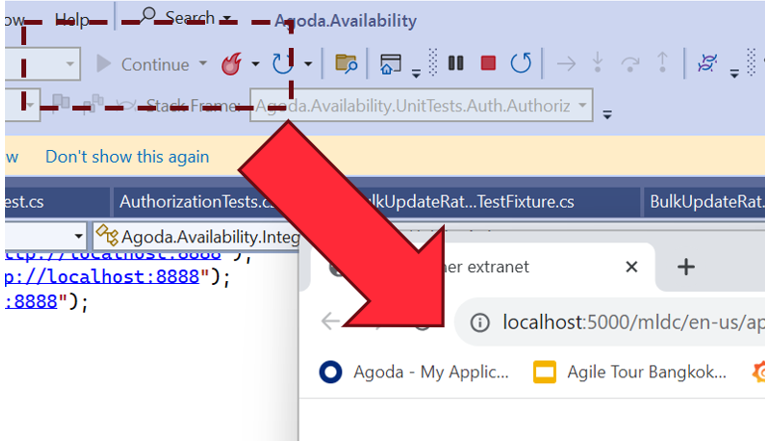
Back then we were working a lot on .NET, and Visual Studio was the go-to IDE. In Visual Studio, the button you press to debug was “F5”. So we used to ask the question:

“Can we git clone, and then just press F5 (Debug), and the application works locally?”

And also:

“What happens after this? Is it fast?”

So there are 2 parts to the F5 Experience really:

  1. Setup (is it Zero)
  2. Debug (is it fast)

Let’s start with the second part of the problem statement and what work we’ve done there.

Is it fast to build?

This is the first question we asked, so let’s measure compile time locally.

We’ve had devs report that things are slow, but it’s hard to know anecdotally because you don’t know in practice how often people need to clean build vs. incremental build vs. hot reload, and this can make a big difference.

For example, if you measure the three, and just for example’s sake they measure:

  • Clean: 25 minutes
  • Incremental: 30 seconds
  • Hot reload: 1 second

You might think, this is fine because it’s highly unlikely people need to clean build, right?

Wrong. The first step in troubleshooting any compilation error is “clean build it”, then try something else. Also, updates in dependencies can cause invalidation of cache and recalculations and re-downloading of some dependencies. With some package managers, this can take a long time. On top of this, you have your IDE reindexing, which can take a long time in some languages too. I still have bad memories about seeing IntelliJ having a 2 hr+ in-progress counter for some of our larger Scala projects years ago.

So you need to measure these to understand what the experience is actually like; otherwise, it’s just subjective opinions and guesswork. And if it is serious, solving this can have big impacts on velocity, especially if you have a large number of engineers working on a project.

How do we do this?

Most compilers have an ability to add plugins or something of the sort to enable this. We created a series of libraries for this. Here are the open-source ones for .NET and webpack/vite:

I’ll use the .NET one as an example because it’s our most mature one for backend, then go into what differences we have on client-side systems like webpack and vite later in another post.

So after adding this, we now have data in Hadoop for local compilation time for our projects.

And it was “amazing”; even for our legacy projects, it was showing 20-30 seconds, which I couldn’t believe. So I went to talk to one of our engineers and sat down and asked him:

“From when you push debug in your IDE to when the browser pops up and you can check your changes, does it take 20-30 seconds?”

He laughed.

He said it’s at least 4-5 minutes.

So we dug in a bit more. .NET has really good compilation time if you have a well-laid-out and small project structure, and this is what we were reporting. After it’s finished compiling the code though, it has to start the web server, and sometimes this takes time, especially if you have a large monolithic application that is optimized for production. In production, we do things like prewarm cache with large amounts of data. In his case, there wasn’t any mocking or optimizations done for local; it just connects to a QA server that, while having less data than production, still has enough that it impacts it in a huge way. On top of this, add remote/hybrid work, when you are downloading this over a VPN, and boom! Your startup time goes through the roof.

So what can we do? Measure this too, of course.

Let’s look a little bit at the web server lifecycle in .NET though (it’s pretty similar in other platforms):

The thread will hang on app.Run() until the web server stops; however, the web server itself has lifecycle hooks we can use. In .NET’s case, HostApplicationLifetime has an OnStarted event. So we can handle this.

However, the web browser may have “popped up,” but the page is still loading. This is because if you don’t initialize the DI dependencies of an HTTP controller before app.Run(), it will the first time the page is accessed.

So we need another measurement to complete the loop, which is:

“The time of first HTTP Request completion after startup”

This will give us the full loop of “Press F5 (Debug)” to “ready to check” on my local.

To do this, we need some middleware, which is in the .NET library mentioned above as well.

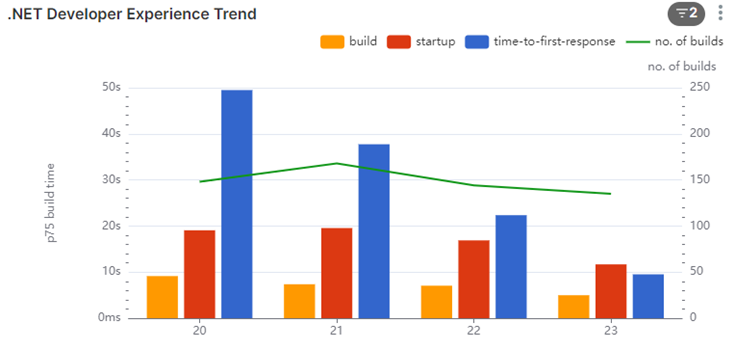
So now we have the full loop; let’s look at some data we collected:

Here’s one of our systems that takes 2-3 min to startup on an average day. We saw that there was an even higher number of 3min+ for the first request, so total waiting time of about 5 minutes. So we started to dig into why.

Before I mentioned the Web Browser “popping up,” this is the behavior on Visual Studio. Most of our engineers use Rider (or other JetBrains IDEs depending on their platform). When we looked into it, we found it wasn’t a huge load time of the first request; it was only taking about 20 seconds. What we found is that because JetBrains IDEs depended on the user opening the browser, the developer opens the browser minutes after it was ready. But why weren’t they opening it straight away? What was this other delay?

We were actually capturing another data point which proved valuable: it was the time the engineer context switches because they know it will take a few minutes, they go off and do something else.

The longer the compile and startup time, the longer they context switch (the bigger tasks they take on while waiting). It starts with checking email and Slack, to going and getting a coffee.

On some repos, we saw extreme examples of 15 to 20 min average for developers opening browsers on some days when the compile and startup time gets high. Probably a busy coffee machine on this day! 🙂

We had a look at some of our other repos that were faster:

In this one, we see that the startup is about 20-30 seconds (including compile time). The first request does take some time (we measured 5-10 seconds), but we are seeing about 30 seconds for the devs, so it’s unlikely they are context switching a lot.

We dug into this number some more though. We found most of the system owners weren’t context switching; they were waiting.

The people that were context switching were the contributors from other areas. We contacted a few of them to understand why. And they told us:

“I honestly didn’t expect it to be that fast, so after pressing debug, I would go make a coffee or do something else.”

To curb this behavior, we found that you can change Rider to pop up the browser, and by doing this, it would interrupt the devs’ context switch, and they would know it’s fast and hopefully change their behavior.

Conclusion

The F5 Experience highlights a critical aspect of developer productivity that often goes unmeasured and unoptimized. Through our investigation and data collection, we’ve uncovered several key insights:

  1. Compilation time alone doesn’t tell the whole story. The full cycle from pressing F5 to having a workable application can be significantly longer than expected.
  2. Developer behavior adapts to system performance. Slower systems lead to more context switching, which can further reduce productivity.
  3. Different IDEs and workflows can have unexpected impacts on the overall development experience.
  4. Even small changes, like automatically opening the browser in Rider, can have a positive impact on developer workflow.

By focusing on the F5 Experience, we can identify bottlenecks in the development process that might otherwise go unnoticed. This holistic approach to measuring and improving the development environment can lead to substantial gains in productivity and developer satisfaction.

Moving forward, teams should consider:

  • Regularly measuring and monitoring their F5 Experience metrics
  • Optimizing local development environments, including mocking or lightweight alternatives to production services
  • Continuously seeking feedback from developers about their workflow and pain points

Remember, the goal is not just to have fast compile times, but to create a seamless, efficient development experience that allows developers to stay in their flow and deliver high-quality code more quickly.

By prioritizing the F5 Experience, we can create development environments that not only compile quickly but also support developers in doing their best work with minimal frustration and waiting. This investment in developer experience will pay dividends in increased productivity, better code quality, and happier development teams.

Anecdote

Another thing we were capturing with this data was information like machine architecture. We noticed 3 out of about 150 Engineers working on one of our larger repos had a compile time that was 3x the others, 3-4 minutes compare to a minute or so. We also noticed they had 7th gen vs the 9th gen intel’s that most fo the engineers had at the time, so we immediately connected out IT support to get them new laptops 🙂

An Introduction to the F5 Experience

In the fast-paced world of software development, efficiency and productivity are paramount. As our systems grow more complex and our teams more distributed, we constantly seek ways to streamline our processes and improve our workflow. Enter the concept of the “F5 Experience” – a philosophy and set of practices aimed at optimizing the developer experience from setup to testing and beyond.

What is the F5 Experience?

The term “F5 Experience” originates from the F5 key in Visual Studio, which is used to start debugging. At its core, the F5 Experience is about achieving zero setup in the development environment. It asks a simple yet powerful question:

Can we clone a repository, press F5 (or its equivalent), and have the application work locally without any additional setup?

Originally this concept came from Andrew Harcourt when I was working with him many years ago now.

This concept extends beyond just running the application. It encompasses both debugging and testing, aiming for a seamless, zero-setup experience across these development tasks.

The focus on zero setup has significant implications for the entire development process:

  1. Instant Start: The ability to begin working on a project immediately after cloning, without complex configuration steps.
  2. Seamless Debugging: Making the process of identifying and fixing issues as smooth as possible, right from the start.
  3. Effortless Testing: Ensuring that tests can be run easily and produce consistent results, without additional setup.

While the F5 Experience primarily focuses on zero setup, this principle has positive knock-on effects on other aspects of development:

  1. Fast Feedback: Minimizing the time between making a change and seeing its effects.
  2. Improved Productivity: Reducing time wasted on environment setup and configuration.
  3. Consistent Environments: Ensuring that all developers work in nearly identical conditions, reducing “works on my machine” issues cause from Engineers having to “patch” together a working environment for testing.

By striving for the ideal Local Developer Experience, we create a foundation for a more efficient, enjoyable, and productive development process.

Why Does the Local Developer Experience Matter?

In our journey to improve developer productivity, we’ve identified several key areas where the Local Developer Experience can make a significant impact:

1. Reducing Time Wasted on Setup

How often have you joined a new project, only to spend days setting up your local environment? A good F5 Experience means that new team members can be productive within minutes, not days or weeks.

2. Improving the Speed of the Inner Loop

The “inner loop” of development – the cycle of writing code, running it, and seeing the results – should be as fast as possible. Long compile times, slow startup processes, or cumbersome testing procedures all detract from this ideal.

3. Enhancing Testing Practices

Tests are crucial for maintaining code quality, but they’re only effective if they’re run regularly. If running tests is a pain, developers will avoid doing it. We aim to make running tests as simple as running the application itself.

4. Minimizing Context Switching

When developers have to wait for long periods – whether for builds, tests, or environment setup – they tend to switch contexts. This context switching can significantly reduce productivity. By optimizing these processes, we keep developers in their flow state.

The Road Ahead

Achieving the ideal F5 Experience is an ongoing journey. It requires a commitment to continuous improvement, a willingness to challenge established practices, and an openness to new tools and methodologies.

In the posts that follow, we’ll dive deeper into each aspect of the F5 Experience. We’ll share our successes, our challenges, and the lessons we’ve learned along the way. We’ll explore how these principles can be applied in different contexts, from small startups to large enterprises, and across various technology stacks.

Our goal is not just to improve our own processes, but to spark a conversation in the wider development community about how we can all work more efficiently and enjoyably.

This is the first in a series of Blog post on the topic, stay tuned for more.