The F5 Experience (Speed)

Is a term I’ve been using for years; I originally learned it from a consultant I worked with at Readify years ago.

Back then we were working a lot on .NET, and Visual Studio was the go-to IDE. In Visual Studio, the button you press to debug was “F5”. So we used to ask the question:

“Can we git clone, and then just press F5 (Debug), and the application works locally?”

And also:

“What happens after this? Is it fast?”

So there are 2 parts to the F5 Experience really:

  1. Setup (is it Zero)
  2. Debug (is it fast)

Let’s start with the second part of the problem statement and what work we’ve done there.

Is it fast to build?

This is the first question we asked, so let’s measure compile time locally.

We’ve had devs report that things are slow, but it’s hard to know anecdotally because you don’t know in practice how often people need to clean build vs. incremental build vs. hot reload, and this can make a big difference.

For example, if you measure the three, and just for example’s sake they measure:

  • Clean: 25 minutes
  • Incremental: 30 seconds
  • Hot reload: 1 second

You might think, this is fine because it’s highly unlikely people need to clean build, right?

Wrong. The first step in troubleshooting any compilation error is “clean build it”, then try something else. Also, updates in dependencies can cause invalidation of cache and recalculations and re-downloading of some dependencies. With some package managers, this can take a long time. On top of this, you have your IDE reindexing, which can take a long time in some languages too. I still have bad memories about seeing IntelliJ having a 2 hr+ in-progress counter for some of our larger Scala projects years ago.

So you need to measure these to understand what the experience is actually like; otherwise, it’s just subjective opinions and guesswork. And if it is serious, solving this can have big impacts on velocity, especially if you have a large number of engineers working on a project.

How do we do this?

Most compilers have an ability to add plugins or something of the sort to enable this. We created a series of libraries for this. Here are the open-source ones for .NET and webpack/vite:

I’ll use the .NET one as an example because it’s our most mature one for backend, then go into what differences we have on client-side systems like webpack and vite later in another post.

So after adding this, we now have data in Hadoop for local compilation time for our projects.

And it was “amazing”; even for our legacy projects, it was showing 20-30 seconds, which I couldn’t believe. So I went to talk to one of our engineers and sat down and asked him:

“From when you push debug in your IDE to when the browser pops up and you can check your changes, does it take 20-30 seconds?”
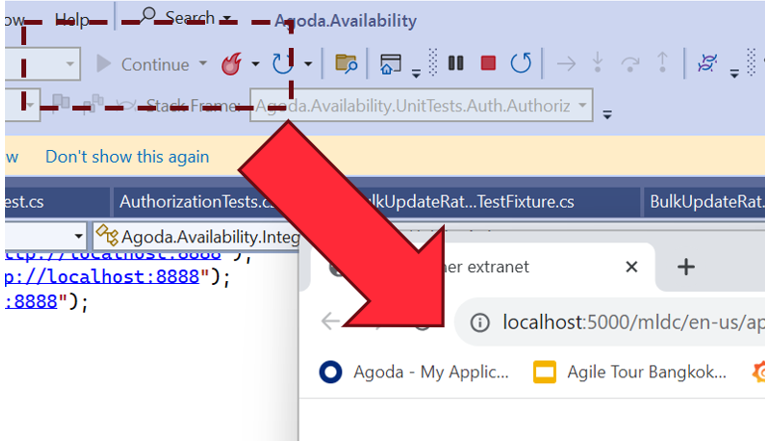
He laughed.

He said it’s at least 4-5 minutes.

So we dug in a bit more. .NET has really good compilation time if you have a well-laid-out and small project structure, and this is what we were reporting. After it’s finished compiling the code though, it has to start the web server, and sometimes this takes time, especially if you have a large monolithic application that is optimized for production. In production, we do things like prewarm cache with large amounts of data. In his case, there wasn’t any mocking or optimizations done for local; it just connects to a QA server that, while having less data than production, still has enough that it impacts it in a huge way. On top of this, add remote/hybrid work, when you are downloading this over a VPN, and boom! Your startup time goes through the roof.

So what can we do? Measure this too, of course.

Let’s look a little bit at the web server lifecycle in .NET though (it’s pretty similar in other platforms):

The thread will hang on app.Run() until the web server stops; however, the web server itself has lifecycle hooks we can use. In .NET’s case, HostApplicationLifetime has an OnStarted event. So we can handle this.

However, the web browser may have “popped up,” but the page is still loading. This is because if you don’t initialize the DI dependencies of an HTTP controller before app.Run(), it will the first time the page is accessed.

So we need another measurement to complete the loop, which is:

“The time of first HTTP Request completion after startup”

This will give us the full loop of “Press F5 (Debug)” to “ready to check” on my local.

To do this, we need some middleware, which is in the .NET library mentioned above as well.

So now we have the full loop; let’s look at some data we collected:

Here’s one of our systems that takes 2-3 min to startup on an average day. We saw that there was an even higher number of 3min+ for the first request, so total waiting time of about 5 minutes. So we started to dig into why.

Before I mentioned the Web Browser “popping up,” this is the behavior on Visual Studio. Most of our engineers use Rider (or other JetBrains IDEs depending on their platform). When we looked into it, we found it wasn’t a huge load time of the first request; it was only taking about 20 seconds. What we found is that because JetBrains IDEs depended on the user opening the browser, the developer opens the browser minutes after it was ready. But why weren’t they opening it straight away? What was this other delay?

We were actually capturing another data point which proved valuable: it was the time the engineer context switches because they know it will take a few minutes, they go off and do something else.

The longer the compile and startup time, the longer they context switch (the bigger tasks they take on while waiting). It starts with checking email and Slack, to going and getting a coffee.

On some repos, we saw extreme examples of 15 to 20 min average for developers opening browsers on some days when the compile and startup time gets high. Probably a busy coffee machine on this day! 🙂

We had a look at some of our other repos that were faster:
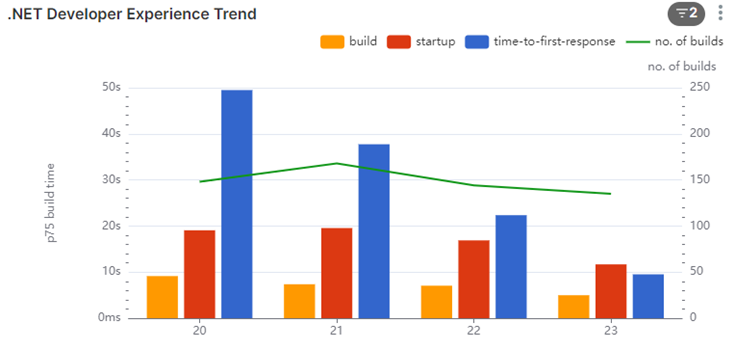
In this one, we see that the startup is about 20-30 seconds (including compile time). The first request does take some time (we measured 5-10 seconds), but we are seeing about 30 seconds for the devs, so it’s unlikely they are context switching a lot.

We dug into this number some more though. We found most of the system owners weren’t context switching; they were waiting.

The people that were context switching were the contributors from other areas. We contacted a few of them to understand why. And they told us:

“I honestly didn’t expect it to be that fast, so after pressing debug, I would go make a coffee or do something else.”

To curb this behavior, we found that you can change Rider to pop up the browser, and by doing this, it would interrupt the devs’ context switch, and they would know it’s fast and hopefully change their behavior.

Conclusion

The F5 Experience highlights a critical aspect of developer productivity that often goes unmeasured and unoptimized. Through our investigation and data collection, we’ve uncovered several key insights:

  1. Compilation time alone doesn’t tell the whole story. The full cycle from pressing F5 to having a workable application can be significantly longer than expected.
  2. Developer behavior adapts to system performance. Slower systems lead to more context switching, which can further reduce productivity.
  3. Different IDEs and workflows can have unexpected impacts on the overall development experience.
  4. Even small changes, like automatically opening the browser in Rider, can have a positive impact on developer workflow.

By focusing on the F5 Experience, we can identify bottlenecks in the development process that might otherwise go unnoticed. This holistic approach to measuring and improving the development environment can lead to substantial gains in productivity and developer satisfaction.

Moving forward, teams should consider:

  • Regularly measuring and monitoring their F5 Experience metrics
  • Optimizing local development environments, including mocking or lightweight alternatives to production services
  • Continuously seeking feedback from developers about their workflow and pain points

Remember, the goal is not just to have fast compile times, but to create a seamless, efficient development experience that allows developers to stay in their flow and deliver high-quality code more quickly.

By prioritizing the F5 Experience, we can create development environments that not only compile quickly but also support developers in doing their best work with minimal frustration and waiting. This investment in developer experience will pay dividends in increased productivity, better code quality, and happier development teams.

Anecdote

Another thing we were capturing with this data was information like machine architecture. We noticed 3 out of about 150 Engineers working on one of our larger repos had a compile time that was 3x the others, 3-4 minutes compare to a minute or so. We also noticed they had 7th gen vs the 9th gen intel’s that most fo the engineers had at the time, so we immediately connected out IT support to get them new laptops 🙂

An Introduction to the F5 Experience

In the fast-paced world of software development, efficiency and productivity are paramount. As our systems grow more complex and our teams more distributed, we constantly seek ways to streamline our processes and improve our workflow. Enter the concept of the “F5 Experience” – a philosophy and set of practices aimed at optimizing the developer experience from setup to testing and beyond.

What is the F5 Experience?

The term “F5 Experience” originates from the F5 key in Visual Studio, which is used to start debugging. At its core, the F5 Experience is about achieving zero setup in the development environment. It asks a simple yet powerful question:

Can we clone a repository, press F5 (or its equivalent), and have the application work locally without any additional setup?

Originally this concept came from Andrew Harcourt when I was working with him many years ago now.

This concept extends beyond just running the application. It encompasses both debugging and testing, aiming for a seamless, zero-setup experience across these development tasks.

The focus on zero setup has significant implications for the entire development process:

  1. Instant Start: The ability to begin working on a project immediately after cloning, without complex configuration steps.
  2. Seamless Debugging: Making the process of identifying and fixing issues as smooth as possible, right from the start.
  3. Effortless Testing: Ensuring that tests can be run easily and produce consistent results, without additional setup.

While the F5 Experience primarily focuses on zero setup, this principle has positive knock-on effects on other aspects of development:

  1. Fast Feedback: Minimizing the time between making a change and seeing its effects.
  2. Improved Productivity: Reducing time wasted on environment setup and configuration.
  3. Consistent Environments: Ensuring that all developers work in nearly identical conditions, reducing “works on my machine” issues cause from Engineers having to “patch” together a working environment for testing.

By striving for the ideal Local Developer Experience, we create a foundation for a more efficient, enjoyable, and productive development process.

Why Does the Local Developer Experience Matter?

In our journey to improve developer productivity, we’ve identified several key areas where the Local Developer Experience can make a significant impact:

1. Reducing Time Wasted on Setup

How often have you joined a new project, only to spend days setting up your local environment? A good F5 Experience means that new team members can be productive within minutes, not days or weeks.

2. Improving the Speed of the Inner Loop

The “inner loop” of development – the cycle of writing code, running it, and seeing the results – should be as fast as possible. Long compile times, slow startup processes, or cumbersome testing procedures all detract from this ideal.

3. Enhancing Testing Practices

Tests are crucial for maintaining code quality, but they’re only effective if they’re run regularly. If running tests is a pain, developers will avoid doing it. We aim to make running tests as simple as running the application itself.

4. Minimizing Context Switching

When developers have to wait for long periods – whether for builds, tests, or environment setup – they tend to switch contexts. This context switching can significantly reduce productivity. By optimizing these processes, we keep developers in their flow state.

The Road Ahead

Achieving the ideal F5 Experience is an ongoing journey. It requires a commitment to continuous improvement, a willingness to challenge established practices, and an openness to new tools and methodologies.

In the posts that follow, we’ll dive deeper into each aspect of the F5 Experience. We’ll share our successes, our challenges, and the lessons we’ve learned along the way. We’ll explore how these principles can be applied in different contexts, from small startups to large enterprises, and across various technology stacks.

Our goal is not just to improve our own processes, but to spark a conversation in the wider development community about how we can all work more efficiently and enjoyably.

This is the first in a series of Blog post on the topic, stay tuned for more.

Too Many Meetings?

I ran a survey recently with my engineers about their pain points. The number one pain point was too many meetings. This is a common complaint with teams that do Scrum, but our Scrum is pretty lightweight, so I started to dig a bit further – “go see.”

I sat down with a few of my engineers and, after confirming they agreed that they have too many meetings, I bluntly said to them, “Show me your calendar.” As I suspected, in all cases, it was pretty sparse, except for one of my tech leads, which I understood. What I did notice, though, is that they had meetings mid-morning and mid-afternoon consistently.

So my hypothesis was: it’s not that they have too many meetings; it’s that they get interrupted and don’t have long periods of focus to work. Working as an engineer before, I understand this. You need a good few uninterrupted hours every day to get into your zone and get stuff done.

I’ve had to deal with this before (as I said, it’s a common complaint in Scrum) and also have colleagues that have as well. Based on past experience, I was able to put together something that we tried. It starts off a bit draconian, but I think you have to because people always bend the rules. So here’s the guidance we came up with:

Practices around Meetings

Please observe the following practices around meetings to enhance productivity and maintain focus.

No Meetings after Lunch

Engineers need at least 2-3 uninterrupted hours straight each day, more if possible. This uninterrupted time is crucial for deep work and maintaining a flow state, which becomes essential for problem-solving and creativity in engineering tasks. According to Cal Newport, author of “Deep Work,” uninterrupted work periods significantly enhance productivity and job satisfaction.

While this may be challenging on sprint planning days, consider making one day per sprint an exception to this rule for sprint ceremonies. Getting other teams into this habit might also be difficult, but targeting one director area at a time can make it more manageable. Here are some tips to deal with it.

Alternative: If morning meetings are challenging, consider scheduling additional meetings at 5 pm to ensure uninterrupted work periods during the day until at least 5 pm.

Default Meeting Time is 30 Minutes

Avoid scheduling 1+ hour meetings at all costs, unless absolutely necessary. Shorter meetings encourage people to arrive on time and be efficient. It also pushes attendees to get to the point quickly and wrap up discussions promptly. Parkinson’s Law states that work expands to fill the time available for its completion. Therefore, shorter meetings can help in focusing discussions and give more time back to attendees.

Tip: If a meeting finishes early, LEAVE, rather than extending discussions unnecessarily.

Review the Purpose of Each Meeting

Assess the necessity of every meeting. If the meeting’s purpose can be achieved via an email or a Slack chat, do this instead. This helps reduce the number of unnecessary meetings and allows more time for focused work.

Tip: Establish clear agendas and goals for meetings to determine if they are truly necessary.

Combine Meetings with the Same Attendees

If you have two meetings that require the same people, schedule them back-to-back in the same room. This approach not only ensures everyone is on time for the second meeting, but if the first meeting ends early, you can start the second one earlier, and potentially give people back more free time.

Supporting Information and Citations
Newport, C. (2016). Deep Work: Rules for Focused Success in a Distracted World. Grand Central Publishing.
Parkinson, C. N. (1955). Parkinson’s Law. The Economist.
Harvard Business Review. (2017). Stop the Meeting Madness. Retrieved from Harvard Business Review.

[Previous content remains unchanged]

Conclusion

Implementing these meeting practices can significantly improve team productivity and engineer satisfaction. By prioritizing uninterrupted work time, keeping meetings focused and efficient, and critically evaluating the necessity of each meeting, we can create an environment that fosters deep work and creativity.

Remember, the goal is not to eliminate meetings entirely, but to make them more purposeful and less disruptive to the flow of work. As we adopt these practices, we should:

  1. Regularly check in with the team to assess the impact of these changes
  2. Be flexible and willing to adjust the practices as needed
  3. Lead by example, adhering to these guidelines ourselves

It’s important to recognize that changing ingrained habits takes time and persistence. There may be initial resistance or challenges, especially when coordinating with other teams or departments. However, the potential benefits – increased productivity, improved job satisfaction, and higher quality work – make this effort worthwhile.

By fostering a culture that values focused work time and efficient communication, we can help our engineers thrive and deliver their best work. Let’s view this as an ongoing process of optimization, always seeking ways to improve our work environment and practices.

Push Groups: Encouraging Adoption of New Tools and Technologies

Another process I’ve been trialling I wanted to share:

Sometimes when you want people to try something new you need to be a bit pushy to get them out of their comfort zone. This is where Push groups get their names.

Push Groups are structured sessions designed to encourage and facilitate the adoption of new tools and technologies within software engineering company. These groups typically consist of 3-4 people from different teams who come together to learn, install, and practice using a new tool or technology.

In the session is “very” hands on. We generally start with the installing the tool on everyone’s laptops, then run through some exercises that participants are required to complete in front of the organiser and share their immediate feedback of why the tool does or does not work.

This serves two purposes

  1. It pushes people to try something they otherwise would not have
  2. It gives the orgnaiser immediate feedback of issues they might not have know

In one example where we used this, we noticed many of our engineers in one area where not using customs shells they were just using vanilla Bash terminal on Mac or Powershell on windows. So we ran a session on Terminal tooling with ohmyposh, windows terminal etc. (we did a separate session with other tech for mac users, I’m using the windows one as an example because its the one geriatric old me that’s familiar with windows tooling ran).

In the first session we got them to install it, pick their themes/fonts (a bit of fun), try some common tasks, like git clone and run one of their repos using npm cli etc. demoing common quality of life features like git/k8s/etc information in the cli, statement completion, etc.

During the session one of the of the devs raised to me, he said: “Look, this is cool, but I never use the terminal outside my IDE, I only use it inside. I then realised its a totally different setup to customise the terminal inside the IDE, but in the session we worked it out and updated the content so that we supported both.

After the session there’s two goals

  1. Use it! – try honestly to use this new thing over the next two weeks, push yourself a bit to try it. And provide feedback about what does and doesnt work.
  2. Run another session for your team the same – even if it doesnt work for you, and get them to do the same thing and provide feedback

Most of the time we find that tools that are useful take off and reach critical mass and become ubiquitous, sometimes though things dont work, and that’s ok, as long as you get the feedback and learn.

Tethics Moments

A long time ago we had to do this exercise called “Ethics Moments”, I think many companies run these, they are pretty common. I liked the format, the scenarios though were not relevant to my engineers. They never face issues with Bribes from local government officials for example. They do however, everyday face what I would call “Technical Ethical” issues around technical debt, collaboration with other teams, execution decisions, etc.

So I decided to use the format but create scenarios more relevant to day-to-day for engineers. And as a play on words used the Term “Tethics”. And got engineers talking about what to do in certain scenarios relevant to day to day.

So let’s dig into some details.

Why are we here?

As engineers, we do things the right way, but we often seem to only limit this to a moral and ethical scope. With Tethics moments, we want to open this discussion of integrity also to the technical work we do. What is the right way to deal with technical dilemmas without hurting the product in the short term or long term? This can be very subjective, and on top of that, we also want to move fast, so how do we solve these problems so we can move fast tomorrow as well?

Create the Scenarios

A scenario should be a dilemma, and something that happens day-today.

I regularly have beers with my engineers, and sometimes when I do, I hear some crazy stories about code reviews, design reviews, etc generally when people are working with teams less mature or under pressure. Pressure is one of the main reason for technical debt in my opinion.

You dont have to be a beer drinker to create scenarios, but you do need to create a comfortable environment (RE: psychological safety, topic for another post) where your engineers feel comfortable speaking out, and this will help you find these things, the ones that come up more often are the ones you want to use for senarios.

I break these up into 3 sections title, description, and notes for the session leader, the notes help guide the conversation in the right direction, which should happen in a leader session anyway, which I’ll go into next. But the reason you need guidance is sometimes your engineers dont understand that they can push back, sometimes they think “this is the way things are” and when this is the case, you need some guidance so the session leader is confident to break them out of this.

I’ll give you an example of one of ours that I think will be relatable to a lot of orgs.

Scenario:
Owner vs Contributor

Description:
You are a system owner for “Generic Frontend System 2”.​
A backend team has sent you a large pull request for review, without a prior design review or any notice the work is coming. ​

It looks clear from their PR that they don’t have the best ReactJS skills, and it needs a lot of reworking, they’ve even managed to introduce a new state management library in their work. On top of this, the fact that it’s so large means it will probably take the team many days, or even weeks, to make all the needed changes.​

When you raise this with them, they say that they are on a hard deadline with Product changes, need to get this into production fast to meet their KPI for the quarter, and argue that it’s still functionally working, even though the code is not up to standards, so they ask if you can let it pass anyway.​

What should you do?

Notes for leader:
In the end it up to the system owner (you in this scenario) how they handle this, if you have push back against what you want (e.g. them fixing their code) and you don’t like it, escalate straight away to manager and higher if you need.​​ You’ll get support for this.

A common practice though, is that if its not “too” bad, getting a commitment from the team that they will immediately work on a fix after it’s merge, and bringing their manager AND PO into the room to make sure everyone is clear on the commitment. The PO is the one that a) has the most control over the sprint backlog and b) is most concerned with getting it into production that fastest, and may also be the one that tells every “its ok to wait”, you’ll be surprised.

<end senario>

So you can see we are leaving it pretty open here, in our company, system owners are the one that ultimately are responsible for the technical debt of their system, it’s part of our ownership culture, so it’s up to them how they handle it, there is guidance there because sometimes our system owners dont feel empowered, sometimes teams are under a lot of pressure and get into ruts, so this type of encouragement helps them get out of it.

The second part of the notes is talking about compromise, because sometimes you need it, but its ultimately up to you how you do this, its just one suggestion.

How to distribute sessions top down

“Top down” is usually a trigger word for me, living in South East Asia, where many companies have a bad top-down cultures. But in this case its not, its important for leaders to help shape a good culture, and this is one tool for helping.

The first session you should run is one with your leaders or managers, run them through the scenarios. Then they get your direct feedback on what is your expectations of how engineer should be dealing with these through the conversations. This is needed because ultimately if an engineer sees a problem and escalates and everyone is aligned they’ll get support from the top, if we arent aligned they might not and this will cause a problem for them.

After this tell them to run with their directs, and so on, for larger numbers of direct report you can run session with leads and send them out, or run multiple session, varies with your org structure.

Finally the session itself

How to run a session?

  • Use the deck of scenarios (have at least 6-7). As a Tethics leader, you should read through them and pick 3-4 you feel are most relevant for your direct reports or team members (depending on how you are running it).
  • Schedule a 1-hour session with direct reports
  • Limit session size to 4-5 people maximum – if you have more people, then schedule multiple sessions.
  • Fewer people means more people will speak out.
  • Read a scenario together, then 15-20 minutes go around the group to ask what each person thinks the right thing to do in that scenario would be. – There is no right or wrong answer to most; it’s about an open discussion.
  • Repeat the process for your selected other Tethics leaders to run with other people.

Are you the moderator?

  • Ask each person to talk and have their say one at a time.
    • Choose a different person to start talking for each scenario.
  • Don’t interrupt people as they are talking.
  • Save your personal opinions on the subject for the end of everyone else talking.
  • Focus more on commenting on others’ opinions than voicing your own.
  • Try Lead people to a better conclusion by questioning (RE: Socratic method of coaching, another topic post) rather than disagreeing.

And that’s it, please let me know if you try this and what your stories are in the comments.

Mobathons: Blending Mob Programming and Hackathons

This is something we’ve been experimenting with recently, so I thought I’d share.

A “mobathon” blends the concepts of mob programming and hackathons, providing a collaborative environment designed to tackle significant maintenance tasks or technology migrations in software development. This innovative approach allows multiple teams to work together intensively on real-world code, offering hands-on experience and producing tangible outcomes.

Why not just call it a hackathon? A hackathon is about encouraging innovation, while a mobathon is very focused on work towards a common goal with learning within a larger organization across many teams.

It is particularly useful in places with many teams that work on similar systems. For example, in one area we have 10 teams, each with frontend system ownership (10 frontend systems), and we want to try to keep knowledge, practices, and technology similar.

Practical Real-world Challenges

Unlike traditional workshops, participants engage with actual codebases, solving genuine problems that arise during technology transitions or maintenance efforts. This method enables engineers to gain valuable experience and build confidence in implementing new technologies. For instance, in a mobathon focused on migrating from webpack to Vite, engineers work in pairs on different systems, with experts available to guide and unblock obstacles, thereby facilitating learning and problem-solving in a real-world context. Vite is a very new technology, and you want the engineers that own the system to understand it when it’s rolled out, rather than some “tech team” or automation process doing it for them.

Efficiency and Effectiveness

These events can significantly accelerate the adoption of new technologies across multiple projects simultaneously in a short period of time. While the primary goal isn’t necessarily to complete all tasks during the event, mobathons often result in several projects reaching a PR-ready or near-ready state, with others progressing to a point where they can be easily integrated into upcoming sprints. This approach allows for faster implementation of improvements across the product portfolio, enhancing overall productivity and reducing lead times for new work.

Team Building, Knowledge Sharing, and Skill Development

The collaborative nature of these events promotes cross-team interaction and networking, fostering a culture of shared learning and problem-solving. This is good in large organizations where teams can sometimes become isolated in silos due to organizational structure. Additionally, mobathons provide engineers with valuable insights into the complexity of certain tasks, enabling more accurate estimation for future work. For example, after participating in a webpack to Vite migration mobathon, developers can provide more precise estimates for similar tasks in other projects, improving planning and resource allocation.

One of the key advantages of mobathons over traditional training methods is their focus on real-world scenarios. Participants encounter and overcome actual challenges that arise in production environments, rather than working with simplified, greenfield projects. This approach helps dispel skepticism about the practicality of new technologies or methodologies in existing systems, making mobathons a powerful catalyst for knowledge dissemination and skill development.

For example, instead of migrating a simple “todo” app from webpack to Vite, you’re migrating “this massive beast I work on every day”. You see all the real-world problems and have some experts there to help when you hit them.

Mobathon, Mob programming, pair programming, Agile

In summary, mobathons offer a dynamic and practical approach to software development, benefiting engineers, product owners, and development managers by providing real-world experience, accelerating technology adoption, and fostering a collaborative team environment.

Hosting a Mobathon Step-by-Step

  1. Define mobathon goal
  2. Book a room for a whole day, get it setup with pairing stations, that devs can easily plugin to
  3. Recruit developers
  4. Create a Slack channel for the mobathon. It should include information about the events such as goal, time, location
  5. Book a restaurant or order pizza/food. We generally provide lunch for the participants
  6. When everyone arrives, give orientation about the mobathon topic and goal (timebox 30-45 min)
  7. Break participants into pairs or groups
  8. Use a whiteboard to track progress
  9. Take lots of pictures of the event, and a boomerang at the end with everyone
  10. Summarize results and post pictures in the Slack channel after the event is completed

Conclusion

Mobathons represent an innovative approach to collaborative software development, combining the best aspects of mob programming and hackathons. By focusing on real-world challenges and fostering a supportive environment for learning and problem-solving, mobathons can significantly accelerate technology adoption, improve cross-team collaboration, and enhance overall productivity within large organizations. As software development continues to evolve, techniques like mobathons offer a promising way to keep teams aligned, knowledgeable, and effective in tackling complex technological transitions.

One Story, One Day. Agile Process

This is a process I’ve tried a few times over the years and wanted to share, its great for teaching your team to teach themselves about common problems and blockers they have, and also getting them to understand how to work better as a team rather than a group of individuals.

This is how it goes:

Take a medium-sized story, put the team in a room, and get them to try to do it in a single day working together. Most of the time they will fail, but they’ll learn.

This helps answer the question, why can’t we get a story done in a short period of time?

Why is this important? During a two-week sprint, sometimes you have to wait for things, so you wait and go work on something else, and it doesn’t matter because you have a full 2 weeks, right? You don’t notice or try to fix these things. These things slow you down, examples are:

  • The flaky CI that you rerun a few times and 6 hours later it’s ready.
  • The code review ping pong that goes for 6 days.
  • The multiple systems that need to merge/deploy in order because for 1 story you need to change 3 systems.
  • The systems that take a whole day to get working on your laptop because you haven’t touched them in a month.

On top of finding the problems, the team also learns how to collaborate on a single story. This helps with not only faster delivery but also sharing of knowledge within the team.

This is good if you see this type of behaviour in your team:

  • At the start of the sprint, each dev picks up a single story and works in isolation
  • Standup meetings seem unimportant because everyone is working on different things
  • During the day your team is not talking; in office situations, they may put headphones on and ignore the rest of the team for the whole day
  • When questioned, you consistently get feedback “we can’t get more than one person working on this”, which usually means they’ve never tried

Note: It’s ok for devs to do short periods in isolation, they should not be “pairing all day” as some extreme companies encourage, but an entire day or more is a warning sign.

Expanded Process

1. Pre-exercise briefing (if it’s the first time)
   – Set expectations and explain the purpose.
   – Get buy-in from the team; if they don’t believe it’s a good idea, they will make it fail.

2. Story Selection:
   – Team agrees on a medium-sized story that would typically take several days to complete.
   – The story should be challenging but potentially achievable.
   – Choose a number of man-days similar to the people in the team if you use man-day estimation.

3. Team Composition:
   – Ensure the team has diverse skills to cover all aspects of the story.
   – Possibly including people that are needed for code review approval, deployment, etc.

4. Environment Setup:
   – Prepare a dedicated workspace where the team can work without interruptions.
   – Book a large meeting room.
– Set up Pairing Stations for a day.

5. The Day:

   – Set a strict one-day time limit, e.g., 8 hours.
   – Begin with a brief planning session to break down the story into tasks, 30min time box.
   – Execute, encourage pairing, and regular communication, time box 7 hours.
   – Call it on time, tell the devs “hands/pens/keyboards down”, at the end of the day, the goal is to learn rather than finish, don’t let them work into the evening, even if they want to. You need time for retro.
   – Conclude with a team retrospective to discuss learnings, challenges, and insights, 30min time box. This is the most important part, they can run overtime on this 🙂

Implementation Notes:

1. Frequency: Implement this approach periodically, not as a daily practice.
2. Follow-up: Use insights gained to improve regular work processes.
3. Balance: Combine with other agile practices for a well-rounded approach.

System Building Manifesto 

It’s hard for highly technical people to not dominate conversations about tech. But in a role of Engineering Manager it’s important to not do this, ownership should be with the people doing the work not their managers.

So how do you manage people with less experience than you and not become a dictator?

Something I’ve been working on with my teams lately is coming up with High level Guidelines to give them work with. Highlighting common pit falls and encouraging best practice that come from the experienced people in the organisation. Having a common understanding of what’s good or best help people move in the right direction while giving them the freedom to design and build as they like, as long as the guidelines are not too specific and leave room for interpretation that maybe be slightly with each team or engineers individual context.

For example, I would not give my teams a guideline of “Code Coverage >80%”, this is too specific, and based on a team’s application they are working on they maybe happy with 70 or even 60%, and that’s ok. A better way to phrase this if coverage is important to you would be “Team’s should value and have high test coverage”.

This again though is too specific, If you have poor assertions, it doesn’t matter what % coverage you have right? Code coverage has a higher purpose, and it alone does not serve this purpose, it’s better to focus on the higher level goals.

Code Coverage, for me, is a part of Test Automation, the goal of test automation is to reduce bugs, production issues etc. So these in my opinion are better to focus on. In my example below

Systems should have test automation that brings confidence and inspires courage in engineers

Where I mention test automation i mention the behaviour I have seen in high performing teams specifically. I’ve worked in teams where the “deploy” button is pressed with little regard for the impacts, because the Engineers are confident in the pipelines, monitoring and rollbacks that are in place. This for me is the high level goal i want my engineers to strive for, Real Continuous Delivery.

So here’s the full list I have in Draft, feel free to comment, I’ll do some follow up post with dives into some of them.

I used the word “Manifesto” because when i showed them to another manager it’s what he called it, I thought it was cool 🙂

Guiding principles for Systems

  • Systems should be Domain Specific, responsible for one or few domains
  • Systems should be small in the overwhelming majority of cases. Small systems limit complexity
  • Systems should be consistent in design in the overwhelming majority of cases
  • Systems should be easy to build
  • Systems should have test automation that brings confidence and inspires courage in engineers
  • Systems should be easy to contribute to, not require extensive training
  • Systems should have Cross Cutting concerns addressed and shared in an easy and consistent way
  • Systems operate independently for the purpose of testing and debugging
  • Systems have consistent agreed upon telemetry for monitoring
    • Telemetry is a solved cross cutting concern for non-domain specific metrics
  • Systems are built on Modern up-to-date frameworks and platforms
  • Systems use Continuous Integration as a principle not a tool, merge and deploy often and in small increments
  • A System scales horizontally, both within a site and across multiple site. With this comes redundancy, Users experience zero downtime for instance and site outages
  • Systems have owners, who are responsible for the long-term health of the systems and who have contributors as customers

Performant .NET APIs

I’m going to conflate two topics here as they king of go together to make the title, the first isnt dotnet specific, its a general API principle.

Systems Should Own their Own data

If you can make this work then there’s a lot of advantages. What does this mean in practice though?

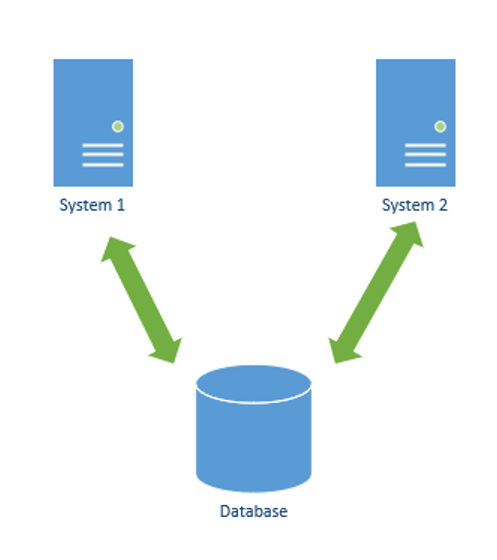
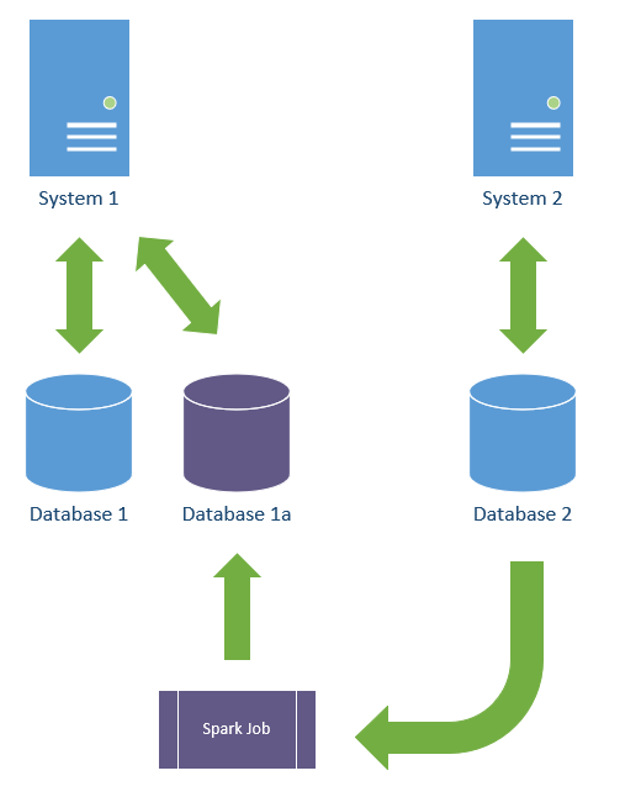
It means that tables in your database should only every be read and written by a single system, and there’s a lot of Pros around this. Essentially the below is what I am recommending you AVOID

How else to proceed though? there is several options that you may or may not be aware about, I’ll mention a few now but wont go into specifics

Backbend for Front end

Event Sourcing

Data Materialization

I’ve have other blogs on these. But what you are asking is what’s the benefit right?

If you control data from within a closed systems, its easier to control, a pattern which becomes easy here is known a “write through cache”.

Most of you will be familiar with a “Pull Through Cache”, this is the most common caching pattern, the logic flows like this

  1. Inbound request for X
  2. Check cache for key X
  3. If X found in Cache return
  4. Else Get X from Database, Update Cache, Return X

So on access we update the cache, and we set an expiry time of Y. And our data is usually stale by Y or less at any given time, unless it hits the DB and then its fresh and slow.

A write through cache is easy to implement when the same system reading is tightly couple with the system writing (or in my recommendation, the same system).

In this scenario the logic works the same, with one difference, when writing we update the cache with the object we are writing, example:

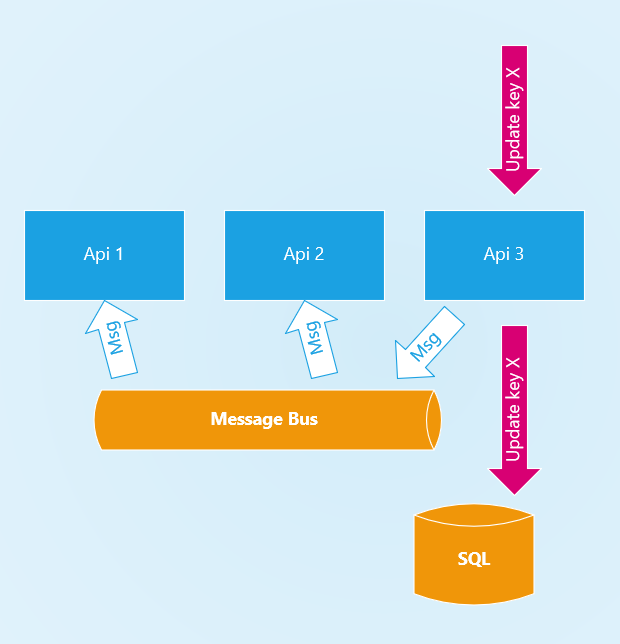
  1. Inbound update for key X
  2. Update database for key X
  3. Update Cache for key X

This way all forces a cache update and your cache is always fresh. Depending on how we implement our cache will vary on how fresh it becomes though. We could work this with local or remote cache.

For small datasets (1s or 10s of Gigabytes in size) I recommend local cache, but if we have a cluster of 3 servers for example how does this work? I generally recommend using a message bus, the example below step 3 sends a message, all APIs in a cluster subscribe to updates on this bus on startup, and use this to know when to re-request updates from DB when update events occur to keep cache fresh. In my experience this sort of pattern leads to 1-4 seconds of cache freshness, depending on your scale (slightly more if geographically distributed)

So this isn’t dotnet specific but it makes me lead to my next point. Once you have 10-15Gb of Cache in RAM, how do you handle this? how do you query it? which brings me to the next part.

Working with big-RAM

I’m going to use an example where we used immutable collections to store the data. Update means rebuild the whole collection in this case, we did this because the data updated infrequently, for more frequently updated data DONT do this.

Then used Linq to query into them, collections where 80Mb to 1.2Gb in size in RAM, and some of them had multiple keys to lookup, this was the tricky bit.

The example Data we had was Geographic data (cities, states, points of interest, etc), and we had in the collections multiple languages, so lookups generally had a “Key” plus another “Language Id” to get the correct translation.

So the initial Linq query for this was like

_cityLanguage.FirstOrDefault(x => x.Key.KeyId == cityId && x.Key.LanguageId == languageId).Value;

The results of this are below

MethodCityNumberMeanErrorStdDev
LookupCityWithLanguage60000929.3 ms17.79 ms17.48 ms

You can see the mean response here is almost a second, which isn’t nice user experience.

The next method we tried was to create a dictionary that was keyed on the two fields. To do this on a POCO you need to implement Equals and GetHash code methods so that the dictionary can Hash and compare the keys like below.

class LanguageKey
    {
        public LanguageKey(int languageId, int keyId)
        {
            LanguageId = languageId;
            KeyId = keyId;
        }
        public int LanguageId { get; }
        public int KeyId { get; }

        public override bool Equals(object obj)
        {
                if(!(obj is LanguageKey)) return false;
                var o = (LanguageKey) obj;
                return o.KeyId == KeyId && o.LanguageId == LanguageId;
        }

        public override int GetHashCode()
        {
            return LanguageId.GetHashCode() ^ KeyId.GetHashCode();
        }

        public override string ToString()
        {
            return $"{LanguageId}:{KeyId}";
        }
    }

So the code we end up with is like this for the lookup

_cityLanguage[new LanguageKey(languageId,cityId)];

And the results are

MethodCityNumberMeanErrorStdDev
LookupCityWithLanguage60000332.3 ns6.61 ns10.86 ns

Now we can see we’ve gone from milliseconds to nanoseconds a pretty big jump.

The next approach we tried is using a “Lookup” object to store the index below is the code to create the lookup and how to access it.

// in ctor warmup
lookup = _cityLanguage.ToLookup(x => new LanguageKey(x.Key.LanguageId, x.Key.KeyId));
// in method
lookup[new LanguageKey(languageId, cityId)].FirstOrDefault().Value;

And the results are similar

MethodCityNumberMeanErrorStdDev
LookupCityWithLanguage60000386.3 ns17.79 ns51.89 ns

We prefer to look at the high percentiles at Agoda though so measure APIs (usually the P90 or P99) below is a peak at how the API is handling the responses.

consistently below 4ms at P90, which is a pretty good experience.

Overall the “Write Through Cache” Approach is a winner for microservices where its common that systems own their own data.

NOTE: this testing was done on an API written in netcore 3.1, I’ll post updates on what it does when we upgrade to 6 🙂

How to Promote an Engineer

To understand how to promote we need to understand why we have titles, and what they are for.

Most modern tech companies (Amazon, etc) have the IC (Individual Contributor) level track concept, so I will use this as a basis. It works in roughly these levels

  • IC1 – Associate Engineer
  • IC2 – Engineer
  • IC3 – Senior Engineer
  • IC4 – Lead
  • Etc

Titles are important for recognition of people’s achievements, to set them targets to drive personal improvement, they also help with reconciliation of compensation to make sure people are paid what they deserve but I don’t personally believe compensation is their primary purpose.

They can also have a negative culture impact if used in the wrong way, sometimes people can use their title to boss or lord over others, but my advice on this is that it’s not a problem with the title, it’s a problem with the person, and this is toxic behavior, if they can’t fix it, show them the door.

Titles are also used implicitly to set the expectations of others. When people work on a team with someone of a higher title than them, they should hopefully be inspired to be a better engineer, and in turn help drive their own career progression.

Usually titles come with a defined list of Qualities that can be quiet subjective and high level, like “Practices the Latest in CI/CD Technology”, while useful as a guide, these aren’t very actionable or objective that you can give to an Engineer to do.

Many Managers I talk to about career progression tend to look at goal setting as a method for Engineer to prove themselves, I like goal setting and I do it a lot, but when it comes to career progression I think it’s a bit flawed and I’ll explain why.

Some examples people used with me for goals for Engineers were:

  • Do a blog post
  • Lead a project to completion
  • Do a tech talk

Goals like this are fine, but if used for career progression you can effectively create a checklist list for a promotion, and after the Engineer has done X,Y,Z on the list we promote him, this doesn’t mean after being promoted they will continue to do this. If we take the example of an Engineer who is set the above three goals, does them in a Quarter or two, gets promoted to senior engineer, then goes back to doing the same thing he did before. He’s not likely to inspire those around him who are doing the same job now, but don’t have the title. In fact, it may even have a negative impact on the team.

And when you are asked by someone “why is he senior?” is your response of “He did a design review and a tech talk 2 years ago” going to be a good answer?

So when are goals ok?

Goals I believe are good for short term, they are good to push someone out of their comfort zone to give them a taste of something, or to defeat fear. A bit like young children and swimming; children are usually worried about getting wet and will cry and complain, but once you finally get them in the water it’s hard to get them out. Goal setting is good for pushing people out of their comfort zones, and also for giving people a taste of something new that they other wise would never have tried, perhaps in the example of cross training, or opening conversation of new career paths, is my opinion.

But back to career progression

If we want people to be doing the above things, they should be self-motivated to do them not doing them because they are led by the promotion carrot stick. So what we are after more, is a change on mindset as opposed to a “To Do” list, so that it becomes are part of their day-to-day thinking.

How to change or measure people’s mindset?

You can’t measure that I’ve found, but the best proxy I’ve found is the behavior people exhibit. The advantage of using behavior is it is a day-to-day thing. The way people conduct themselves when dealing with others, specific to engineering scenarios, on a day-to-day basis is something you can set goals around, or more so, expectations.

Setting expectations of behavior is something that Ben Horowitz talks about, he wrote a blog a long time ago called “Good PM, Bad PM” applying this to Product Mangers in the 90s and 00s.

If we promote people based on their day-to-day behavior the exhibit, they are likely to continue this behavior as it part of their routine, they are unlikely to degreed their behavior over time, and if more goals are set around improving behavior then they will most likely progress.

Taking the example of the “Inspiration from the Senior Engineer on my team”, if we assume that behavior is consistent over time then the answer to the question about “why is he senior?” becomes easier to answer in that he acts in fashion A,B,C on a day-to-day basis.

I have some example of what I set, to try to explain the method:

  • A Senior Engineer identifies and helps with skill gaps in his immediate area, escalating when they are too much for him to handle. He is the guy that says in a stand up “hey Bob, you haven’t had much experience in system X how about you pick up that task today.” He encourages continuous improvement of the team in the day to day.

The above is an expectation around collaboration and system ownership, this is from my Senior Engineer expectations, you can see how its worded that it’s day-to-day behavior expectation around being a positive influence in the team.

The thing missing from this that’s present in the Horowitz article though is the “Bad PM”. Horowitz remarks on calling out explicit negatives in behavior as well. This is very useful for calling out common bad behavior people pick up within the organization (or in the industry in general) that might be common and help to correct them.

Here’s an example from my basic Engineer Expectations:

  • An Engineer Tests. They employ automation to do so and understands when to use Unit vs System vs Integration Testing. An engineer does not have a “Tester” on their team whose responsibility it is to do the testing.

This is a common pitfall from the industry, especially from older engineers who used to work on teams where they did have “testers”. Engineers like this that have any form of Quality role attached to their team think they have a “tester”, and this is very bad for not only cross functional teams but also the correct use of automation. So by calling out this negative behavior we help to correct this by setting the expectations.

Be careful though, the expectations I have here are specific to my context, not everyone should have the same expectations, there will be things unique to your company, team, etc. that they should change. From the example above, maybe you do have “Testers” on your team, and that is ok for you.

In closing though, I would recommend trying to Set “Behavior Expectations” around your career levels as a method to drive the right change, in your staff, for promotions.