TypeScript Project AppSettings

Ok so there’s a few nice things that MS have done with typescript, but Dev time vs build time vs deploy time they don’t all work the same, so there’s a few things we’ve done to make the F5 experience nice while making sure the build and deployed results are the same.

In the below examples we are using

  • Visual Studio 2015
  • Team City
  • Octopus Deploy

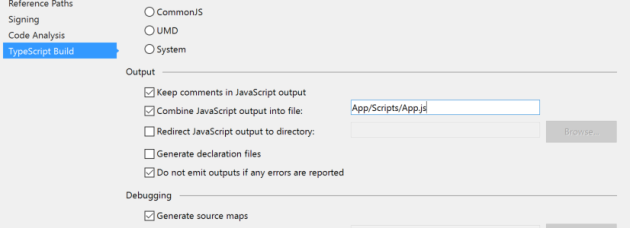
Firstly TypeScript in Visual Studio has this nice feature to wrap up your typescript into a single js file while your coding. It’ll save to this file as you are saving your TS files, so its nice for making code changes on the fly while debugging, and you get a single file output.

TypeScriptCombine

Also this will build when TeamCity runs msbuild as well. But don’t check this file in, its compile ts output, it should be treated like binary output from a C# project.

And you can further minify and compact this using npm (see this post for details).

This isn’t prefect though, because we shovel our static content to a separate CDN that is spared between environments (Folder per version), and we have environment specific JavaScript variables that need to be set, this can’t be done in a TypeScript file as they all compile into a single file. I could use npm to generate the TypeScript into 2 files but this conflicts too much with the developers local setup in using the above feature from my tests.

So we pulled it into a js file that is separate form the type script, this obviously though causes the type script to break as the object doesn’t exist. So we added a declaration file for it like below:

declare var AppSetting: {
url: string;
baseCredential: string;
ApiKey: string;
}

Then drop the actual object in a JavaScript file with the tokens ready for octopus, with a simple if statement to drop in the Developers local settings when running locally.


var AppSetting;
(function (AppSetting) {
if (window.location.hostname == "localhost") {
AppSetting.url= "http://localhost:9129/";
AppSetting.baseCredential= "XXXVVVWWW";
AppSetting.ApiKey= "82390189wuiuu";
} else {
AppSetting.url= "#{url}";
AppSetting.baseCredential= "#{baseCredential}";
AppSetting.ApiKey= "#{ApiKey}";
}
})(AppSetting || (AppSetting = {}));

This does mean we need a extra http request to pull down the appSetting js file for our environment, but it means we can maintain our single CDN for static content/code like we have traditionally done.

SQL Query Slow? Some Basic MSSQL tips

A lot of developers I’ve worked with in the past don’t have good experience with SQL out of the box, when is say good i mean beyond knowing the basics. A lot of the systems I work on are high performance so I end up training developers in SQL as a priority when they come onto the team. There is a few basic things I always show them which gets them up to speed pretty easily.

Common Mistakes to Avoid

Backwards Conversions in WHERE clauses

A common mistake is backwards where clauses, this causes the engine to create a temporary table and convert all the data in that column in the table, you should always convert the parameter not the column.


WHERE CONVERT(int,column1) = @param1

Cursors, they aren’t bad, just use them correctly

If you are using cursors for doing transactional workloads I will be scared and probably not talk to you again. If you are using them simply to iterate through a temporary table or table var and do “something” you are probably using them correctly.

Just remember the use these two hints all the time READ_ONLY and FAST_FORWARD, they will give you a speed boost of an order of magnitude.


DECLARE authors_cursor CURSOR READ_ONLY FAST_FORWARD FOR

limit them to a few thousand rows if you can, don’t use them for millions of rows if you can avoid it.

INSERT is your friend, UPDATE is your enemy

Try to design your schema with INSERTing rather than UDPATing, you will mitigate contention this way, contention of resources is what makes you build big indexes and will slow you down in the long run.

Get some CTEs up ya

Common Table Expressions (CTEs) are useful for breaking sub-queries out, and I find are cleaner in the code, performance difference is arguable though.

Table Variables over Temp Tables

Yes, I’ve said it, now I may get flamed. Temp tables have their place, primarily when you need to index your content, but if you have temporary data that is large enough to require an index, maybe it should be a real table.

Also Table variables are easier debugging because you don’t have to drop them before F5ing again in SSMS.

Missing Indexes

Number one cause of query slow down is bad indexing. If you are doing large amounts of UPDATE/INSERT on your tables though, too much indexing can be bad too.

SSMS is your friend in this case, there are a lot more advanced tools out there sure, but you should be starting with SSMS, you’ll be able to find out your basic slow downs

Look at query plans

Hit this button in the tool bar and your away

DisplayEstimatedQueryPlan

If there is an obvious slow down SSMS will recommend you an index to fix your problem.

You can see the below Green text it displays sometimes (not all the time) you can right click on this and select “Missing Index Details…” and it will give you are CREATE INDEX statement that you can use to create your index.

MissingIndexHintFromSSMS

Most of the index hints in here are pretty spot on but there is a few things to consider before going “yeah! here’s the index that will solve my problem”

  1. Don’t index bit columns, or columns that have a small Cardinality
  2. Look for covering indexes, what it suggests might be the same as an index you have already but with one extra column, which means you could use a single index for both jobs
  3. Think about any high volume updates you have, you might slow down your updating if you add more indexes

The query plan itself will give you some more detailed info than the hints

Each block will be broken up by the percent of the entire statement (below is 1 block which is 13% of the entire statement), then within each block it breaks it up further, the below 3 Index Seeks use 12% of the total performance each.

QueryPlanUISSMS

When looking at the above, it can get very confusing what to do if you are not very familiar with SQL this interface gives you a lot of info when you mouse over each point, I think this is why some developers like to hide behind entity frameworks 🙂

The basic thing i tell people to look out for is the below:

ClusterdIndexScan

Index Scans are usually your source of pain that you can fix, and when you get big ones SSMS will generally suggest indexes for you based on these. You will want to make sure they are consuming a fair chuck of the query before creating an index for them though, the above example of 2% is not a good one.

Maintain your Database

Your indexes will need defragmeting/rebuidling and you will need to reclaim space by backing up db and logs.

I won’t go into this too much in the scope of this post, I might do another post about it as its a rather large subject. I recommend googling this for recommendation but at least use the wizard in SSMS to setup a “default” maintenance plan job nightly, don’t leave your database un-maintained, that will slow it down in the long run.

People to watch and Learn from

Pinal Dave from SQL Authority is “the man”, he has come up on more of my google searches for SQL issues than stackoverflow.

Packaging Large Scale JS projects with gulp

Large scale JS projects have become a lot more common with the rise of AngularJS and other javascript frameworks.

Laying out your project though you want to have your source in a lot of separate files to keep things neat and in a structure, but you don’t want you browser making  a few hundred connections to the web server on every page load.

I previous blogged about a simple JS and CSS minify and compress for a C# based project, but this time I’m looking at a small AngularJS project that has over 50 js files.

I’m using VS 2015 with the Web Essentials add-on, so in the package.json file can put my npm requirements and they will download, with 2013 i previously had to run npm on my local each time I setup to get them, the new VS is way better for these tasks, if you haven’t upgraded to 2015 you should download it now.

There is 3 important files highlighted below

GulpPackageJsonBower.PNG

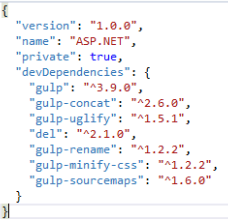
Firstly lets look at my package json file:

package.json

in here you can add all your npm dependencies and VS with run npm in the background to install them, as you are typing.

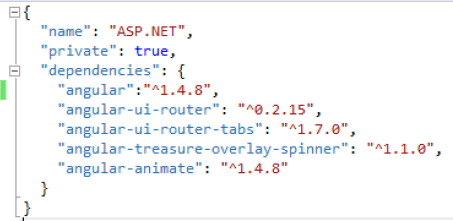
Next is the bower.json file

bower.sjon.png

This is used for managing your 3rd party libraries, traditionally when throwing in 3rd party js libraries I would use a CDN, however with Angular, you will end up with a bunch of smaller libraries that will end you up with too many CDN references, so you are better off using bower to download them into your project, then from there combine them (They will already be uglifyd in most cases).

Now there is also a “.bowerrc” file that i have added, because i don’t like the default path


{
"directory": "app/lib"
}

Again as with the package json it will start downloading these as you type and press save, also to note it doesn’t clean up if you delete one, so you’ll  need to go into the target location and delete the folder manually.

Lastly the Gulpfile.js file, here is where we bring it all together.

In the example below I am processing 2 lots of javascript, the 3rd party libraries into a lib.min.js and our code into scripts.min.js. I could also add a final step to combine them as well.

The good thing about the below is that as i add new js files to my /app/scripts folder, they automatically get combined into the main script file, and when a add new 3rd party libraries the will automatically get added to the 3rd party script file (hence the aforementioned change to the bowerrc file).

The 3rd party libraries tend to sometimes get painful though, you can see below that i am not minifing them only joining, the ones i’m using are all minified already, but sometimes you will get ones that aren’t, also one of the packages i am using contains the jQuery1.8 libraries that it appears to use for some sort of unit test, so i had to exclude this file specifically, so be prepared for some troubleshooting with this.


/// <binding BeforeBuild='clean' AfterBuild='minify, scripts' />
// include plug-ins
var gulp = require('gulp');
var concat = require('gulp-concat');
var uglify = require('gulp-uglify');
var del = require('del');
var rename = require('gulp-rename');
var minifyCss = require('gulp-minify-css');
var sourcemaps = require('gulp-sourcemaps');

gulp.task('default', function () {
});

//Define javascript files for processing
var config = {
AppJSsrc: ['App/Scripts/**/*.js'],
LibJSsrc: ['App/lib/**/*.min.js', '!App/lib/**/*.min.js.map',
'!App/lib/**/*.min.js.gzip', , 'App/lib/**/ui-router-tabs.js',
'!App/lib/**/jquery-1.8.2.min.js']
};

//delete the output file(s)
gulp.task('clean', function () {
del(['App/scripts.min.js']);
del(['App/lib.min.js']);
return del(['Content/*.min.css']);
});

gulp.task('scripts', function () {
// Process js from us
gulp.src(config.AppJSsrc)
.pipe(sourcemaps.init())
.pipe(uglify())
.pipe(concat('scripts.min.js'))
.pipe(sourcemaps.write('maps'))
.pipe(gulp.dest('App'));
// Process js from 3rd parties
gulp.src(config.LibJSsrc)
.pipe(concat('lib.min.js'))
.pipe(gulp.dest('App'));
});

gulp.task('minify', function () {
gulp.src('./Content/*.css')
.pipe(minifyCss())
.pipe(rename({
suffix: '.min'
}))
.pipe(gulp.dest('Content/'));
});

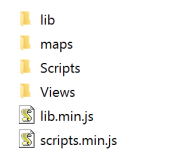
So now i end up with two files outputted

BuildOutputJavaScriptFiles.PNG

oh and don’t for get to add tehse fiels to your gitignore or tfignore so they don’t get checked in. and also make sure you add “note_modules” and your 3rd party library folder as well, you don’t want to be checking in your dependencies, I’ll do another blog post about using the above dependencies in the build environment.

Just to note, not having node_modules in my gitignore killed VS2015s integration with github causing a error about the path being longer than 260 characters. Prevented me checking in and refused to acknowledge the project was under source control.

And in my app i only need to script tags


<script src="App/lib.min.js"></script>
<script src="App/scripts.min.js"></script>

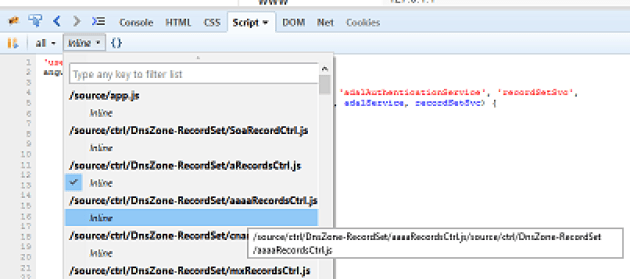
You will also note in the above processing I have a source map file output, this is essential for debugging the scripts. These map files wont get download unless the browser is in debugging mode and you should use your build/deployment environment to exclude from production, to stop people decompressing you js code.

You can see from the screen shot below with me debugging on my local, firebug is able to render the original javascript code for me to debug and step through the code just like it was uncompressed, with the original file names and all.

DebugFireFoxSourceMapFiles

Handling Client Side error in AngularJS and sending them Server Side

I did an example in my AzureDNS App today of how to add a ApiController that will log client side error to a server side store.

Coming from a C# background I am used to having a central logging store (e.g. SQL table or SEQ more recently) that all errors are dumped too. When running code on a server its easy for an app to throw its logs into something that is behind the firewall and catalogs the logs from all your apps nicely.

When you have code that is running in someone’s web browser that not always as easy, but what I’ve done with this example is just create a controller on /api/Log/Error within the running app that i can throw my JavaScript Exceptions at, then add a call from Angular’s global exception handler.

The Log Controller can be found here

https://github.com/HostedSolutions/AzureDNSUI/blob/master/src/HostedSol.AzureDNSUI.Web/Controllers/LogController.cs

The log error method is pretty straight forward, the logger object is passed in via DI from autofac


[Route("~/api/Log/Error")]
[HttpPost]
// POST: api/Log/Error
public void PostError([FromBody]string value)
{
_logger.Error(value);
}

The the global error handler in Angular is done as follows

https://github.com/HostedSolutions/AzureDNSUI/blob/master/src/HostedSol.AzureDNSUI.Web/App/Scripts/fac/loggerSvc.js


'use strict';
angular.module('AzureDNSUI') // This would be changed to your app name if reusing this code
.factory('$exceptionHandler', function($injector) {
return function(exception, cause) {
var $http = $injector.get("$http");
var $log = $injector.get("$log");
exception.message += ' (caused by "' + cause + '")';
$log.log(exception); // Logs to console
$http.post('/api/Log/Error', JSON.stringify(exception)); // Where the magic happens
throw exception;
};
});

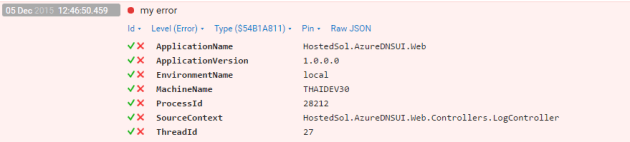
An example error from Angular in our SEQ server below:

SEQExampleOutputFromAngularJS

There is a few fields that we can customize that I do by default from the Serilog config, some of these are not relevant for the javascript errors, for example the SourceContext will always be the same, I’ll do a follow-up post about collecting client information to pass through later.

Handling the Psychology of Users and Software Bugs

Users, when presented with issues in software (Error messages, unexpected behavior, etc), tend to try to explain things with what limited knowledge they have, and the lions share of users don’t understand the inner workings of software. Commonly this is know as Abductive reasoning, the processes of forming a conclusion based on the simplest possible explanation without much investigation.

Generally I find users draw conclusions in this manner from their past negative experience with your or other applications.

The first example I want to mention is relating users picking up on similar repeated error messages.

I used to expose the Message property of the Exception object in the error message to the users, in a hope to help in trouble shooting. This ended up causing a serious issues with the users reasoning.

As you may know one of the most common programming mistake in .NET is a “Object Reference not set to an instance of an object”, or null reference error. I once had a user say to me:

It’s been 6 months and we are still getting the same Object Reference Error coming back again, and again, when are you going to fix this Object reference error?

It was of course not the same error, when applying new development work I had made this common mistake and introduced a null reference error a few times. The user though saw the same error, even though it was in different section of the application, and assumed the same problem, most annoyed because it was the same issue he had already paid me 3 times to fix.

Similar unexpected behavior is another one.

I once had a web forms application where I didn’t take much care on the assignment of the default button in the panels, so the enter key had quite unpredictable behavior on some pages when used from textboxes, but it wasn’t until we had a user that didn’t like her mouse that we really started picking up on it.

At first we fixed a couple of pages, then she found more and more, after 3-4 reports of the issues (each on different pages) we realized it was wide spread, bit the bullet, and audited the whole application. Instead of fixing on a per report basis.

But this was enough, the user was poisoned, every time we spoke to her about issue she had she was sure it was “another problem with pressing the enter key”, 6 months later, she was still telling us “I think its another issues with pressing the enter key”.

This behavior of the user is unavoidable, you can’t change human behavior, but you can mitigate the behavior.

Firstly your Error Messages.

If you know what the error is, i.e. its a “handled error”, like your database server is offline/timing out. Then customize all your error messages in good English

A good error message should do two things

1. Tell the user whats wrong
2. Suggest what the user can do next

For example

If the exception you are handling is “SQLException: Timeout Exception”

The database is currently not responding, it maybe temporarily offline or there may be a larger issue. Please try again shortly and contact support if the problem persists.

Next if you have a global error handler like me, or are handling generic exceptions that you might not know what the error is, then be ambiguous and keep your user in the dark, don’t assume they can help you (They are not your friend 🙂 ).

A good error message in this situation is “Unknown Error”, tell the user you don’t know what it is, because you don’t or you would be handling it.

Unknown Error: Please contact support and quote them this number (44FHGI2)

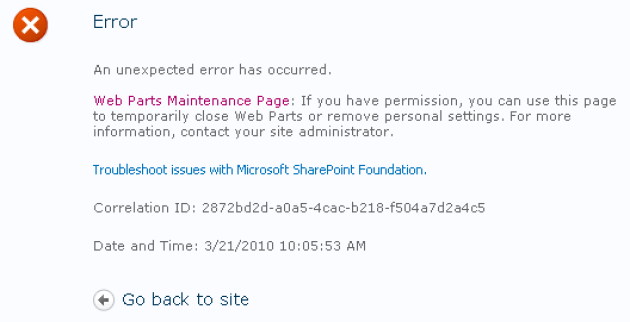
How do you know what it is? Use a correlation ID, SharePoint is an example of this, but not a good one. In SharePoint when you get an error they give you an ID that you can pass on to the support team to lookup the logs, why share point is a bad example is that they use a GUID, have you every asked a user to read you a GUID over the phone?
CorrelationIDErrorMessage

If you ever have a reference number this long that people maybe reading or typing out make sure its got a check digit in it, and a damn good reason for it being so long.

If you don’t have some sort of sequence you can grab a number from, in your logging system or storage, then generating a fairly unique alpha-numeric code isn’t overly hard, lots of libraries out there. You should also feed your correlation Id into all logs form a users session if you can, not just the error.

Secondly Good Habits.

If someone picks up a mistake you’ve made (like my enter key example above) take some time to think, “How much of an issues is this going to be with the rest of my app?”, don’t let it get out of control, if you find some “bad practice” or even just “lazzyness”, take your time to check it out, Ctrl+Shitf+F is your friend in this circumstance. you can usually get a good indication from a few smart searches how wide spread an issue may or may not be.

Lastly, take some pride in your work.

A job finished isn’t always a job well done. I recommend giving yourself as much “click around time” as you can after your done (also know as exploratory testing if you need a fancy word to justify it to your boss), just clicking around and using it as much as you can, on all sorts of areas, don’t forget tabbing, enter keys, and the usual alternate methods of navigating around.


Azure DNS Web UI, the beginning

I was a bit frustrated to hear that the Azure DNS service didn’t have a UI.

It is however understandable, the main purpose for introducing a DNS service in the cloud environment is primarily around environments that will be run up programmatically (i.e. Infrastructure as code).

But I’ve been meaning to dig my hands into a small sized angularJS project to try out some stuff so I decided to write a small Web UI for it, this is why I haven’t done any posts in a week. Well that and my cousin’s wedding 🙂

It is starting to Take shape now in GitHub:

https://github.com/HostedSolutions/AzureDNSUI

It’s based on the Authentication libraries published in the TODO example app from MS.

There is still a bit of work to be done, i’ll be doing some follow-up posts, and hopefully be able to get it into the Azure Marketplace.

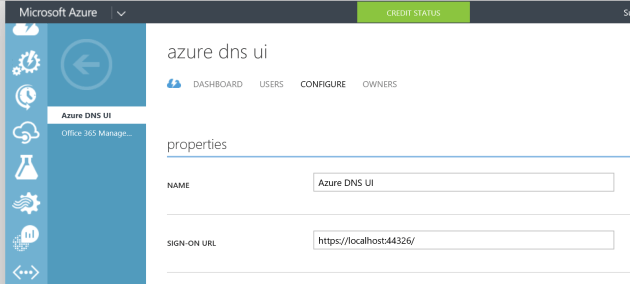
Currently there is a requirement of configuring an Azure Application in Azure AD, then putting the AppID and tenant in to the config to make it work. As I understand it, if it is a marketplace app that will configure this automatically in your environment when its installed.

This is configured under the active directory section in Azure, and there is a few gotchas i will cover in followup posts. but hopefully won’t be needed in the long run.

AzureApplicaitonConfiguration


&amp;lt;add key="ida:Tenant" value="hostedsolutionscomau.onmicrosoft.com" /&amp;gt;
&amp;lt;add key="ida:Audience" value="ffd940d1-3eed-425b-9ae9-fd0e9955db29" /&amp;gt;

The app itself is pretty basic, after a bounce and back to Azure/MSLive to login, you come back with a token that is passed with the API calls from JavaScript. The Azure Management gear is all CORS enabled so it can be hosted on a different domain from the APIs and runs fine.

You simply select the Subscription then resource group and you get a list of domains in that resource group.

AzureDNSUserInterfaceWeb.PNG

Then once a domain is selected you can edit the individual records.

I noticed with the schema of the JSON objects they are designed hierarchical, assuming that for each A record, for example, there will most likely be multiple IPs (i.e. DNS load balancing), so i have tried to design the UI to suite this.

The exception was the TXT records, if someone can explain to me why you would have multiple records for a single TXT value, I’d be glad to fix it up, but even looking at the RFCs left me saying WTF?

AzureDNSUserInterfaceWebEditorRecords

I think it will be another few weeks before this is completed and ready for the market place. But I think its a tool worth having, because while the “run up” of Infrastructure as Code deployments might be all command line based, sometimes its handy to be able to use UI to check your work and make minor “on the spot” fix ups for troubleshooting, rather than having to pour through command lines.

more to come in the coming weeks…

XML and JSON (De)Serialization Tools

I’ve been working with a lot of external systems lately that have their own objects that they serialize into either JSON or XML, and have found some good to tools to rebuild those objects into C# classes that i can add to my apps.

For XML I’ve found this one (http://xmltocsharp.azurewebsites.net/)

Some Example XML from one of the Apps I’ve been working with (This was a sample on their website)


<reply>
    <contents>...</contents>
    <attachment filename="..." md5="...">
      <!-- base-64 encoded file contents -->
    </attachment>
  </reply>

The tools nicely converts to the below C#


[XmlRoot(ElementName="attachment")]
public class Attachment {
[XmlAttribute(AttributeName="filename")]
public string Filename { get; set; }
[XmlAttribute(AttributeName="md5")]
public string Md5 { get; set; }
}

[XmlRoot(ElementName="reply")]
public class Reply {
[XmlElement(ElementName="contents")]
public string Contents { get; set; }
[XmlElement(ElementName="attachment")]
public Attachment Attachment { get; set; }
}

Then i can use the following code to deserialise their Response Stream from the HTTP response


Reply reply=new Reply ();
var resp = CallA MethodThatReturnsaStreamResposne();
using (var sr = new StreamReader(resp))
{
var xs = new XmlSerializer(reply.GetType());
reply= (Model.Tickets)(xs.Deserialize(sr));
}

Pretty similar with JSON too, using this site (http://json2csharp.com/)

However they don’t support invalid names, so i am going to use one int his example and how to work around it.

{".Name":"Jon Smith"}
public class RootObject
{
    public string __invalid_name__.Name { get; set; }
}

JSON properties support dashes and periods, which are not supported in C#, so in C# there is support for a attribute “jsonproperty” that you can use like the below to fix the issue.

 
public class RootObject
{
    [JsonProperty(".Name")]
    public string Name { get; set; }
}

Then to deserialize I use the Newtonsoft JSON libraries example below

var del = message.GetBody<string>();
var myObject = JsonConvert.DeserializeObject<RootObject>(del); 

Obviously thought you would not leave it named as “RootObject” though 🙂

In the example above i was reading a JSON object from a Azure Service Bus Queue.

Lastly, thought i would add in the class i use for going back to XML. In this case i was working on today I was going to a PHP based system Kayako and it has some strange requirements.

I created a class to inherit my XML objects from so add an extension method.

     public class XmlDataType
    {
        public string ToXmlString()
        {
            StringBuilder sb = new StringBuilder();
            string retval = null;
            
            using (XmlWriter writer = XmlWriter.Create(sb, new XmlWriterSettings() {Encoding = Encoding.UTF8}))//{OmitXmlDeclaration = true}
            {
                var ns = new XmlSerializerNamespaces();
                
                ns.Add(&quot;&quot;, &quot;&quot;);
                new XmlSerializer(this.GetType(),new XmlAttributeOverrides() { }).Serialize(writer, this,ns);
                retval = sb.ToString();
            }
            return retval.Replace(&quot;utf-16&quot;,&quot;UTF-8&quot;);
        }
    }

Kayako only accepts UTF8 not UTF16, adn you need to remove the xmlns properties, which i do with the Namespace declaration above.

The way I’ve changed UTF16 to 8 is a bit dodgy but it works for Kayako.

Now i can just call MyObject.ToXmlString() and get a string for the XML data that i can pass into a HTTP Request.

Noting that some of the Kayako methods don’t like the xml tag at the start, so if you need to remove this I’ve left in a bit of commented out code that you can use in the XML Writer settings initialization.

Converting Between UTC and TimeZone in SQL CLR

I make a habit of storing in UTC time, and then converting when displaying, or getting input form the user. It makes things a lot easier and more manageable. I have yet to try a large project with the new offsets data type, but worried about how they will handle daylight savings time, which is a constant source of frustration for Australian Developers (Disclaimer: I come from Queensland where our cows don’t like it either).

Most of the time we handle the conversion in the Application or Presentation layer, I don’t like to encourage developers to handle it in the SQL layer because this is the most common place of doing comparisons and means you have more opportunity for Developer error when one side of your comparison is in the wrong Time Zone.

However there are a few cases where it is needed so today I whipped up a project that is backwards compatible to SQL 2008 R2 (the earliest version running in prod systems i work on).

GitHub Link here https://github.com/HostedSolutions/SQLDates

it basically re-advertises the TimeZoneInfo object, wrapped up specific to what I use which is going back and forth from UTC to what ever time zone my users are in.

Most of my projects are either multi-tenanted, or have users in different states in Australia that need to view data in their own timezone.

Going to UTC below (i.e. form user input in a text box).


[Microsoft.SqlServer.Server.SqlFunction]
public static SqlDateTime ConvertToUtc(SqlString dotNetTimeZone, SqlDateTime theDateTime)
{
var localDate = DateTime.SpecifyKind((DateTime)theDateTime, DateTimeKind.Unspecified);

// create TimeZoneInfo by string time zone.
var timeZoneInfo = TimeZoneInfo.FindSystemTimeZoneById(dotNetTimeZone.ToString());

// convert date local to utc date by time zone.
return TimeZoneInfo.ConvertTimeToUtc(localDate, timeZoneInfo);
}

Coming from UTC below (i.e. form data in a database table)

[Microsoft.SqlServer.Server.SqlFunction]
public static SqlDateTime ConvertToLocalTimeZone(SqlString dotNetTimeZone, SqlDateTime theDateTime)
{
// create TimeZoneInfo by string time zone by time zone.
var timeZoneInfo = TimeZoneInfo.FindSystemTimeZoneById(dotNetTimeZone.ToString());

// convert date utc to local date.
return TimeZoneInfo.ConvertTimeFromUtc((DateTime)theDateTime, timeZoneInfo);
}

The DataTools SQL projects these days are great, you just need to add a reference into your C# library from your SQL project, and it’ll compile into the SQL script that generates for deploy, examples are all in the github project.

Just noting that you can’t compile a C# class library for 3.5 in a SQL Data Tools project, you need to create an external C# class library project, because 3.5 reference in the SQL projects have some issue with mscorlib.

SQLDataToolsProjectReference

After adding the reference you also need to also set it to “unsafe”

SetReferenceToCLRProjectUnsafe

Then when you publish the Class with output like the below into your deployment script:

CREATE ASSEMBLY [SQLDatesFunc]
AUTHORIZATION [dbo]
FROM 0x4D5A90000300000004000000FFFF0000B8000000000000004000...
WITH PERMISSION_SET = UNSAFE;

I’ve also included a post deploy script in this example code with the other settings you need to get you database going with CLR functions

sp_configure 'clr enabled', 1
GO
RECONFIGURE
GO
ALTER DATABASE [$(DatabaseName)] SET TRUSTWORTHY ON;
GO


Moving from TFVC to Git

I’ve had to move a few projects now and it’s pretty straight forward if you don’t want to carry over work item history. If you do then this is possible to pull over, but you might be better to use git-tfs, as opposed to git-tf.

I’m using git-tf in this example (git-tf-2.0.3.20131219)

First for convenience i set the PATH

PATH=%PATH%;D:\3rdParty\git-tf-2.0.3.20131219

Then create a new folder and use git-tf to pull down your TFS VC chagne history into a Git report like so

git-tf clone https://MEME.visualstudio.com/DefaultCollection $/MyProject/solOARS D:\SOURCE\Repos\OARS –deep

The “–deep” flag above is what pulls down the whole history, without it you just get one commit with the latest version. You’ll get prompted for the credentials, in this example I’m using VSO, so you will need a set of basic auth creds (https://www.visualstudio.com/en-us/integrate/get-started/auth/overview).

BasicAuthUsernamePasswordVSO

Then you’ve get some output like the following to know its working and done.

Cloning $/MyProject/solOARS into D:\SOURCE\Repos\OARS\solOARS: 19%,
Cloned 13 changesets. Cloned last changeset 1332 as 1c1cf84

Once this is done you can add the existing Repo to VS

AddExistingRepo

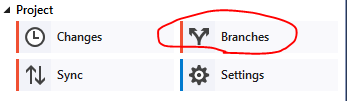
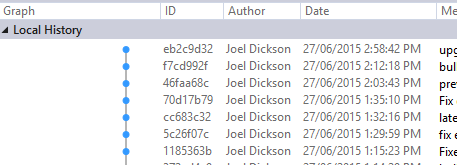
Then check if the history is there on your local by the following

click Branches

ViewBranchHistoryOnLocal

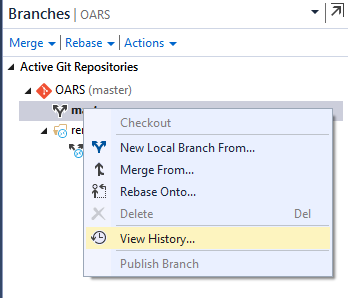
Right click on master and click view history

ViewBranchHistoryOnLocal2

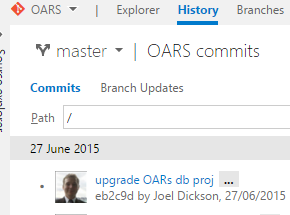
And you should see a commit for every check in that is in you history

ViewBranchHistoryOnLocal3

Once this is confirm you can go back and then go to Sync

You’ll get prompted here to input the address of your Repo, just throw it in and away you go.

PublishToRemoteRepo

Once this is done you will be able to see the history come through on your repo, in my case its a TFS-Git repo

ResultInTFS

Replacing Windows Services with Web Apps using App Init in IIS 8+ (and 7.5 sort of)

We’ve always moved towards a SOA, so most of our business logic is in the web service layer, primarily WCF traditionally, but moving towards REST these days. So a lot of our windows services end up as simply a timer that polls a web method, or a timer that pools a web method to then tell it what methods to poll.

Disclaimer: if anyone is saying right now “why are you polling, and not using a Service Bus?”, its mostly to do with 3rd party integration or legacy systems when we need to poll.

In the past we have never contemplated putting something like this into a web app due to IIS limitations around “keep alive” of the app domain.

With Application Initialization as of IIS 8 (and supported in 7.5 with a plugin) we have started to do this. So instead of having a dependence on a windows service we are just dropping timers into the start up of the web app. This reduces the amount of projects we have to deploy/maintain/monitor.

There is a few dependencies on this though beyond just the tag in the web config that need to be set to make an App Domain “immortal”, as I’ve been putting it.

First the tag in your web config


 <applicationInitialization doAppInitAfterRestart="true">
 <add initializationPage="/myService.svc" />
</applicationInitialization>

I usually just throw it at the based svc file, but anything that hits something that executes .NET code is fine, then you need to make sure you have the doAppInitAfterRestart set “true”, in case someone kills the worker process or something odd like that.

Note though that relative paths (using ~) are not supported, so it you have something in a sub app you are going to have to code this path in.

Next is your App Pool Settings, you need to set the following values:

  • idleTimeout to 0
  • recyclingPeriodicrestart to 0
  • startMode to AlwaysRunning

Then you also need to set the following values in your Web Site settings as well

  • preloadEnabled to “true”
  • serviceAutoStartEnabled to “true”

I use Step Templates in Octopus deploy to check for these values and Update them if note set:

Below is an example of the powershell i use in the AppPool update script


Import-Module WebAdministration
$enable32BitAppOnWin64Val=[System.Convert]::ToBoolean($enable32BitAppOnWin64)
$idleTimeoutVal= [TimeSpan]::FromMinutes($idleTimeout)
$recyclingPeriodicrestartVal= [TimeSpan]::FromMinutes($recyclingPeriodicrestart)

Write-Host "Checking $AppPoolName processModel.idleTimeout is $idleTimeoutVal"
if((Get-ItemProperty "IIS:\AppPools\$AppPoolName").processModel.idleTimeout -ne $idleTimeoutVal)
{
$delPool = Get-Item "IIS:\AppPools\$AppPoolName";
$delPool.processModel.idleTimeout=$idleTimeoutVal;
$delPool | Set-Item
Write-Host "Setting $AppPoolName processModel.idleTimeout to $idleTimeoutVal"
}
else
{
Write-Host "$AppPoolName processModel.idleTimeout is $idleTimeoutVal already"
}

Write-Host "Checking $AppPoolName recycling.periodicrestart.time is $recyclingPeriodicrestartVal"
if((Get-ItemProperty "IIS:\AppPools\$AppPoolName").recycling.periodicrestart.time -ne $recyclingPeriodicrestartVal)
{
$delPool = Get-Item "IIS:\AppPools\$AppPoolName";
$delPool.recycling.periodicrestart.time=$recyclingPeriodicrestartVal;
$delPool | Set-Item
Write-Host "Setting $AppPoolName recycling.periodicrestart.time to $recyclingPeriodicrestartVal"
}
else
{
Write-Host "$AppPoolName recycling.periodicrestart.time is $recyclingPeriodicrestartVal already"
}

Write-Host "Checking $AppPoolName enable32BitAppOnWin64 is $enable32BitAppOnWin64Val"
if((Get-ItemProperty "IIS:\AppPools\$AppPoolName").enable32BitAppOnWin64 -ne $enable32BitAppOnWin64Val)
{
$delPool = Get-Item "IIS:\AppPools\$AppPoolName";
$delPool.enable32BitAppOnWin64=$enable32BitAppOnWin64Val;
$delPool | Set-Item
Write-Host "Setting $AppPoolName enable32BitAppOnWin64 to $enable32BitAppOnWin64Val"
}
else
{
Write-Host "$AppPoolName enable32BitAppOnWin64 is $enable32BitAppOnWin64Val already"
}

Write-Host "Checking $AppPoolName startMode is $startMode"
if((Get-ItemProperty "IIS:\AppPools\$AppPoolName").startMode -ne $startMode)
{
$delPool = Get-Item "IIS:\AppPools\$AppPoolName";
$delPool.startMode=$startMode;
$delPool | Set-Item
Write-Host "Setting $AppPoolName startMode to $startMode"
}
else
{
Write-Host "$AppPoolName startMode is $startMode already"
}

And i use a similar script for the Web Site update, pretty basic stuff.

What about the App Domain? the above will secure the App Pool but not the App Domain, a common cause of app domain restart is a deploy via octopus, when it changes the IIS path it will restart the App Domain of the site. to handle this you need to add a snippet like the below to you Application end event in Global asax


protected void Application_End()
{
var client = new WebClient();
var hostName = Dns.GetHostName();
var url = "http://" + hostName + "/service.svc";
client.DownloadString(url);
}

Once these are all setup you couldn’t kill that App Domain with a crowbar. Even end tasking it from Task Manager it will restart.

So you are safe to run timers and any other services you like in it, just like you would in a windows service.